HYDROGEN DETECTOR(for Hydrogen Tank Side) ON-VEHICLE INSPECTION

PROCEDURE
-
INSPECT HYDROGEN DETECTOR
-
Remove the No. 2 motor under cover.
-
Remove the front floor cover LH.
-
Remove the front floor cover RH.
-
Remove the front floor center cover LH.
-
Connect the GTS to the DLC3.
-
Turn the power switch on (IG).
-
Enter the following menus: Powertrain / FC / Data List / Tank Side Hydrogen Detector Density.
Powertrain > FC > Data ListTester Display Tank Side Hydrogen Detector Density -
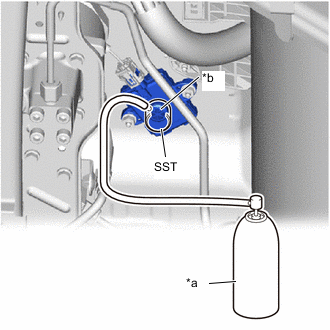
*a Hydrogen Gas for Inspection *b Hydrogen Detecting Portion Cover the hydrogen detecting portion of the hydrogen detector with SST.
- SST
- 09405-62010 ( 09405-06010 )
-
While injecting hydrogen gas, check the hydrogen concentration displayed on the GTS.
OK 0.9 to 1.6 % Note
Use hydrogen gas at 1.3% concentration.
Tech Tips
The value stabilizes approximately 5 seconds after hydrogen gas injection.
If the result is not as specified, replace the hydrogen detector.
-
Install the front floor center cover LH.
-
Install the front floor cover RH.
-
Install the front floor cover LH.
-
Install the No. 2 motor under cover.
-