HYBRID CONTROL SYSTEM Drive Start Control System
DESCRIPTION
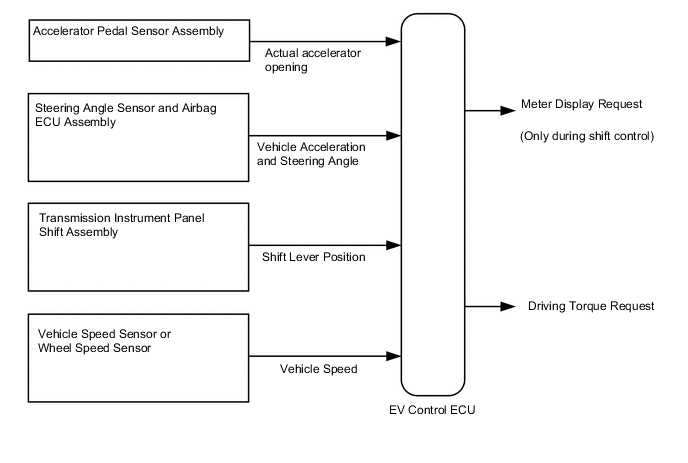
The drive start control is controlled by the EV control ECU.
If the EV control ECU determines that the shift lever and accelerator pedal are operated abnormally, driving torque is restricted and, when necessary, a warning is displayed on the combination meter assembly.
CAUTION / NOTICE / HINT
Note
When the vehicle is parked with the power switch off, if the FC control ECU judges that the FC stack temperature will go below 0°C (32°F), it activates the FC air compressor, hydrogen pump and FC cooling water pump for a maximum of 180 seconds and drains water from the FC stack assembly. When performing inspection or repairs with the power switch off (not on (IG) or on (READY)), disconnect the cable from the negative (-) auxiliary battery terminal before performing work (If the auxiliary battery voltage is needed to conduct inspection, warm up the FC system beforehand).
Tech Tips
Even if the accelerator pedal position is maintained, the engine output may increase when driving uphill and decrease when driving downhill. This is due to the drive start control controlling the driving torque, and is not a malfunction.
PROCEDURE
-
SYMPTOM CONFIRMATION
-
Interview the customer to confirm the problem.
Result Result Proceed to Hunting A Hesitation/poor acceleration B
B 
PAST ACTIVATION CONFIRMATION Click here
A 
-
-
PAST ACTIVATION CONFIRMATION
-
Check if the customer operated the vehicle in a way that would cause the drive start control to operate.
Tech Tips
Drive Start Control Activation ConditionsCondition 1 (Reverse control)
Activation conditions
-
The shift lever is in R.
-
The accelerator pedal is depressed.
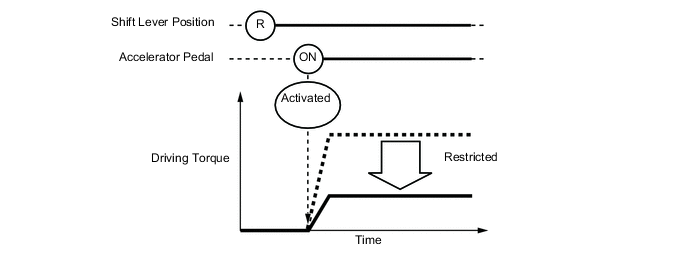
Items Controlled
-
Driving torque is restricted.
Deactivation Conditions
-
The shift lever is moved to any position other than R.
-
The accelerator pedal is released.
Condition 2 (Shift control a)
Activation conditions
-
The shift lever is moved from P to any forward position (D or Br) or R.
-
The accelerator pedal is open by approximately 1/5 or more.
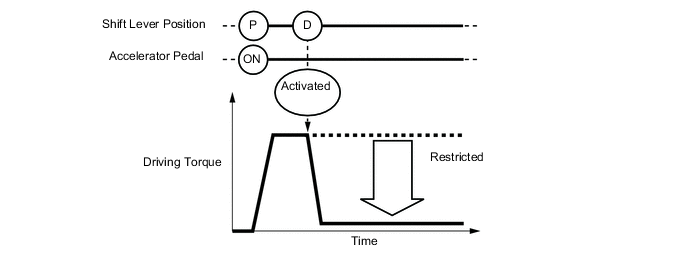
Items Controlled
-
Driving torque is restricted.
Deactivation Conditions
-
The shift lever is in P or N.
-
The accelerator pedal is released.
Condition 3 (Shift control b)
Activation conditions
-
The shift lever is moved from R to any forward position (D or Br), any forward position (D or Br) to R, or N to R.
-
The accelerator pedal is open by approximately 1/5 or more.
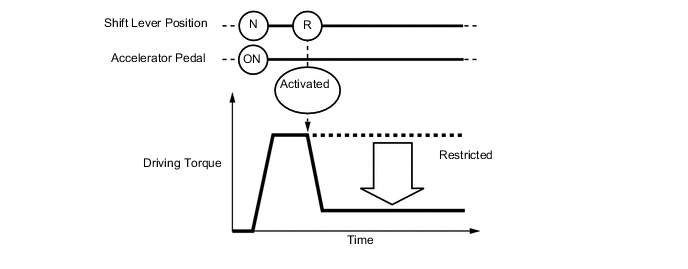
Items Controlled
-
Driving torque is restricted.
Deactivation Conditions
-
The shift lever is in P or N.
-
The accelerator pedal is released.
Tech Tips
During reverse control or shift control, driving torque is adjusted based on the road gradient and steering angle.
Result Result Proceed to Performed A Not performed B -
B 
SYSTEM NORMAL (GO TO PROBLEM SYMPTOM TABLE) Click here
A
-
-
CHECK DTC OUTPUT
-
Connect the GTS to the DLC3.
-
Turn the power switch on (IG).
-
Enter the following menus: System Select / Health Check.
-
Check the DTCs.
-
Turn the power switch off.
Result Result Proceed to DTCs are not output A DTC is output B
B
GO TO DTC CHART
A
-
-
READ VALUE USING GTS (FR, FL, RR, RL WHEEL SPEED)
-
Connect the GTS to the DLC3.
-
Turn the power switch on (READY).
-
Enter the following menus: Chassis / ABS/VSC/TRC / Data List / FR Wheel Speed, FL Wheel Speed, RR Wheel Speed and RL Wheel Speed.
Chassis > ABS/VSC/TRC > Data ListTester Display FR Wheel Speed FL Wheel Speed RR Wheel Speed RL Wheel Speed
Chassis > ABS/VSC/TRC > Data ListTester Display Measurement Item Range Normal Condition FR Wheel Speed Front speed sensor RH Min.: 0 km/h (0 mph), Max.: 326 km/h (202 mph) When driving at constant speed: No large fluctuations FL Wheel Speed Front speed sensor LH Min.: 0 km/h (0 mph), Max.: 326 km/h (202 mph) When driving at constant speed: No large fluctuations RR Wheel Speed Rear speed sensor RH Min.: 0 km/h (0 mph), Max.: 326 km/h (202 mph) When driving at constant speed: No large fluctuations RL Wheel Speed Rear speed sensor LH Min.: 0 km/h (0 mph), Max.: 326 km/h (202 mph) When driving at constant speed: No large fluctuations -
Read the value displayed on the GTS.
Standard GTS Display Condition Specified Condition FR Wheel Speed
FL Wheel Speed
RR Wheel Speed
RL Wheel Speed
Vehicle stopped 0 km/h (0 mph) Vehicle being driven at constant speed between 16 to 64 km/h (10 to 40 mph) No large fluctuations when driving at a constant speed CAUTION:
When performing the confirmation driving pattern, obey all speed limits and traffic laws.
Tech Tips
Data can be captured relatively easily by using the snapshot function in the Data List. Confirm the data after performing the drive test.
-
Turn the power switch off.
Result Proceed to OK NG
NG
INSPECT FRONT OR REAR SPEED SENSOR Click here
OK
-
-
READ VALUE USING GTS (VEHICLE SPEED)
-
Connect the GTS to the DLC3.
-
Turn the power switch on (READY).
-
Enter the following menus: Powertrain / EV / Data List / Vehicle Speed.
Powertrain > EV > Data ListTester Display Vehicle Speed
Powertrain > EV > Data ListTester Display Measurement Item Range Normal Condition Vehicle Speed Vehicle speed - When driving at constant speed: No large fluctuations -
Read the value of "Vehicle Speed" displayed on the GTS.
Standard Inspection Condition Specified Condition Vehicle stopped 0 km/h (0 mph) Vehicle being driven at a constant speed
(16 to 64 km/h (10 to 40 mph))
No large fluctuations in displayed speed CAUTION:
Perform this road test only in an appropriate safe location, in accordance with all local laws.
Tech Tips
Data can be captured relatively easily by using the snapshot function in the Data List. Confirm the data after performing the drive test.
-
Turn the power switch off.
Result Proceed to OK NG
NG
INSPECT ELECTRONICALLY CONTROLLED BRAKE SYSTEM (HOW TO PROCEED WITH TROUBLESHOOTING) Click here
OK
-
-
READ VALUE USING GTS (DECELERATION SENSOR, DECELERATION SENSOR2)
-
Connect the GTS to the DLC3.
-
Turn the power switch on (READY).
-
Enter the following menus: Chassis / ABS/VSC/TRC / Data List / Deceleration Sensor, Deceleration Sensor2.
Chassis > ABS/VSC/TRC > Data ListTester Display Deceleration Sensor Deceleration Sensor2
Chassis > ABS/VSC/TRAC > Data ListTester Display Measurement Item Range Normal Condition Deceleration Sensor Acceleration sensor 1 Min.: -18.525 m/s2, Max.: 18.387 m/s2
During deceleration/acceleration: Changes continuously Deceleration Sensor2 Acceleration sensor 2 Min.: -18.525 m/s2, Max.: 18.387 m/s2
During deceleration/acceleration: Changes continuously -
Read the value displayed on the GTS.
Standard Condition Specified Condition During deceleration Value changes with vehicle speed During acceleration Value changes with vehicle speed CAUTION:
When performing the confirmation driving pattern, obey all speed limits and traffic laws.
Tech Tips
Data can be captured relatively easily by using the snapshot function in the Data List. Confirm the data after performing the drive test.
-
Turn the power switch off.
Result Proceed to OK NG
NG
INSPECT YAW RATE SENSOR Click here
OK
-
-
READ VALUE USING GTS (STEERING ANGLE SENSOR)
-
Connect the GTS to the DLC3.
-
Turn the power switch on (READY).
-
Enter the following menus: Chassis / ABS/VSC/TRC / Data List / Steering Angle Sensor.
Chassis > ABS/VSC/TRC > Data ListTester Display Steering Angle Sensor
Chassis > ABS/VSC/TRC > Data ListTester Display Measurement Item Range Normal Condition Steering Angle Sensor Steering angle sensor Min.: -3276.8 degrees, Max.: 3276.7 degrees Turning left: Increases
Turning right: Decreases
-
Read the value displayed on the GTS.
Standard Condition Specified Condition Steering wheel turned left Value increases with steering wheel operation Steering wheel turned right Value decreases with steering wheel operation CAUTION:
When performing the confirmation driving pattern, obey all speed limits and traffic laws.
Tech Tips
Data can be captured relatively easily by using the snapshot function in the Data List. Confirm the data after performing the drive test.
-
Turn the power switch off.
Result Proceed to OK NG
OK
SYSTEM NORMAL (GO TO PROBLEM SYMPTOM TABLE) Click here
NG
INSPECT STEERING ANGLE SENSOR Click here
-
-
PAST ACTIVATION CONFIRMATION
-
Check if the customer operated the vehicle in a way that would cause the drive start control to operate.
Tech Tips
Drive Start Control Activation ConditionsCondition 1 (Reverse control)
Activation conditions
-
The shift lever is in R.
-
The accelerator pedal is depressed.
Items Controlled
-
Driving torque is restricted.
Deactivation Conditions
-
The shift lever is moved to any position other than R.
-
The accelerator pedal is released.
Condition 2 (Shift control a)
Activation conditions
-
The shift lever is moved from P to any forward position (D or Br) or R.
-
The accelerator pedal is open by approximately 1/5 or more.
Items Controlled
-
Driving torque is restricted.
Deactivation Conditions
-
The shift lever is in P or N.
-
The accelerator pedal is released.
Condition 3 (Shift control b)
Activation conditions
-
The shift lever is moved from R to any forward position (D or Br), any forward position (D or Br) to R, or N to R.
-
The accelerator pedal is open by approximately 1/5 or more.
Items Controlled
-
Driving torque is restricted.
Deactivation Conditions
-
The shift lever is in P or N.
-
The accelerator pedal is released.
Tech Tips
During reverse control or shift control, driving torque is adjusted based on the road gradient and steering angle.
Result Result Proceed to Not performed A Performed B Tech Tips
If the customer operated the vehicle in a way which caused the drive start control to operate, explain the operation of the system to the customer and that the operation is not a malfunction.
-
B
SYSTEM NORMAL
A
-
-
CHECK DTC OUTPUT
-
Connect the GTS to the DLC3.
-
Turn the power switch on (IG).
-
Turn the GTS on.
-
Enter the following menus: System Select / Health Check.
-
Check the DTCs.
Result Result Proceed to DTCs are not output A DTC is output B
B
GO TO DTC CHART
A
-
-
INSPECT TRANSMISSION INSTRUMENT PANEL SHIFT ASSEMBLY
-
Connect the GTS to the DLC3.
-
Turn the power switch on (IG).
-
Turn the GTS on.
-
Enter the following menus: Powertrain / EV / Data List / Shift Sensor Shift Position.
Powertrain > EV > Data ListTester Display Shift Sensor Shift Position OK Condition Specified Condition Shift Sensor Shift Position Matches currently selected shift position Result Proceed to OK NG
NG
REPLACE TRANSMISSION INSTRUMENT PANEL SHIFT ASSEMBLY Click here
OK
-
-
READ VALUE USING GTS (ACCEL PEDAL POSITION NO.1, ACCEL PEDAL POSITION NO.2)
-
Connect the GTS to the DLC3.
-
Turn the power switch on (IG).
-
Turn the GTS on.
-
Enter the following menus: Powertrain / Hybrid Control / Data List / Accel Pedal Position No.1, Accel Pedal Position No.2.
Powertrain > EV > Data ListTester Display Accel Pedal Position No.1 Accel Pedal Position No.2
Powertrain > EV > Data ListTester Display Measurement Item Range Normal Condition Accel Pedal Position No.1 Accelerator pedal position sensor No. 1 - Accelerator pedal depressed:
Changes with accelerator pedal pressure
Accel Pedal Position No.2 Accelerator pedal position sensor No. 2 - Accelerator pedal depressed:
Changes with accelerator pedal pressure
-
Read the value displayed on the GTS.
OK Condition Specified Condition Accelerator Pedal Released → Depressed Values smoothly change following accelerator pedal operation -
Turn the power switch off.
Result Proceed to OK NG
OK
SYSTEM NORMAL (GO TO PROBLEM SYMPTOM TABLE) Click here
NG
REPLACE ACCELERATOR PEDAL SENSOR ASSEMBLY Click here
-