FRONT SEAT OUTER BELT ASSEMBLY(for Smart Cab) INSTALLATION

CAUTION / NOTICE / HINT
Tech Tips
-
Use the same procedure for RHD and LHD vehicles.
-
The procedures listed below are for LHD vehicles.
-
Use the same procedure for the RH and LH sides.
-
The procedure listed below is for the LH side.
-
A bolt without a torque specification is shown in the standard bolt chart.
PROCEDURE
-
INSTALL FRONT SEAT OUTER BELT ASSEMBLY LH
-
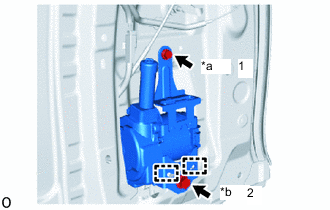
*a Bolt A *b Bolt B Attach the 2 guides and temporarily install the front seat outer belt assembly LH with the 2 bolts.
-
Tighten the 2 bolts in the order shown in the illustration.
- Torque:
- for Bolt A
- 12.5 N*m { 127 kgf*cm, 9 ft.*lbf }
- for Bolt B
- 42.0 N*m { 428 kgf*cm, 31 ft.*lbf }
-
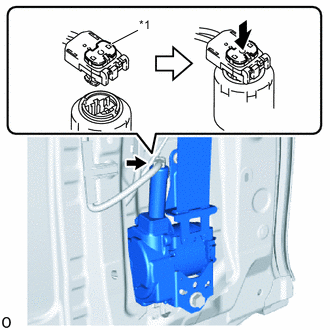
*1 Locking Button Connect the pretensioner connector and lock the locking button as shown in the illustration.
Note
Securely lock the locking button.
-
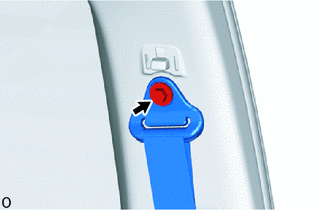
Install the bolt and connect the shoulder anchor of the front seat outer belt assembly LH.
- Torque:
- 42 N*m { 428 kgf*cm, 31 ft.*lbf }
-
Check that the ELR locks.
Note
The check should be performed with the front seat outer belt assembly LH installed.
-
With the belt assembly installed, check that the belt locks when it is pulled out quickly.
-
-
-
INSTALL SEAT BELT ANCHOR COVER CAP
-
INSTALL REAR DOOR TRIM BOARD SUB-ASSEMBLY LH
-
INSTALL FRONT SEAT OUTER BELT ASSEMBLY LH (for Floor Anchor)
-
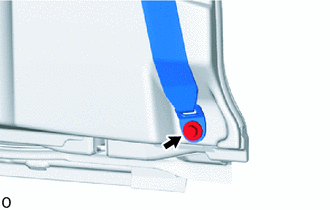
Install the bolt and connect the floor anchor of the front seat outer belt assembly LH.
-
-
INSTALL LAP BELT OUTER ANCHOR COVER
-
CONNECT CABLE TO NEGATIVE BATTERY TERMINAL
Note
When disconnecting the cable, some systems need to be initialized after the cable is reconnected.
-
CHECK SRS WARNING LIGHT
-
for Type A:
-
for Type B:
-