MAYDAY SWITCH INSPECTION
PROCEDURE
-
REMOVE MAP LIGHT ASSEMBLY
-
INSPECT MAP LIGHT ASSEMBLY
-
Check the resistance.
-
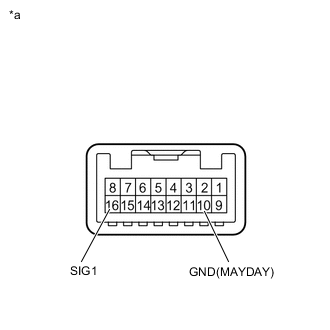
*a Component without harness connected
(Map Light Assembly)
Measure the resistance according to the value(s) in the table below.
Resistance Tester Connection Condition Specified Condition 16 (SIG1) - 10 (GND(MAYDAY)) Mayday switch not pressed 410 to 414 Ω 16 (SIG1) - 10 (GND(MAYDAY)) Mayday switch pressed 81 to 83 Ω
-
-
Check the operation (indicator).
-
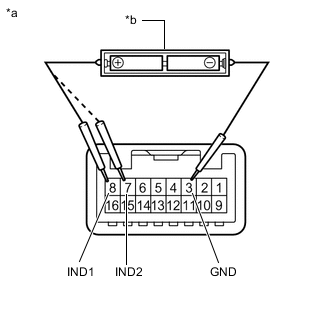
*a Component without harness connected
(Map Light Assembly)
*b Two 1.5 V dry cell batteries Check that each indicator illuminates when 2 dry cell batteries are connected to the map light assembly connector terminals as shown in the illustration.
Note
Do not apply more than 3 V.
OK Tester Connection Condition Specified Condition 8 (IND1) - 3 (GND) Positive (+) dry cell battery - Negative (-) dry cell battery HELP RED indicator illuminates 7 (IND2) - 3 (GND) Positive (+) dry cell battery - Negative (-) dry cell battery HELP GREEN indicator illuminates
-
-
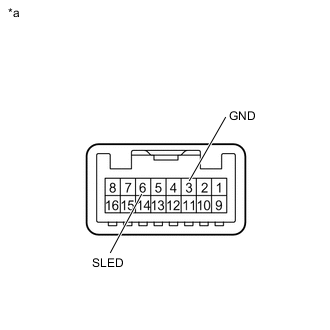
*a Component without harness connected
(Map Light Assembly)
Check that the HELP indicator illuminates when the battery is connected to the map light assembly connector terminals as shown in the illustration.
OK Tester Connection Condition Specified Condition 6 (SLED) - 3 (GND) Positive (+) battery terminal - Negative (-) battery terminal HELP indicator illuminates
-
-
INSTALL MAP LIGHT ASSEMBLY