TELEMATICS SYSTEM, Diagnostic DTC:B1570
| DTC Code | DTC Name |
|---|---|
| B1570 | Red LED Error |
DESCRIPTION
This DTC is stored when the telematics transceiver detects an open or short in the manual (SOS) switch indicator (red) circuit of the manual (SOS) switch.
The manual (SOS) switch indicator (red) illuminates for 10 seconds and turns off when the ignition switch is turned to ON.
If a malfunction in the telematics system is detected, the manual (SOS) switch indicator (red) will illuminate. However, the manual (SOS) switch indicator (red) may not illuminate when this DTC is stored.
| DTC No. | Detection Item | DTC Detection Condition | Trouble Area |
|---|---|---|---|
| B1570 | Red LED Error | Current for the manual (SOS) switch indicator (red) exceeds malfunction threshold for 20 seconds when the ignition switch is ON. |
|
WIRING DIAGRAM
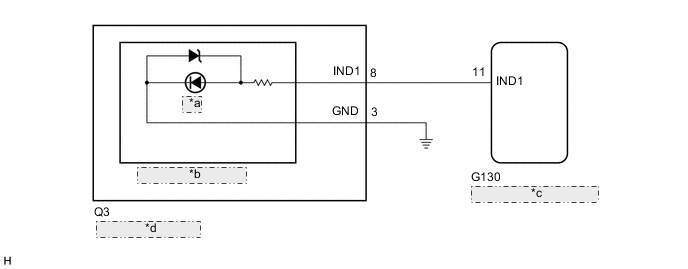
| *a | RED |
| *b | Manual (SOS) Switch |
| *c | Telematics Transceiver |
| *d | Map Light Assembly |
CAUTION / NOTICE / HINT
Note
Depending on the parts that are replaced during vehicle inspection or maintenance, performing initialization, registration or calibration may be needed. Refer to Registration for Telematics System.
Tech Tips
If DTC B1570 is stored, the manual (SOS) switch indicator (red) may not illuminate when another DTC is stored.
PROCEDURE
-
CHECK DTC
-
Turn the ignition switch off.
-
Connect the GTS to the DLC3.
-
Turn the ignition switch to ON and wait for 20 seconds.
-
Turn the GTS on.
-
Check for DTCs and check that no DTCs are output.
Body Electrical > Telematics > Trouble CodesOK No DTCs are output. Result Proceed to OK NG
OK 
USE SIMULATION METHOD TO CHECK Click here
NG 
-
-
INSPECT MAP LIGHT ASSEMBLY (MANUAL (SOS) SWITCH) (RED INDICATOR)
-
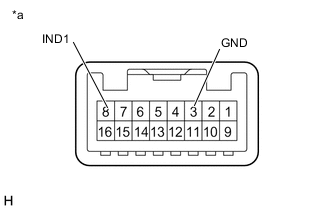
*a Component without harness connected
(Map Light Assembly (Manual (SOS) Switch))
Remove the map light assembly (manual (SOS) switch).
-
Connect 2 dry-cell batteries (1.5 V each) in series.
-
Connect a positive (+) lead from the batteries to terminal 8 (IND1) and a negative (-) lead to terminal 3 (GND) of the map light assembly (manual (SOS) switch) connector.
-
Check if the manual (SOS) switch indicator (red) illuminates.
OK Manual (SOS) switch indicator (red) illuminates. Result Proceed to OK NG
NG
REPLACE MAP LIGHT ASSEMBLY (MANUAL (SOS) SWITCH) Click here
OK
-
-
CHECK HARNESS AND CONNECTOR (MAP LIGHT ASSEMBLY (MANUAL (SOS) SWITCH) - TELEMATICS TRANSCEIVER AND BODY GROUND)
-
Disconnect the Q3 map light assembly (manual (SOS) switch) connector.
-
Disconnect the G130 telematics transceiver connector.
-
Measure the resistance according to the value(s) in the table below.
Standard Resistance Tester Connection Condition Specified Condition G130-11 (IND1) - Q3-8 (IND1) Always Below 1 Ω G130-11 (IND1) or Q3-8 (IND1) - Body ground Always 10 kΩ or higher Q3-3 (GND) - Body ground Always Below 1 Ω Result Proceed to OK NG
NG
REPAIR OR REPLACE HARNESS OR CONNECTOR
OK
-
-
REPLACE TELEMATICS TRANSCEIVER
-
Replace the telematics transceiver with a new one.
Result Proceed to NEXT
NEXT
PERFORM REGISTRATION Click here
-