REAR VIEW MONITOR SYSTEM(for Navigation Receiver Type), Diagnostic DTC:C1622
| DTC Code | DTC Name |
|---|---|
| C1622 | Open or Short Circuit in Back Camera Signal |
DESCRIPTION
This DTC is stored if the navigation receiver assembly judges as a result of its self-check that the signals or signal lines between the navigation receiver assembly and the rear television camera assembly are not normal.
| DTC No. | Detection Item | DTC Detection Condition | Trouble Area |
|---|---|---|---|
| C1622 | Open or Short Circuit in Back Camera Signal | Open or short circuit in television camera signal |
|
WIRING DIAGRAM
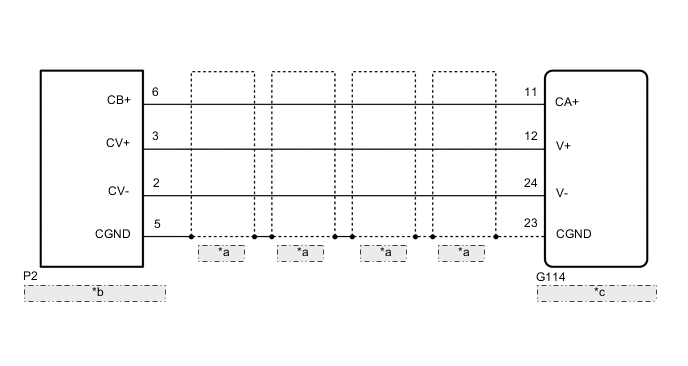
| *a | Shielded |
| *b | Rear Television Camera Assembly |
| *c | Navigation Receiver Assembly |
CAUTION / NOTICE / HINT
Tech Tips
When replacing the navigation receiver assembly, it is necessary to perform the vehicle contract setting for Connected Service.
PROCEDURE
-
CHECK FOR DTC
-
Clear the DTC.
Body Electrical > Navigation System > Clear DTCs -
Check for DTCs.
Body Electrical > Navigation System > Trouble CodesOK No DTC is output. Result Proceed to OK NG
OK 
USE SIMULATION METHOD TO CHECK Click here
NG 
-
-
CHECK HARNESS AND CONNECTOR (NAVIGATION RECEIVER ASSEMBLY - REAR TELEVISION CAMERA ASSEMBLY)
-
Disconnect the G114 navigation receiver assembly connector.
-
Disconnect the P2 rear television camera assembly connector.
-
Measure the resistance according to the value(s) in the table below.
Standard Resistance Tester Connection Condition Specified Condition G114-11 (CA+) - P2-6 (CB+) Always Below 1 Ω G114-12 (V+) - P2-3 (CV+) Always Below 1 Ω G114-23 (CGND) - P2-5 (CGND) Always Below 1 Ω G114-24 (V-) - P2-2 (CV-) Always Below 1 Ω G114-11 (CA+) or P2-6 (CB+) - Body ground Always 10 kΩ or higher G114-12 (V+) or P2-3 (CV+) - Body ground Always 10 kΩ or higher G114-23 (CGND) or P2-5 (CGND) - Body ground Always 10 kΩ or higher G114-24 (V-) or P2-2 (CV-) - Body ground Always 10 kΩ or higher Result Proceed to OK NG
NG
REPAIR OR REPLACE HARNESS OR CONNECTOR
OK
-
-
CHECK NAVIGATION RECEIVER ASSEMBLY
-
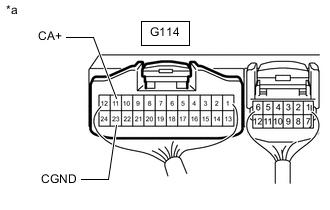
*a Component with harness connected
(Navigation Receiver Assembly)
Remove the navigation receiver assembly with its connectors still connected.
-
Measure the resistance according to the value(s) in the table below.
Standard Resistance Tester Connection Condition Specified Condition G114-23 (CGND) - Body ground Always Below 1 Ω -
Measure the voltage according to the value(s) in the table below.
Standard Voltage Tester Connection Switch Condition Specified Condition G114-11 (CA+) - Body ground Ignition switch ACC 5.5 to 7.05 V Result Proceed to OK NG
NG
REPLACE NAVIGATION RECEIVER ASSEMBLY Click here
OK
-
-
CHECK REAR TELEVISION CAMERA ASSEMBLY
-
Remove the navigation receiver assembly with its connectors still connected.
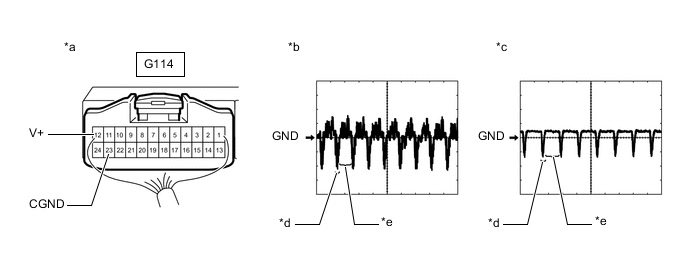
*a Component with harness connected
(Navigation Receiver Assembly)
*b Waveform 1 *c Waveform 2 *d Synchronization Signal *e Video Waveform - - -
Check the waveform of the rear television camera assembly using an oscilloscope.
Tech Tips
-
A waterproof connector is used for the rear television camera assembly. Therefore, inspect the waveform at the navigation receiver assembly with the connector connected.
-
The video waveform changes according to the image sent by the rear television camera assembly.
Item Content Terminal No. (Symbol) G114-12 (V+) - G114-23 (CGND) Tool Setting 200 mV/DIV., 50 μsec./DIV. Condition Waveform 1: Ignition switch ON, shift lever in R, camera lens not covered, displaying an image
Waveform 2: Ignition switch ON, shift lever in R, camera lens covered, blacking out screen
OK Waveform is as shown in the illustration. Result Proceed to OK NG -
OK
REPLACE NAVIGATION RECEIVER ASSEMBLY Click here
NG
-
-
REPLACE REAR TELEVISION CAMERA ASSEMBLY
-
Replace the rear television camera assembly with a new or known good one.
-
for A Deck:
-
for J Deck:
Result Proceed to NEXT -
NEXT
-
-
CHECK FOR DTC
-
Clear the DTC.
Body Electrical > Navigation System > Clear DTCs -
Check for DTCs.
Body Electrical > Navigation System > Trouble CodesOK No DTC is output. Result Proceed to OK NG
OK
END (REAR TELEVISION CAMERA ASSEMBLY WAS DEFECTIVE)
NG
REPLACE NAVIGATION RECEIVER ASSEMBLY Click here
-