RADIO ANTENNA CORD INSTALLATION
CAUTION / NOTICE / HINT
Tech Tips
-
Use the same procedure for RHD and LHD vehicles.
-
The procedure listed below is for LHD vehicles.
PROCEDURE
-
INSTALL NO. 2 ANTENNA CORD SUB-ASSEMBLY
-
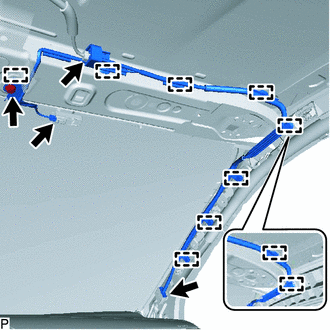
w/ Digital Audio Broadcasting Antenna
-
Attach the clamps to install the No. 2 antenna cord sub-assembly.
-
Connect the connectors.
-
Attach the guide and install the bolt.
- Torque:
- 8.4 N*m { 86 kgf*cm, 74 in.*lbf }
-
-
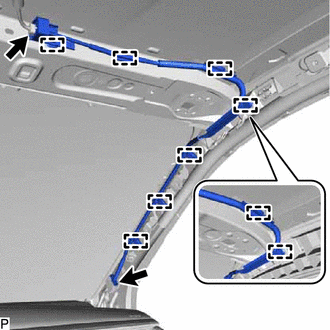
w/o Digital Audio Broadcasting Antenna
-
Attach the clamps to install the No. 2 antenna cord sub-assembly.
-
Connect the connectors.
-
-
-
INSTALL ROOF HEADLINING ASSEMBLY
-
for Single Cab:
-
for Smart Cab:
-
for Double Cab:
-
-
INSTALL ANTENNA CORD SUB-ASSEMBLY (for LHD)
-
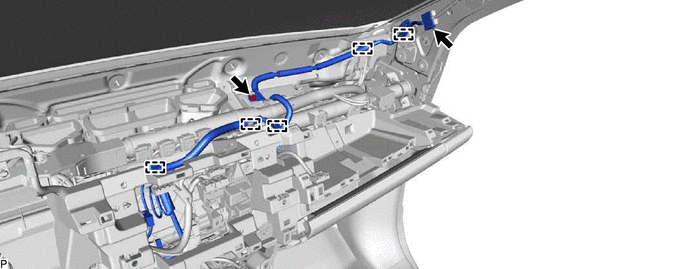
w/ Navigation System:
-
Install the antenna cord sub-assembly with the bolt.
- Torque:
- 8.4 N*m { 86 kgf*cm, 74 in.*lbf }
-
Attach the clamps shown in the illustration.
-
Connect the connector.
-
-
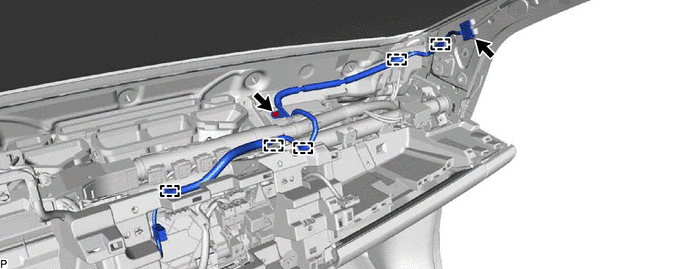
w/o Navigation System:
-
Install the antenna cord sub-assembly with the bolt.
- Torque:
- 8.4 N*m { 86 kgf*cm, 74 in.*lbf }
-
Attach the clamps shown in the illustration.
-
Connect the connector.
-
-
-
INSTALL ANTENNA CORD SUB-ASSEMBLY (for RHD)
-
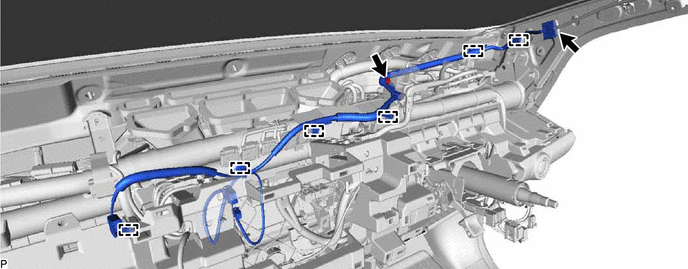
w/ Navigation System:
-
Install the antenna cord sub-assembly with the bolt.
- Torque:
- 8.4 N*m { 86 kgf*cm, 74 in.*lbf }
-
Attach the clamps shown in the illustration.
-
Connect the connector.
-
-
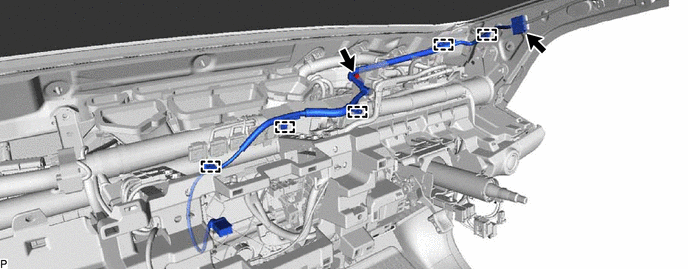
w/o Navigation System:
-
Install the antenna cord sub-assembly with the bolt.
- Torque:
- 8.4 N*m { 86 kgf*cm, 74 in.*lbf }
-
Attach the clamps shown in the illustration.
-
Connect the connector.
-
-
-
INSTALL UPPER INSTRUMENT PANEL SUB-ASSEMBLY
-
CONNECT CABLE TO NEGATIVE BATTERY TERMINAL
Note
When disconnecting the cable, some systems need to be initialized after the cable is reconnected Click here.
-
CHECK SRS WARNING LIGHT