NAVIGATION SYSTEM Dimmer Signal Circuit
DESCRIPTION
The combination meter assembly sends an auto dimmer signal to the navigation receiver assembly via this circuit.
When the navigation receiver assembly receives an auto dimmer signal from the combination meter assembly, the panel switch of the navigation receiver assembly dims and the screen changes to the night screen.
WIRING DIAGRAM
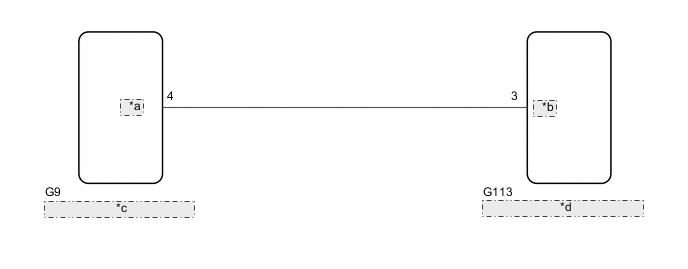
| *a | ACAN |
| *b | ADIM |
| *c | Combination Meter Assembly |
| *d | Navigation Receiver Assembly |
CAUTION / NOTICE / HINT
Note
-
Check that the wire harness is properly installed and does not have any sharp bends, pinching or loose connections.
-
When replacing the combination meter assembly, make sure to replace it with a new one.
PROCEDURE
-
CHECK COMBINATION METER ASSEMBLY
-
Disconnect the navigation receiver assembly connector.
-
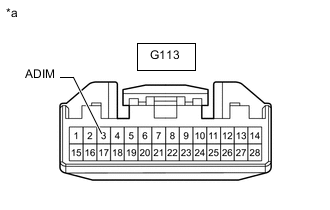
*a Front view of wire harness connector
(to Navigation Receiver Assembly)
Measure the voltage according to the value(s) in the table below.
Standard Voltage Tester Connection Condition Specified Condition G113-3 (ADIM) - Body ground Ignition switch ON
Automatic light control sensor covered by hand, and light control switch in tail or head position
11 to 14 V Result Proceed to OK NG
OK 
PROCEED TO NEXT SUSPECTED AREA SHOWN IN PROBLEM SYMPTOMS TABLE Click here
NG 
-
-
CHECK HARNESS AND CONNECTOR (NAVIGATION RECEIVER ASSEMBLY - COMBINATION METER ASSEMBLY)
-
Disconnect the G113 navigation receiver assembly connector.
-
Disconnect the G9 combination meter assembly connector.
-
Measure the resistance according to the value(s) in the table below.
Standard Resistance Tester Connection Condition Specified Condition G9-4 (ACAN) - G113-3 (ADIM) Always Below 1 Ω G9-4 (ACAN) - Body ground Always 10 kΩ or higher Result Proceed to OK NG
OK
REPLACE COMBINATION METER ASSEMBLY Click here
NG
REPAIR OR REPLACE HARNESS OR CONNECTOR
-