ECD SYSTEM(w/ Urea SCR System), Diagnostic DTC:P1603
| DTC Code | DTC Name |
|---|---|
| P1603 | Engine Stall History |
DESCRIPTION
After starting the engine, this DTC is stored when the engine stops without the ignition switch being operated.
Using the GTS, the conditions present when the DTC was stored can be confirmed by referring to the freeze frame data. Freeze frame data records engine conditions when a malfunction occurs. This information can be useful when troubleshooting.
It is necessary to check if the vehicle has ran out of fuel before performing troubleshooting, as this DTC is also stored when the engine stalls due to running out of fuel.
| DTC No. | Detection Item | DTC Detection Condition | Trouble Area | MIL | Memory |
|---|---|---|---|---|---|
| P1603 | Engine Stall History | 2 seconds or more elapse after starting the engine, and the engine running, the engine stops for 0.5 seconds or more without the ignition switch being operated (1 trip detection logic). |
|
- | DTC stored |
| DTC No. | Data List |
|---|---|
| P1603 |
|
CAUTION / NOTICE / HINT
-
Fuel system
-
The following malfunctions may be present in the fuel system.
-
Problem with injector assemblies.
-
Problem with fuel supply pump assembly.
-
Air in fuel pipe.
-
Fuel filter element assembly clog.
-
-
-
Engine assembly
-
The following malfunctions may be present in the engine assembly.
-
Insufficient compression.
-
Tech Tips
-
In contrast to normal malfunction diagnosis for components, circuits and systems, DTC P1603 is used to determine the malfunctioning area from the problem symptoms and freeze frame data when the user mentions problems such as engine stall.
As the DTC can be stored as a result of certain user actions, even if the DTC is output, if the customer makes no mention of problems, clear the DTC without performing any troubleshooting and return the vehicle to the customer.
-
DTCs related to engine stall and starting problems may be detected due to operations performed by the user. The following are a few examples. Ask questions to the user about how the vehicle is operated and give advice as necessary.
-
For vehicles with an automatic transmission, the engine stalls due to shifting too early and the engine load cannot keep up.
-
If any other DTCs are output, perform troubleshooting for those DTCs first.
-
Read freeze frame data using the GTS. Freeze frame data records the engine condition when malfunctions are detected. When troubleshooting, freeze frame data can help determine if the vehicle was moving or stationary, if the engine was warmed up or not, and other data from the time the malfunction occurred.
-
When confirming the freeze frame data, be sure to check all 5 sets of freeze frame data.
-
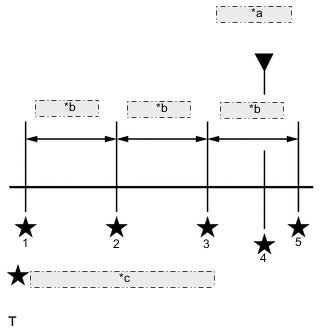
*a DTC is stored *b 0.5 seconds *c Freeze frame data recorded point The fourth set of freeze frame data is the data recorded when the DTC is stored.
-
PROCEDURE
-
READ OUTPUT DTC (RECORD STORED DTC AND FREEZE FRAME DATA) (PROCEDURE 1)
-
Connect the GTS to the DLC3.
-
Turn the ignition switch to ON and turn the GTS on.
-
Enter the following menus: Powertrain / Engine / Trouble Codes.
-
Record the stored DTC and freeze frame data.
Powertrain > Engine > Trouble CodesTech Tips
This freeze frame data shows the actual engine conditions when engine stall trouble occurred.
Result Proceed to NEXT
NEXT 
-
-
CHECK ANY OTHER DTCS OUTPUT (IN ADDITION TO DTC P1603)
-
Connect the GTS to the DLC3.
-
Turn the ignition switch to ON and turn the GTS on.
-
Enter the following menus: Powertrain / Engine / Trouble Codes.
-
Read the DTCs.
Powertrain > Engine > Trouble CodesResult Result Proceed to DTC P1603 is output A DTC P1603 and other DTCs are output B Tech Tips
If any DTCs other than P1603 are output, troubleshoot those DTCs first.
B 
GO TO DTC CHART Click here
A
-
-
TAKE SNAPSHOT DURING IDLING (PROCEDURE 3)
-
Connect the GTS to the DLC3.
-
Start the engine and turn the GTS on.
-
Warm up the engine (engine coolant temperature is 75°C (167°F) or higher).
-
Enter the following menus: Powertrain / Engine / Data List / Diesel Starting.
-
Take a snapshot when idling with no load after the engine is warmed up and when the problem is occurring.
Tech Tips
-
A snapshot can be used to compare vehicle data from the time of the malfunction to normal data and is very useful for troubleshooting.
-
The shift lever should be in neutral and the A/C switch and all accessory switches should be off.
-
If rough idling occurs when the A/C switch is on, take another snapshot with the A/C switch on.
-
Take a snapshot when the problem is occurring, such as when the engine is cold. However, if the problem does not reoccur, it is acceptable to only take a snapshot after the engine is warmed up.
Result Proceed to NEXT -
NEXT
-
-
DETERMINE CAUSE OF PROBLEM (CHECK FREEZE FRAME DATA AND SNAPSHOT)
-
Determine the cause of the problem based on the freeze frame data recorded in procedure 1 and the Data List values recorded when idling the engine in procedure 3.
Battery Voltage Judgment of Data List Values Problem Cause Normal Condition Diagnosis Note "Battery Voltage" in freeze frame data is below 6 V Engine starting trouble may have occurred because battery is fully depleted During cranking: 6 V or higher The battery may be fully depleted or the battery terminals may be loose. Common Rail Pressure Judgment of Data List Values Problem Cause Normal Condition Diagnosis Note "Common Rail Pressure" in freeze frame data is below 25000 kPa (254.9 kgf/cm2, 3626 psi)
Problem supplying fuel to fuel supply pump assembly (low pressure side)
-
Ran out of fuel, air in fuel, fuel frozen (in this case, values of "Coolant Temp" in freeze frame data are low)
-
Fuel filter element clog, fuel line clog (low pressure side) or fuel leak
-
Feed pump (in fuel supply pump assembly) malfunctioning
Problem supplying fuel to fuel supply pump assembly (low pressure side) or problem on high pressure side
-
Fuel supply pump assembly (pre-stroke control valve operation malfunction)
-
Common rail assembly
When in a stable condition such as when the engine is idling after being warmed up, the common rail pressure is within 5000 kPa of the target common rail pressure
Tech Tips
In order to maintain the injection amount before an engine stall, the target common rail pressure is increased drastically. At this time, Common Rail Pressure may not follow correctly, but this is normal behavior and not a malfunction.
If "Common Rail Pressure" is 10000 kPa (102.0 kgf/cm2, 1451 psi) or less, fuel injection control is stopped.
Injection Feedback Val #1 (to #4) Judgment of Data List Values Problem Cause Normal Condition Diagnosis Note "Injection Feedback Val #1 (to #4)" in freeze frame data is not +3.0 mm3/st or less
Injector assembly malfunction or compression problem Less than +3.0 mm3/st
If an injector assembly is malfunctioning, even though the engine starts, idling is rough.
"Injection Feedback Val #1 (to #4)" in Data List is not +3.0 mm3/st or less when idling
Injection Volume Judgment of Data List Values Problem Cause Normal Condition Diagnosis Note "Injection Volume" in Data List is more than 12 mm3/st and "Injection Feedback Val #1 (to #4)" is within range of 3.0 mm3/st when idling after warming up engine
Injector assemblies of all cylinders malfunctioning - Immobiliser Fuel Cut History Judgment of Data List Values Problem Cause Normal Condition Diagnosis Note "Immobiliser Fuel Cut History" in freeze frame data is OFF to ON Fuel injection has stopped due to engine immobiliser system.
Tech Tips
"Main Injection Period" in freeze frame data is 0 μs
OFF
-
Inspect engine immobiliser system.
-
Inspection looseness in battery terminal.
-
Inspect connection condition of ECM power supply system wiring.
Tech Tips
Perform the next inspection if there are no problems with the above items.
Result Proceed to NEXT -
NEXT
GO TO FUEL INJECTION SYSTEM Click here
-