ECD SYSTEM(w/o EGR System), Diagnostic DTC:P1251
| DTC Code | DTC Name |
|---|---|
| P1251 | Step Motor for Turbocharger Control Circuit (Intermittent) |
DESCRIPTION
Refer to DTC P0046.
| DTC No. | Detection Item | DTC Detection Condition | Trouble Area | MIL | Memory |
|---|---|---|---|---|---|
| P1251 | Step Motor for Turbocharger Control Circuit (Intermittent) | Boost pressure is higher than the threshold* for 5 seconds (1 trip detection logic). Tech Tips *: This value changes based on engine speed, atmospheric pressure and the engine coolant temperature (the value is generally between 90 and 276 kPa). |
|
Comes on | DTC stored |
| DTC No. | Data List |
|---|---|
| P1251 |
|
Tech Tips
If DTC P1251 is stored due to the VN turbo vane being stuck closed, the following symptoms may appear:
-
Vehicle surge when driving with full load
-
Sudden lack of power due to power being limited
CONFIRMATION DRIVING PATTERN
| DTC No. | DTC Detection Drive Pattern |
|---|---|
| P1251 | Vehicle being driven |
MONITOR RESULT
Note
After replacing an injector assembly, the ECM needs registration Click here.
Tech Tips
Read freeze frame data using the GTS. Freeze frame data records the engine condition when malfunctions are detected. When troubleshooting, freeze frame data can help determine if the vehicle was moving or stationary, if the engine was warmed up or not, and other data from the time the malfunction occurred.
PROCEDURE
-
CHECK FOR ANY OTHER DTCS OUTPUT (RECORD STORED DTC AND FREEZE FRAME DATA)
-
Connect the GTS to the DLC3.
-
Turn the ignition switch to ON and turn the GTS on.
-
Enter the following menus: Powertrain / Engine and ECT / Trouble Codes.
-
Read the DTCs.
Powertrain > Engine and ECT > Trouble CodesTech Tips
-
Record the stored DTCs and freeze frame data.
-
Be sure to carefully examine "MAP" and "Target Booster Pressure" in the freeze frame data.
Result Result Proceed to P1251 is output A P1251 and other DTCs are output B Tech Tips
DC motor-related DTCs: P0046, P0047 and P0048.
Nozzle vane position sensor-related DTCs: P2564 and P2565.
-
B 
GO TO DTC CHART Click here
A 
-
-
CHECK INTAKE SYSTEM
-
Check if the hoses between the air cleaner filter element sub-assembly and turbocharger sub-assembly, and turbocharger sub-assembly and intake manifold are damaged or disconnected.
Result Result Proceed to Hoses or pipes are damaged or disconnected A No hoses or pipes are damaged or disconnected B Tech Tips
-
Be sure to check if the hoses and pipes between the air cleaner and compressor are disconnected as disconnection of a hose or pipe can cause overboost. Also, check the high pressure hoses for disconnection due to overboost.
-
Check for disconnection of the exhaust pipes.
-
Using your hand, check whether the pipes and hoses in the intake system are securely connected.
-
Check for any modifications in the intake system made by the user.
-
B 
GO TO STEP 4 Click here
A
-
-
REPAIR OR REPLACE INTAKE SYSTEM
-
Repair or replace the malfunctioning part in the intake system.
Result Proceed to NEXT
NEXT
-
-
PERFORM ACTIVE TEST USING GTS (OPERATE TURBOCHARGER SUB-ASSEMBLY)
-
Connect the GTS to the DLC3.
-
Turn the ignition switch to ON and turn the GTS on.
-
Enter the following menus: Powertrain / Engine and ECT / Active Test / Test the Turbo Charger Step Motor / Data List / Target VN Turbo Position and Actual VN Turbo Position.
-
While changing the Active Test value to 10, 20, 30, 40, 30, 20 and 10%, check that Actual VN Turbo Position smoothly changes to the set opening amount.
Note
When moving the vanes toward the fully closed position, make sure that Actual VN Turbo Position does not become 5% or less.
OK The Actual VN Turbo Position value follows the Target VN Turbo Position. Result Proceed to OK NG
NG
CHECK HARNESS AND CONNECTOR (TURBOCHARGER NOZZLE VANE CONTROL ACTUATOR - ECM) Click here
OK
-
-
READ VALUE USING GTS (INJECTION VOLUME)
-
Connect the GTS to the DLC3.
-
Start the engine and warm it up until the engine coolant temperature reaches 75°C (167°F) or higher.
-
Allow the engine to idle for 1 minute or more.
Tech Tips
The A/C switch and all accessory switches should be off with a fully warm engine.
-
Turn the GTS on.
-
Enter the following menus: Powertrain / Engine and ECT / Data List / Primary / Injection Volume.
Powertrain > Engine and ECT > Data ListTester Display Injection Volume -
Read the value of Injection Volume at 4000 rpm without load.
Result Result Proceed to Injection Volume is less than 8.0 mm3/st
A Except above B Tech Tips
-
If the injector assembly is malfunctioning, the compensatory injection volume remains at 5.0 mm3/st.
-
If there is a disconnection, the feedback value will increase and +5.0 mm3/st will be indicated, because it will become impossible for the injector to inject.
-
B
GO TO STEP 9 Click here
A
-
-
REPLACE INJECTOR ASSEMBLIES OF ALL CYLINDERS
-
Replace the injector assemblies of all cylinders.
Note
-
When replacing the injector assembly for a cylinder, always be sure to use a new No. 1 injection pipe sub-assembly and a new No. 2 injection pipe sub-assembly.
-
Follow the procedure in the repair manual and temporarily install the No. 1 injection pipe sub-assembly, No. 2 injection pipe sub-assembly and No. 1 nozzle leakage pipe assembly, and then correctly position the injector assemblies. After that, tighten parts according to the torque specifications.
-
If the installation procedure is not performed correctly, injector assemblies may become out of position, which may cause the injector assemblies to deteriorate, resulting in malfunctions.
-
If an injector assembly deteriorates and malfunctions, other problems such as knocking, rough idle, etc. may occur.
-
If an injector assembly becomes out of position, it is possible that the seal between the injector assembly and injection pipe sub-assembly may become incomplete, resulting in a fuel leak.
Result Proceed to NEXT -
NEXT
-
-
BLEED AIR FROM FUEL SYSTEM
-
Bleed the air from the fuel system.
Result Proceed to NEXT
NEXT
-
-
REGISTER INJECTOR COMPENSATION CODE AND PERFORM PILOT QUANTITY LEARNING
-
Register the injector compensation code.
Powertrain > Engine and ECT > UtilityTester Display Injector Compensation -
Perform the injector pilot quantity learning.
Powertrain > Engine and ECT > UtilityTester Display Pilot Quantity Learning Result Proceed to NEXT
NEXT
-
-
CONFIRM WHETHER MALFUNCTION HAS BEEN SUCCESSFULLY REPAIRED
-
Connect the GTS to the DLC3.
-
Clear the DTCs.
Powertrain > Engine and ECT > Clear DTCs -
Turn the ignition switch off.
-
Start the engine and warm it up.
-
Confirm the value of Engine Speed from the Freeze Frame Data recorded previously, and then drive the vehicle according to the Engine Speed value.
Tech Tips
Take a snapshot of "MAP" and "Target Boost Pressure" in the Data List with the GTS while driving the vehicle.
-
Enter the following menus: Powertrain / Engine and ECT / Trouble Codes.
-
Read the DTCs.
Powertrain > Engine and ECT > Trouble CodesResult Result Proceed to P1251 is not output and the amount by which MAP exceeds Target Boost Pressure is 20 kPa or less A Except above B* Tech Tips
*: Return to "Check Intake System" and inspect areas that have not been inspected yet.
A
END
B*
GO TO STEP 2 Click here
-
-
CHECK HARNESS AND CONNECTOR (TURBOCHARGER NOZZLE VANE CONTROL ACTUATOR - ECM)
-
Disconnect the DC motor connector.
-
Disconnect the nozzle vane position sensor connector.
-
Disconnect the ECM connector.
-
Measure the resistance according to the value(s) in the table below.
Standard Resistance Tester Connection Condition Specified Condition C91-1 (M-) - C59-2 (VNM-) Always Below 1 Ω C91-2 (M+) - C59-1 (VNM+) Always Below 1 Ω C93-3 (VTA1) - C59-23 (VNA) Always Below 1 Ω C93-2 (VNE2) - C59-22 (VNE2) Always Below 1 Ω C93-1 (VNVC) - C59-30 (VNVC) Always Below 1 Ω C91-1 (M-) or C59-2 (VNM-) - Body ground and other terminals Always 10 kΩ or higher C91-2 (M+) or C59-1 (VNM+) - Body ground and other terminals Always 10 kΩ or higher C93-3 (VTA1) or C59-23 (VNA) - Body ground and other terminals Always 10 kΩ or higher C93-1 (VNVC) or C59-30 (VNVC) - Body ground and other terminals Always 10 kΩ or higher -
Reconnect the DC motor connector.
-
Reconnect the nozzle vane position sensor connector.
-
Reconnect the ECM connector.
Result Proceed to OK NG
NG
REPAIR OR REPLACE HARNESS OR CONNECTOR
OK
-
-
INSPECT TURBOCHARGER NOZZLE VANE PLATE
-
Remove the turbocharger sub-assembly.
-
Inspect the turbocharger nozzle vane plate.
-
Remove the e-washer from the turbocharger nozzle vane control actuator.
-
-
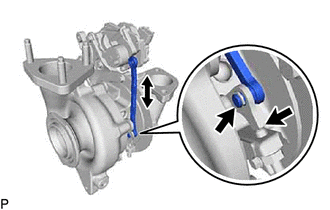
Move the turbocharger vane control rod sub-assembly and check that the turbocharger nozzle vane plate moves.
Result Result Proceed to Catches, but operates* OK Gets stuck and does not operate NG Tech Tips
*: Check several times.
OK
REPLACE TURBOCHARGER NOZZLE VANE CONTROL ACTUATOR Click here
NG
REPLACE TURBOCHARGER SUB-ASSEMBLY Click here
-