| DTC Code | DTC Name |
|---|---|
| P0180 | Fuel Temperature Sensor "A" Circuit |
| P0182 | Fuel Temperature Sensor "A" Circuit Low Input |
| P0183 | Fuel Temperature Sensor "A" Circuit High Input |
DESCRIPTION
The fuel temperature sensor monitors the fuel temperature. The fuel temperature sensor has a thermistor that varies its resistance depending on the fuel temperature. When the fuel temperature is low, the resistance of the thermistor is high. When the temperature is high, the resistance is low. The variations of resistance are communicated to the ECM as changes of voltage (See Fig. 1).
The fuel temperature sensor is connected to the ECM. The 5 V power source voltage in the ECM is applied to the fuel temperature sensor from terminal THF via resistor R.
Resistor R and the fuel temperature sensor are connected in series. When the resistance value of the fuel temperature sensor changes due to a change in fuel temperature, the voltage at terminal THF also changes. Based on this signal, the ECM corrects the pressure control compensation of the fuel supply pump assembly.
| DTC No. | Detection Item | DTC Detection Condition | Trouble Area | MIL | Memory |
|---|---|---|---|---|---|
| P0180 | Fuel Temperature Sensor "A" Circuit | Open or short in the fuel temperature sensor circuit for 0.5 seconds (1 trip detection logic). |
|
Comes on | DTC stored |
| P0182 | Fuel Temperature Sensor "A" Circuit Low Input | Short in the fuel temperature sensor circuit for 0.5 seconds (1 trip detection logic). |
|
Comes on | DTC stored |
| P0183 | Fuel Temperature Sensor "A" Circuit High Input | Open in the fuel temperature sensor circuit for 0.5 seconds (1 trip detection logic). |
|
Comes on | DTC stored |
| DTC No. | Data List |
|---|---|
| P0180 | Fuel Temp |
| P0182 | |
| P0183 |
-
If DTC P0180, P0182 and/or P0183 is stored, the following symptoms may appear:
-
-
Misfire
-
Combustion noise
-
Black smoke
-
Lack of power
-
-
When DTC P0180, P0182 and/or P0183 is stored, check the intake air temperature by entering the following menus: Powertrain / Engine / Data List / Fuel Temp.
Table 3. Reference Temperature Displayed Malfunction -40°C (-40°F) Open circuit 140°C (284°F) or higher Short circuit
CONFIRMATION DRIVING PATTERN
| DTC Detection Drive Pattern | Ignition switch to ON for 0.5 seconds |
CAUTION / NOTICE / HINT
After replacing the ECM, the new ECM needs registration (See page ) and initialization (Click here).
Read freeze frame data using the GTS. Freeze frame data records the engine condition when malfunctions are detected. When troubleshooting, freeze frame data can help determine if the vehicle was moving or stationary, if the engine was warmed up or not, and other data from the time the malfunction occurred.
PROCEDURE
- Click here
READ VALUE USING GTS (FUEL TEMPERATURE)
-
Connect the GTS to the DLC3.
-
Turn the ignition switch to ON and turn the GTS on.
-
Enter the following menus: Powertrain / Engine / Data List / Fuel Temp.
- Powertrain > Engine > Data List
Tester Display Fuel Temperature -
-
-
-
- Powertrain > Engine > Data List
-
Read the value.
OK Same as the actual fuel temperature Result Result Proceed to -40°C (-40°F) A 140°C (284°F) or higher B OK (Same as actual fuel temperature) C Tip:
-
If there is an open circuit, the GTS indicates -40°C (-40°F).
-
If there is a short circuit, the GTS indicates 140°C (284°F) or higher.
-
- AClick here
- BClick here
- CClick here
GO TO STEP 7
-
- Click here
READ VALUE USING GTS (CHECK FOR OPEN IN WIRE HARNESS)
-
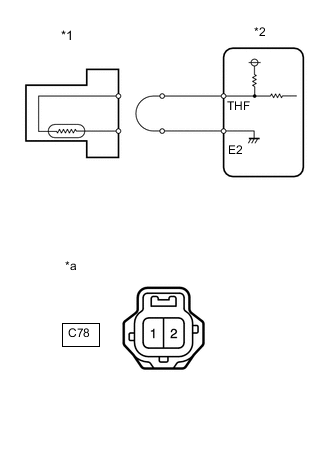
*1 Fuel Temperature Sensor *2 ECM *a Front view of wire harness connector
(to Fuel Temperature Sensor)
Disconnect the fuel temperature sensor connector.
-
Connect terminals 2 and 1 of the fuel temperature sensor connector.
-
Connect the GTS to the DLC3.
-
Turn the ignition switch to ON and turn the GTS on.
-
Enter the following menus: Powertrain / Engine / Data List / Fuel Temp.
- Powertrain > Engine > Data List
Tester Display Fuel Temperature -
-
-
-
- Powertrain > Engine > Data List
-
Read the value.
OK 140°C (284°F) or higher -
Reconnect the fuel temperature sensor connector.
Result Proceed to OK NG
- OKClick here
- NGClick here
-
- Click here
REPLACE FUEL SUPPLY PUMP ASSEMBLY (FUEL TEMPERATURE SENSOR)
-
Replace the fuel supply pump assembly.
Result Proceed to NEXT
- NEXTClick here
GO TO STEP 10
-
- Click here
CHECK HARNESS AND CONNECTOR (FUEL TEMPERATURE SENSOR - ECM)
-
Disconnect the fuel temperature sensor connector.
-
Disconnect the ECM connector.
-
Measure the resistance according to the value(s) in the table below.
Standard Resistance Tester Connection Condition Specified Condition C78-2 - C55-29 (THF) Always Below 1 Ω C78-1 - C55-28 (E2) Always Below 1 Ω -
Reconnect the fuel temperature sensor connector.
-
Reconnect the ECM connector.
Result Proceed to OK NG
- OKClick here
- NGClick here
-
- Click here
CONFIRM GOOD CONNECTION TO ECM. IF OK, REPLACE ECM.
-
Replace the ECM.
Result Proceed to NEXT
- NEXTClick here
GO TO STEP 7
-
- Click here
REPAIR OR REPLACE HARNESS OR CONNECTOR
-
Repair or replace the harness or connector.
Result Proceed to NEXT
- NEXTClick here
-
- Click here
CONFIRM WHETHER MALFUNCTION HAS BEEN SUCCESSFULLY REPAIRED
-
Connect the GTS to the DLC3.
-
Clear the DTCs.
- Powertrain > Engine > Clear DTCs
-
-
-
Turn the ignition switch to ON for 1 second or more.
-
Enter the following menus: Powertrain / Engine / Trouble Codes.
- Powertrain > Engine > Trouble Codes
-
-
-
Confirm that the DTC is not output again.
Result Proceed to NEXT
- NEXT
END
-
- Click here
READ VALUE USING GTS (CHECK FOR SHORT IN WIRE HARNESS)
-
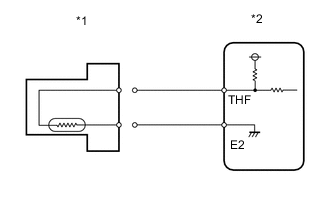
*1 Fuel Temperature Sensor *2 ECM Disconnect the fuel temperature sensor connector.
-
Connect the GTS to the DLC3.
-
Turn the ignition switch to ON and turn the GTS on.
-
Enter the following menus: Powertrain / Engine / Data List / Fuel Temp.
- Powertrain > Engine > Data List
Tester Display Fuel Temperature -
-
-
-
- Powertrain > Engine > Data List
-
Read the value.
OK -40°C (-40°F) -
Reconnect the fuel temperature sensor connector.
Result Proceed to OK NG
- OKClick here
- NGClick here
-
- Click here
REPLACE FUEL SUPPLY PUMP ASSEMBLY (FUEL TEMPERATURE SENSOR)
-
Replace the fuel supply pump assembly.
Result Proceed to NEXT
- NEXTClick here
-
- Click here
BLEED AIR FROM FUEL SYSTEM
-
Bleed the air from the fuel system.
Result Proceed to NEXT
- NEXTClick here
-
- Click here
PERFORM FUEL SUPPLY PUMP INITIALIZATION
-
Perform fuel supply pump initialization.
Result Proceed to NEXT
- NEXTClick here
GO TO STEP 7
-
- Click here
CHECK HARNESS AND CONNECTOR (FUEL TEMPERATURE SENSOR - ECM)
-
Disconnect the fuel temperature sensor connector.
-
Disconnect the ECM connector.
-
Measure the resistance according to the value(s) in the table below.
Standard Resistance Tester Connection Condition Specified Condition C78-2 or C55-29 (THF) - Body ground Always 10 kΩ or higher -
Reconnect the fuel temperature sensor connector.
-
Reconnect the ECM connector.
Result Proceed to OK NG
- OKClick here
- NGClick here
GO TO STEP 6
-
- Click here
REPLACE ECM
-
Replace the ECM.
Result Proceed to NEXT
- NEXTClick here
GO TO STEP 7
-