POWER POINT SOCKET(for Front Side) REMOVAL
CAUTION / NOTICE / HINT
Tech Tips
-
Use the same procedure for RHD and LHD vehicles.
-
The procedures listed below are for RHD vehicles.
PROCEDURE
-
REMOVE INSTRUMENT PANEL REGISTER BEZEL GARNISH
-
REMOVE NO. 1 INSTRUMENT PANEL GARNISH SUB-ASSEMBLY
-
REMOVE NO. 2 INSTRUMENT PANEL GARNISH SUB-ASSEMBLY
-
REMOVE CENTER INSTRUMENT CLUSTER FINISH PANEL SUB-ASSEMBLY
-
REMOVE RADIO RECEIVER ASSEMBLY (w/ Audio, for Radio Receiver Type)
-
REMOVE RADIO AND DISPLAY RECEIVER ASSEMBLY (w/ Audio, for Radio and Display Type)
-
REMOVE NAVIGATION RECEIVER ASSEMBLY (w/ Navigation System)
-
REMOVE CONTROL KNOB SUB-ASSEMBLY
-
for Manual Air Conditioning System:
-
for Manual Cooler System:
-
-
REMOVE INTEGRATION PANEL SUB-ASSEMBLY
-
for Manual Air Conditioning System:
-
for Manual Cooler System:
-
-
REMOVE AIR CONDITIONING CONTROL ASSEMBLY (for Automatic Air Conditioning System)
-
REMOVE LOWER INSTRUMENT COVER SUB-ASSEMBLY
-
REMOVE NO. 1 POWER OUTLET SOCKET ASSEMBLY
-
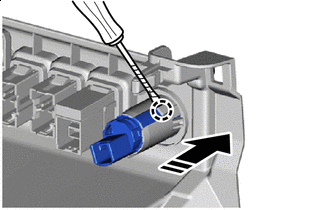

Protective Tape 
Remove in this Direction Using a thin-bladed screwdriver, detach the claw, and remove the No. 1 power outlet socket assembly as shown in the illustration.
Tech Tips
Tape the thin-bladed screwdriver tip before use.
-
-
REMOVE NO. 1 POWER OUTLET SOCKET COVER
-
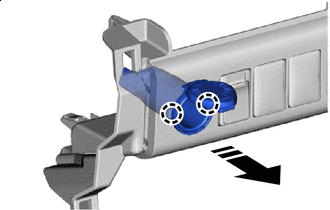
Remove in this Direction Detach the claw and remove the No. 1 power outlet socket cover as shown in the illustration.
-