METER / GAUGE SYSTEM CUSTOMIZE PARAMETERS
-
CUSTOMIZE METER / GAUGE SYSTEM
-
Customizing with the GTS
-
Connect the GTS to the DLC3.
-
Turn the ignition switch to ON.
-
Turn the GTS on.
-
Enter the following menus: Customize Setting / Warning or Display.
-
Select the setting by referring to the table below.
Note
Be sure to record the current value before customizing.
WarningTester Display Description Default Setting ECU Driver Side Seatbelt Warning Buzzer Function to turn on/off the seat belt warning buzzer ON 0:OFF,1:ON Combination meter assembly Front Passenger Side Seatbelt Warning Buzzer Function to turn on/off the seat belt warning buzzer ON 0:OFF,1:ON Combination meter assembly Flasher Sound Volume Adjustment Function to change the flasher sound volume Medium 10:Large,00:Medium,01:Small Combination meter assembly Flasher Sound Tone Setting Function to change the flasher sound tone Tone 1 00:Tone 1,01:Tone 2,10:Tone 3 Combination meter assembly Lane Change Flashing Times Setting Function to change the lane change flashing time 3 000:OFF,001:3,010:4,011:5,100:6,101:7 Combination meter assembly
DisplayTester Display Description Default Setting ECU ECO Drive Indicator Zone Function to enable or disable the eco driving indicator zone display in the multi-information display ON 0:OFF,1:ON Combination meter assembly ODO Display Time After IG OFF Setting Function to change the ODO display time after the ignition switch is turned OFF 30s 00:30s,01:60s,10:600s,11:OFF Combination meter assembly
-
-
Customizing with the combination meter assembly (for TFT Display Type)
-
Turn the ignition switch to ON.
-
Enter the following menus: Settings.
-
Select the setting by referring to the table below.
Note
Be sure to record the current value before customizing.
Settings Combination Meter Assembly Display Description Default Setting ECU Language Function to change the language on the display English English, French, Spanish, Thai, Portuguese or Indonesian Combination meter assembly Units Function to change the units on the display L/100 km km/L, L/100 km Combination meter assembly Eco Driving Indicator Light Function to activate/deactivate the ECO driving indicator light ON ON or OFF Combination meter assembly Switch Settings Function to change the screen assigned to the TOP button on the steering pad switch assembly - - Combination meter assembly Drive Info 1 Function to change the item to be displayed on Drive Info 1
-
Current Fuel Economy (Bar Type)
-
Average Fuel Economy (After Reset)
-
Current Fuel Economy (Bar Type)
-
Current Fuel Economy (Value Type)
-
Average Fuel Economy (After Reset)
-
Average Fuel Economy (After Start)
-
Average Fuel Economy (After Refuel)
-
Average Speed (After Reset)
-
Average Speed (After Start)
-
Elapsed Time (After Reset)
-
Elapsed Time (After Start)
-
Distance (Range)
-
Distance (After Start)
-
Other (Blank)
Combination meter assembly Drive Info 2 Function to change the item to be displayed on Drive Info 2
-
Average Speed (After Reset)
-
Distance (Range)
-
Current Fuel Economy (Bar Type)
-
Average Fuel Economy (After Reset)
-
Average Fuel Economy (After Start)
-
Average Fuel Economy (After Refuel)
-
Average Speed (After Reset)
-
Average Speed (After Start)
-
Elapsed Time (After Reset)
-
Elapsed Time (After Start)
-
Distance (Range)
-
Distance (After Start)
-
Other (Blank)
Combination meter assembly Pop-up Display Function to change the interrupt display setting of each item - - Combination meter assembly Color Function to change the cursor color when selecting a displayed item Clear Blue Clear Blue, Clear Turquoise, Deep Orange or Radiant Orange Combination meter assembly Initialize display The setting items can be initialized - - Combination meter assembly -
-
Enter the following menus: Settings Tab /Settings / Eco Savings
-
Select the setting by referring to the table below.
Eco Savings Combination Meter Assembly Display Description Default Setting ECU Gasoline Price To select the gasoline price * $/gal. or $/L Combination meter assembly Fuel Cons. Comparison To select the fuel consumption unit * MPG or L/100km Combination meter assembly ECO Savings To select the eco savings display setting Basic Basic or Details Combination meter assembly *: Changes according to the vehicle specification
-
-
Customizing with the combination meter assembly (for Dot Display Type)
-
While on the "SETTINGS" screen of the multi-information display, pressing and holding the DISP switch in the steering pad switch assembly switches to customization mode.
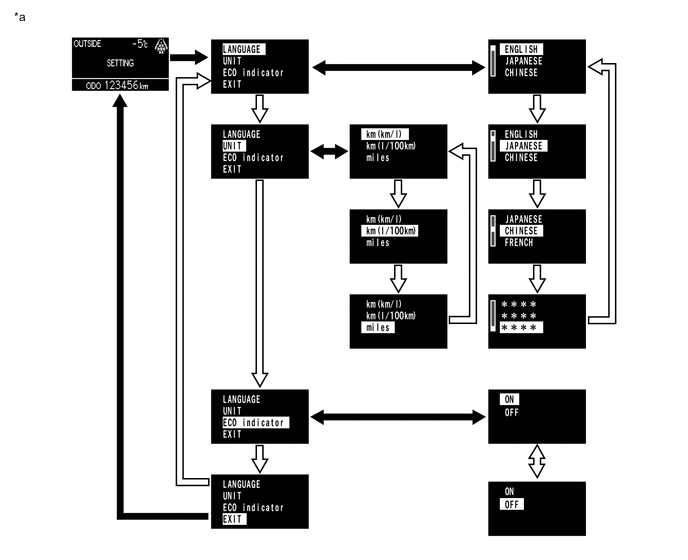
*a Example - - 
Press and hold the DISP switch in the steering pad switch assembly 
Briefly press the DISP switch in the steering pad switch assembly Combination Meter Assembly Display Description Default Setting ECU LANGUAGE Function to change the language on the display English English, French, Spanish, Thai, Portuguese or Indonesian Combination meter assembly UNIT Function to change the units on the display L/100 km km/L, L/100 km Combination meter assembly ECO indicator Function to activate/deactivate the ECO driving indicator light ON ON or OFF Combination meter assembly
-
-