MAP LIGHT BULB REPLACEMENT
CAUTION / NOTICE / HINT
Note
-
When replacing the map light bulb with a new one, if the bulb socket is blue, use a 5 W bulb.
-
When replacing the map light bulb with a new one, if the bulb socket is black, use an 8 W bulb.
PROCEDURE
-
REMOVE MAP LIGHT ASSEMBLY
-
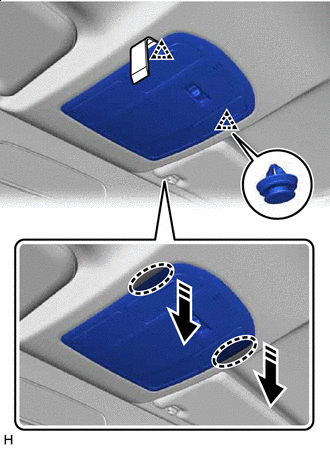

Insert Moulding Remover D Here 
Remove in this Direction Insert moulding remover D at the position shown in the illustration and pull as shown to detach the clip.
-
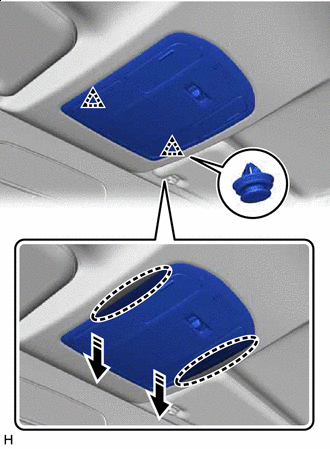
Place Hands Here Remove in this Direction Place your hands in the gap created during the above procedure and pull down to detach the clip as shown in the illustration.
-
Disconnect the connector and remove the map light assembly.
-
-
REMOVE BULB ASSEMBLY
-
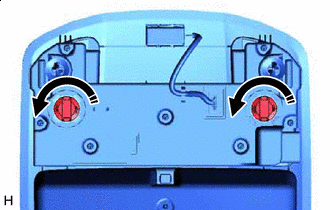
Remove in this Direction Turn the 2 bulb assemblies as shown in the illustration to remove them from the map light.
-
-
REMOVE MAP LIGHT BULB
-
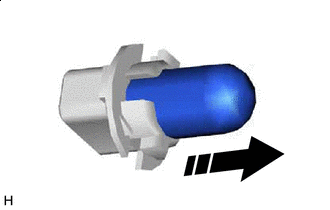
Remove in this Direction Remove the map light bulb.
-
-
INSTALL MAP LIGHT BULB
-
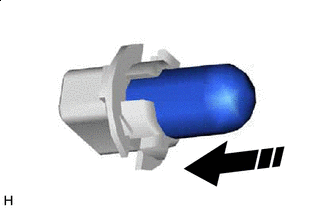
Install in this Direction Install the map light bulb.
-
-
INSTALL BULB ASSEMBLY
-
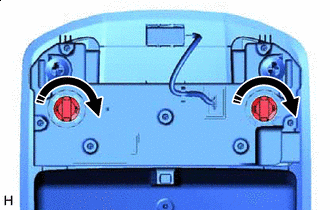
Install in this Direction Turn the 2 bulb assemblies as shown in the illustration to install them to the map light.
-
-
INSTALL MAP LIGHT ASSEMBLY
-
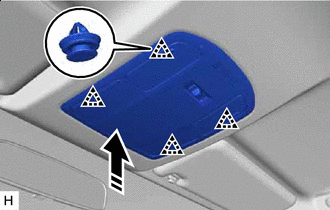
Install in this Direction Connect the connector.
-
Attach the clip to install the map light assembly as shown in the illustration.
-