IMMOBILISER SYSTEM(w/o Smart Entry and Start System), Diagnostic DTC:B2799
| DTC Code | DTC Name |
|---|---|
| B2799 | Engine Immobiliser System Malfunction |
DESCRIPTION
The ECM stores this DTC when a communication line between the ECM and transponder key ECU assembly is malfunctioning or the communication ID of the ECM and transponder key ECU assembly do not match.
| DTC No. | Detection Item | DTC Detection Condition | Trouble Area | Note |
|---|---|---|---|---|
| B2799 | Engine Immobiliser System Malfunction | One of the following conditions is met:
|
|
DTC Output Confirmation Operation: |
| Vehicle Condition when Malfunction Detected | Fail-safe Operation when Malfunction Detected |
|---|---|
| Engine cannot be started | - |
| DTC No. | Data List and Active Test |
|---|---|
| B2799 | - |
WIRING DIAGRAM

| *1 | Transponder Key ECU Assembly |
CAUTION / NOTICE / HINT
Note
-
If the transponder key ECU assembly or ECM is replaced, refer to Service Bulletin.
-
After repair, confirm that no DTCs are output by performing "DTC Output Confirmation Operation".
Tech Tips
If transponder key ECU assembly DTCs are output simultaneously, troubleshoot the transponder key ECU assembly DTCs first.
PROCEDURE
-
CLEAR DTC
-
Clear the DTCs.
Powertrain > Engine > Clear DTCsResult Proceed to NEXT
NEXT 
-
-
CHECK FOR DTC
-
Start the engine.
-
Check for DTCs.
Powertrain > Engine > Trouble CodesTech Tips
Before checking for DTCs, perform the "DTC Output Confirmation Operation" procedure.
OK B2799 is not output. Result Result Proceed to OK A NG (B2799 is output) B NG (Other DTCs are output) C
A 
USE SIMULATION METHOD TO CHECK Click here
C
GO TO DIAGNOSTIC TROUBLE CODE CHART Click here
B
-
-
INSPECT ECM (TERMINAL IMO)
-
Using an oscilloscope, check the waveform.
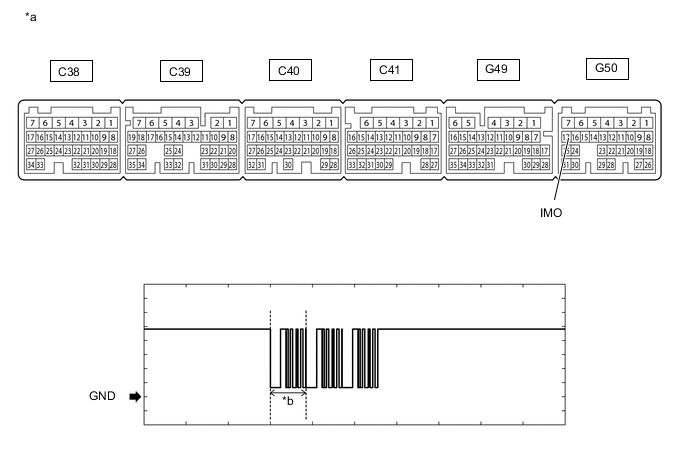
*a Component with harness connected
(ECM)
*b Waveform Measurement Condition Item Content Tester Connection G50-17 (IMO) - Body ground Tool Setting 2 V/DIV., 500 ms./DIV. Condition Within 3 seconds of starter operation and initial combustion, or within 3 seconds of ignition switch first being turned to ON after cable disconnected and reconnected to negative (-) battery terminal OK Waveform is similar to that shown in the illustration. Result Result Proceed to OK A NG (Terminal IMO stuck low (2.4 V or less)) B NG (Terminal IMO stuck high (12 V) or abnormal waveform) C
B 
INSPECT ECM (IMO TERMINAL VOLTAGE) Click here
C
GO TO STEP 7 Click here
A
-
-
INSPECT ECM (TERMINAL IMI)
-
Using an oscilloscope, check the waveform.

*a Component with harness connected
(ECM)
*b Waveform Measurement Condition Item Content Tester Connection G50-16 (IMI) - Body ground Tool Setting 2 V/DIV., 500 ms./DIV. Condition Within 3 seconds of starter operation and initial combustion, or within 3 seconds of ignition switch first being turned to ON after cable disconnected and reconnected to negative (-) battery terminal OK Waveform is similar to that shown in the illustration. Result Proceed to OK NG
NG
GO TO STEP 12 Click here
OK
-
-
REGISTER ECU COMMUNICATION ID
-
Reregister the ECU communication ID.
Tech Tips
Refer to Service Bulletin.
Result Proceed to NEXT
NEXT
-
-
CHECK WHETHER ENGINE STARTS
-
Using a registered key, turn the ignition switch to ON.
-
Check that the engine starts 5 seconds after the ignition switch was turned to ON.
OK Engine starts normally. Result Proceed to OK NG
OK
END (COMMUNICATION ID REGISTRATION WAS DEFECTIVE)
NG
-
-
REPLACE ECM
-
Temporarily replace the ECM with a new one.
Result Proceed to NEXT
NEXT
-
-
REGISTER ECU COMMUNICATION ID
-
Reregister the ECU communication ID.
Tech Tips
Refer to Service Bulletin.
Result Proceed to NEXT
NEXT
-
-
CHECK WHETHER ENGINE STARTS
-
Using a registered key, turn the ignition switch to ON.
-
Check that the engine starts 5 seconds after the ignition switch was turned to ON.
OK Engine starts normally. Result Proceed to OK NG
OK
END (ECM WAS DEFECTIVE)
NG
REPLACE TRANSPONDER KEY ECU ASSEMBLY
-
-
INSPECT ECM (IMO TERMINAL VOLTAGE)
-
Disconnect the G50 ECM connector.
-
Turn the ignition switch to ON.
-
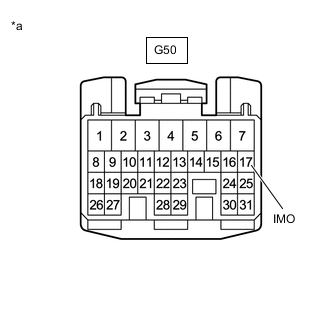
*a Front view of wire harness connector
(to ECM)
Measure the voltage according to the value(s) in the table below.
Standard Voltage Tester Connection Condition Result G50-17 (IMO) - Body ground Ignition switch turned to ON using registered key Terminal IMO stuck low (2.4 V or less) Terminal IMO stuck high (12 V) or abnormal waveform Result Result Proceed to Terminal IMO stuck low (2.4 V or less) A Terminal IMO stuck high (12 V) or Abnormal waveform B
B
GO TO STEP 7 Click here
A
-
-
CHECK HARNESS AND CONNECTOR (TRANSPONDER KEY ECU - ECM AND BODY GROUND)
-
Disconnect the G127 transponder key ECU assembly connector.
-
Disconnect the G50 ECM connector.
-
Measure the resistance according to the value(s) in the table below.
Standard Resistance Tester Connection Condition Specified Condition G127-12 (EFII) - G50-17 (IMO) Always Below 1 Ω G127-12 (EFII) - Body ground Always 10 kΩ or higher G50-17 (IMO) - Body ground Always 10 kΩ or higher Result Proceed to OK NG
NG
REPAIR OR REPLACE HARNESS OR CONNECTOR
OK
-
-
REPLACE TRANSPONDER KEY ECU ASSEMBLY
-
Replace the transponder key ECU assembly with a new one.
Tech Tips
Refer to Service Bulletin.
Result Proceed to NEXT
NEXT
-
-
REGISTER KEY
-
Register the key.
Tech Tips
Refer to Service Bulletin.
Result Proceed to NEXT
NEXT
-
-
REGISTER ECU COMMUNICATION ID
-
Register the ECU communication ID.
Tech Tips
Refer to Service Bulletin.
Result Proceed to NEXT
NEXT
-
-
CHECK WHETHER ENGINE STARTS
-
Using a registered key, turn the ignition switch to ON.
-
Check that the engine starts 5 seconds after the ignition switch was turned to ON.
OK Engine starts normally. Result Proceed to OK NG
OK
END (TRANSPONDER KEY ECU ASSEMBLY WAS DEFECTIVE)
NG
REPLACE ECM Click here
-