SMART ENTRY AND START SYSTEM(for Start Function) Power Source Mode does not Change to ON (IG and ACC)
DESCRIPTION
If any of the following operations are performed, the certification ECU (smart key ECU assembly) receives a signal, and changes the power source mode.
-
With the electrical key transmitter sub-assembly in the cabin, the engine switch is pressed.
-
When the transmitter battery of the electrical key transmitter sub-assembly is depleted, the brake pedal is depressed and the electrical key transmitter sub-assembly is held near the engine switch.
-
When the smart key cancel function has been canceled on the customization menu, the brake pedal is depressed and the electrical key transmitter sub-assembly is held near the engine switch.
| Problem Symptom | Data List Item | Active Test Item |
|---|---|---|
| Power source mode does not change to on (IG) or on (ACC) |
Power Source Control |
- |
CAUTION / NOTICE / HINT
Note
-
When using the GTS with the engine switch off, connect the GTS to the DLC3 and turn a courtesy light switch on and off at intervals of 1.5 seconds or less until communication between the GTS and the vehicle begins. Then select the Model Code "KEY REGIST" under manual mode and enter the following menus: Body Electrical / Entry&Start(CAN). While using the GTS, periodically turn a courtesy light switch on and off at intervals of 1.5 seconds or less to maintain communication between the GTS and the vehicle.
-
The smart entry and start system (for Start Function) uses a multiplex communication system (LIN communication system) and the CAN communication system. Inspect the communication function by following How to Proceed with Troubleshooting Click here. Troubleshoot the smart entry and start system (for Start Function) after confirming that the communication systems are functioning properly.
-
Make sure that no DTCs are output. If any DTCs are output, proceed to the Diagnostic Trouble Code Chart.
-
If the smart entry and start system is disabled through the customize function, enable the system before performing troubleshooting.
-
Before replacing the certification ECU (smart key ECU assembly) or electrical key transmitter sub-assembly, refer to the smart entry and start system (for Entry Function) precaution.
-
Inspect the fuses of circuits related to this system before performing the following procedure.
-
After completing repairs, confirm that the problem does not occur.
-
The indoor electrical key antenna assemblies have an antenna coil between each two CLG terminals.
-
The door control receiver is also related to interior verification.
Tech Tips
-
When the cable is disconnected and reconnected to the negative (-) battery terminal, the power source mode returns to the state it was in before the cable was disconnected.
-
If the room oscillator does not recognize, the cause of the malfunction may be stored in the certification ECU (smart key ECU assembly).
-
If the cause of the malfunction is stored in the certification ECU (smart key ECU assembly), the following table is helpful in checking whether the malfunction was caused by wave interference.
Body Electrical > Entry&Start > Utility
| Tester Display |
|---|
| Operation History |
| Parameter Name | Content |
|---|---|
| Operating Engine Switch / Key RF Signal Interference | When the engine switch was operated, the electrical key transmitter sub-assembly could not be confirmed due to wave interference. Therefore, the output frequency was switched to the other channel (changed from channel 1 to channel 2 or from channel 2 to channel 1). If the cause of the malfunction has not been stored but any devices that can cause wave interference in the cabin have been removed and the room oscillator successfully recognizes the key, the possibility of wave interference is high. |
| Parameter Name | Content |
|---|---|
| Operating Power Switch/ Indoor oscillator LF Signal Interference | When the engine switch was operated, the room oscillator could not be confirmed due to wave interference. Therefore, the output frequency was switched to the other channel (changed from channel 1 to channel 2 or from channel 2 to channel 1). If the cause of the malfunction has not been stored but any devices that can cause wave interference in the cabin have been removed and the room oscillator successfully recognizes the key, the possibility of wave interference is high. |
PROCEDURE
-
CHECK TRANSMITTER BATTERY
-
Check the transmitter battery level of the electrical key transmitter sub-assembly that was checked first.
-
Press and hold the lock switch of the transmitter for 5 seconds and check the number of times that the transmitter LED illuminates.
Tech Tips
-
The electrical key transmitter sub-assembly sends voltage information to the certification ECU (smart key ECU assembly) when it is being used. The certification ECU (smart key ECU assembly) displays "Yes" for the "Key Low Battery" item of the Data List when this voltage information indicates 2.2 V or less.
-
Even if the transmitter battery is depleted, it is still possible to start the engine by holding the electrical key transmitter sub-assembly near the engine switch, depressing the brake pedal and pressing the engine switch.
-
Result Result Proceed to Transmitter LED illuminates 3 times or more when switch is pressed and held A Transmitter LED does not illuminate when switch is pressed and held B Transmitter LED illuminates once or twice but not a third time C -
B 
INSPECT TRANSMITTER BATTERY Click here
C 
REPLACE TRANSMITTER BATTERY Click here
A 
-
-
READ VALUE USING GTS (KEY LOW BATTERY)
-
Connect the GTS to the DLC3.
-
Turn the engine switch on (IG).
-
Turn the GTS on.
-
Enter the following menus: Body Electrical / Entry&Start / Data List.
-
According to the display on the GTS, read the Data List.
Body Electrical > Entry&Start > Data ListTester Display Measurement Item Range Normal Condition Diagnostic Note Key Low Battery Transmitter battery depleted Yes or No Yes: Transmitter battery depleted
No: Transmitter battery not depleted
The electrical key transmitter sub-assembly sends voltage information to the certification ECU (smart key ECU assembly) when it is transmitting. The certification ECU (smart key ECU assembly) displays "Yes" for the "Key Low Battery" item of the Data List when this voltage information indicates 2.2 V or less.
This Data List item should be checked when the electrical key transmitter sub-assembly is at room temperature (example: at -20°C (-4°F), "Yes" may be displayed even if the transmitter battery is new).
Body Electrical > Entry&Start > Data ListTester Display Key Low Battery OK "No" is displayed in the Data List. Result Proceed to OK NG
NG
REPLACE TRANSMITTER BATTERY Click here
OK
-
-
CHECK FOR DTC
-
Clear the DTCs.
Body Electrical > Entry&Start > Clear DTCs
Body Electrical > Starting Control > Clear DTCs
Body Electrical > Power Source Control > Clear DTCs -
Recheck for DTCs.
Body Electrical > Entry&Start > Trouble Codes
Body Electrical > Starting Control > Trouble Codes
Body Electrical > Power Source Control > Trouble CodesOK DTC is not output. Result Proceed to OK NG
NG
GO TO DIAGNOSTIC TROUBLE CODE CHART
OK
-
-
CHECK SMART ENTRY AND START SYSTEM (VEHICLE INTERIOR DETECTION)
-
Get into the vehicle while carrying a different, previously-registered electrical key transmitter sub-assembly.
-
for Automatic Transmission
Move the shift lever to P.
-
With the brake pedal*1 or clutch pedal*2 released, check that pressing the engine switch causes the power source mode to change.
-
*1: for Automatic Transmission
-
*2: for Manual Transmission
Result Result Proceed to Power source mode does not change A Off → on (ACC) → on (IG) → off B -
B
END (ELECTRICAL KEY TRANSMITTER SUB-ASSEMBLY WAS DEFECTIVE)
A
-
-
CHECK WIRELESS AND ENTRY FUNCTION
-
Check that the wireless door lock functions operate normally.
-
Check that the entry lock and unlock functions operate on each door.
Tech Tips
If the door control receiver is defective, code verification does not begin in the cabin and the entry lock and unlock functions do not operate.
OK Wireless door lock, entry door lock and entry door unlock functions operate normally. Result Proceed to OK NG
NG
GO TO SMART ENTRY AND START SYSTEM (All Door Entry Lock/Unlock Functions and Wireless Functions do not Operate) Click here
OK
-
-
CHECK PUSH START FUNCTION
-
Remove the transmitter battery from the electrical key transmitter sub-assembly.
-
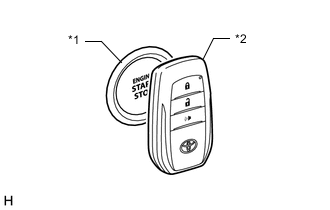
*1 Engine Switch *2 Electrical Key Transmitter Sub-assembly With the brake pedal*1 or clutch pedal*2 depressed, hold the electrical key transmitter sub-assembly near the engine switch and check if the power source mode changes.
-
*1: for Automatic Transmission
-
*2: for Manual Transmission
Tech Tips
If the power source mode changes, the cabin verification is malfunctioning.
OK The power source mode changes. Result Result Proceed to The power source mode changes A The power source mode does not change B -
B
READ VALUE USING GTS (STOP LIGHT SWITCH1, NEUTRAL SWITCH/ CLUTCH SW) Click here
A
-
-
CHECK WAVE ENVIRONMENT
-
Install the transmitter battery to the electrical key transmitter sub-assembly.
-
Bring the electrical key transmitter sub-assembly near the No. 1 indoor electrical key antenna assembly (front floor) and perform a smart entry and start system check.
Note
Communication may not be possible if the electrical key transmitter sub-assembly is within 0.2 m (0.656 ft.) of the No. 1 indoor electrical key antenna assembly (front floor).
-
Bring the electrical key transmitter sub-assembly near the No. 2 indoor electrical key antenna assembly (rear floor) and perform a smart entry and start system check.
Note
Communication may not be possible if the electrical key transmitter sub-assembly is within 0.2 m (0.656 ft.) of the No. 2 indoor electrical key antenna assembly (rear floor).
-
Bring the electrical key transmitter sub-assembly near the No. 2 indoor electrical key antenna assembly (inside luggage) and perform a smart entry and start system check.
Note
Communication may not be possible if the electrical key transmitter sub-assembly is within 0.2 m (0.656 ft.) of the No. 2 indoor electrical key antenna assembly (inside luggage).
Tech Tips
-
As the effect of wave interference decreases by moving the electrical key transmitter sub-assembly close to each indoor electrical key antenna assembly, it may be possible to check whether wave interference is the cause of the problem.
-
If the problem only occurs in specific places or at specific times, wave interference may be the cause of the problem. Also, parts installed by the dealer may cause wave interference. As a result, when parts have been installed by the dealer, it may be necessary to remove those parts before inspecting the vehicle.
-
There may be wave interference if the vehicle is near broadcasting antennas, large video displays, wireless garage door opener systems, wireless security cameras, home security systems, etc. In this case, move the vehicle to a different location and check if there is any improvement.
-
If a tool for checking electric waves, such as a signal strength meter, is available, move around the area while observing both the LF band (used by the vehicle antenna to form the detection area) and RF band (used by the electrical key transmitter sub-assembly for transmission) to check for locations where there is wave interference.
Result Result Proceed to System cannot be operated A System can be operated B -
B
AFFECTED BY WAVE INTERFERENCE
A
-
-
CHECK KEY DIAGNOSTIC MODE
-
Check the following antennas in key diagnostic mode.
-
Select either channel 1 or channel 2 and perform the key diagnostic mode inspection for each channel.
Body Electrical > Entry&Start > UtilityTester Display Communication Check(Key Diag Mode) Tech Tips
If the buzzer sounds with [CH1] displayed but not with [CH2], the electrical key transmitter sub-assembly cannot be detected by channel 2 due to a malfunction, such as wave interference.
-
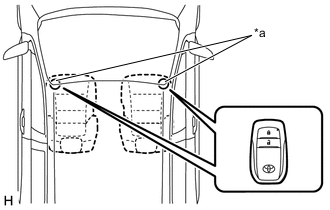
*a Inspection Point Check the No. 1 indoor electrical key antenna assembly (front floor).
When the electrical key transmitter sub-assembly is at either inspection point, check that the wireless door lock buzzer sounds.
-
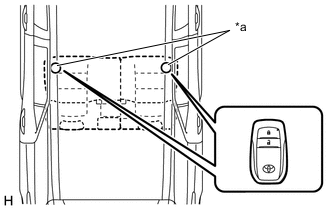
*a Inspection Point Check the No. 2 indoor electrical key antenna assembly (rear floor).
When the electrical key transmitter sub-assembly is at either inspection point, check that the wireless door lock buzzer sounds.
-
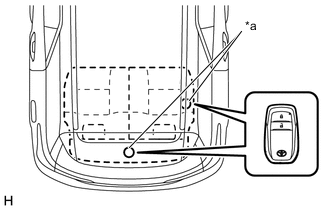
*a Inspection Point Check the No. 2 indoor electrical key antenna assembly (inside luggage).
When the electrical key transmitter sub-assembly is at either inspection point, check that the wireless door lock buzzer sounds.
Tech Tips
-
If the buzzer sounds, it can be determined that the vehicle interior transmitters are operating normally.
-
It is possible to check which indoor electrical key antenna assembly (front floor, rear floor or inside luggage) is operating by the sounding of the buzzer.
-
If the buzzer does not sound for any indoor electrical key antenna assemblies, the certification ECU (smart key ECU assembly) circuit may be malfunctioning.
Result Result Proceed to Front floor operation check fails A Rear floor operation check fails B Inside luggage operation check fails C The wireless buzzer sounds/does not sound for all indoor electrical key antenna assemblies D -
B
CHECK HARNESS AND CONNECTOR (CERTIFICATION ECU (SMART KEY ECU ASSEMBLY) - NO. 2 INDOOR ELECTRICAL KEY ANTENNA ASSEMBLY (REAR FLOOR)) Click here
C
CHECK HARNESS AND CONNECTOR (CERTIFICATION ECU (SMART KEY ECU ASSEMBLY) - NO. 2 INDOOR ELECTRICAL KEY ANTENNA ASSEMBLY (INSIDE LUGGAGE)) Click here
D
CHECK CONNECTOR CONNECTION CONDITION Click here
A
-
-
CHECK HARNESS AND CONNECTOR (CERTIFICATION ECU (SMART KEY ECU ASSEMBLY) - NO. 1 INDOOR ELECTRICAL KEY ANTENNA ASSEMBLY (FRONT FLOOR))
-
Disconnect the G17 certification ECU (smart key ECU assembly) connector.
-
Disconnect the G28 No. 1 indoor electrical key antenna assembly (front floor) connector.
-
Measure the resistance according to the value(s) in the table below.
Standard Resistance Tester Connection Condition Specified Condition G17-31 (CLG1) - G28-1 (ANTE1) Always Below 1 Ω G17-30 (CG1B) - G28-3 (CLGB) Always Below 1 Ω G17-31 (CLG1) or G28-1 (ANTE1) - Body ground Always 10 kΩ or higher G17-30 (CG1B) or G28-3 (CLGB) - Body ground Always 10 kΩ or higher Result Proceed to OK NG
NG
REPAIR OR REPLACE HARNESS OR CONNECTOR
OK
-
-
CHECK CONNECTOR CONNECTION CONDITION
-
Disconnect the G16 and G17 certification ECU (smart key ECU assembly) connectors.
-
Connect the G16 and G17 certification ECU (smart key ECU assembly) connectors.
-
Press the engine switch and check that the engine starts.
OK Engine starts. Result Proceed to OK NG
OK
CONNECT SECURELY
NG
-
-
CHECK CERTIFICATION ECU (SMART KEY ECU ASSEMBLY) (OUTPUT TO NO. 1 INDOOR ELECTRICAL KEY ANTENNA ASSEMBLY (FRONT FLOOR))
-
Connect the G17 certification ECU (smart key ECU assembly) connector.
-
Connect the G28 No. 1 indoor electrical key antenna assembly (front floor) connector.
-
Using an oscilloscope, check the waveform.
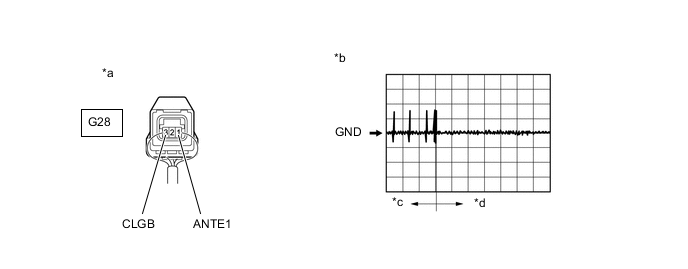
*a Component with harness connected
(No. 1 Indoor Electrical Key Antenna Assembly (Front Floor))
*b Waveform 1 *c Door open *d After approximately 30 seconds from when the door is closed Standard Frequency: Tester Connection Condition Tool Setting Specified Condition G28-1 (ANTE1) - G28-3 (CLGB) Procedure:
-
All doors closed
-
Engine switch off
-
Electrical key transmitter sub-assembly not inside vehicle
-
Door is open
-
Door is closed
-
Within 30 seconds
2 V/DIV., 500 ms./DIV. Pulse generation
(See waveform 1)
Result Proceed to OK NG -
OK
REPLACE NO. 1 INDOOR ELECTRICAL KEY ANTENNA ASSEMBLY (FRONT FLOOR) Click here
NG
REPLACE CERTIFICATION ECU (SMART KEY ECU ASSEMBLY)
-
-
INSPECT TRANSMITTER BATTERY
-
Inspect the transmitter battery.
Note
Do not wrap the lead wire around a terminal, wedge it between terminals, or solder it. The terminal may be deformed or damaged, and the transmitter battery will not be able to be installed correctly.
Result Proceed to OK NG
OK
REPLACE ELECTRICAL KEY TRANSMITTER SUB-ASSEMBLY
NG
REPLACE TRANSMITTER BATTERY Click here
-
-
CHECK HARNESS AND CONNECTOR (CERTIFICATION ECU (SMART KEY ECU ASSEMBLY) - NO. 2 INDOOR ELECTRICAL KEY ANTENNA ASSEMBLY (REAR FLOOR))
-
Disconnect the G17 certification ECU (smart key ECU assembly) connector.
-
Disconnect the N9 No. 2 indoor electrical key antenna assembly (rear floor) connector.
-
Measure the resistance according to the value(s) in the table below.
Standard Resistance Tester Connection Condition Specified Condition G17-6 (CLG2) - N9-1 (ANTE2) Always Below 1 Ω G17-23 (CG2B) - N9-3 (CLGB) Always Below 1 Ω G17-6 (CLG2) or N9-1 (ANTE2) - Body ground Always 10 kΩ or higher G17-23 (CG2B) or N9-3 (CLGB) - Body ground Always 10 kΩ or higher Result Proceed to OK NG
NG
REPAIR OR REPLACE HARNESS OR CONNECTOR
OK
-
-
CHECK CONNECTOR CONNECTION CONDITION
-
Disconnect the G16 and G17 certification ECU (smart key ECU assembly) connectors.
-
Connect the G16 and G17 certification ECU (smart key ECU assembly) connectors.
-
Press the engine switch and check that the engine starts.
OK Engine starts. Result Proceed to OK NG
OK
CONNECT SECURELY
NG
-
-
CHECK CERTIFICATION ECU (SMART KEY ECU ASSEMBLY) (OUTPUT TO NO. 2 INDOOR ELECTRICAL KEY ANTENNA ASSEMBLY (REAR FLOOR))
-
Connect the G17 certification ECU (smart key ECU assembly) connector.
-
Connect the N9 No. 2 indoor electrical key antenna assembly (rear floor) connector.
-
Using an oscilloscope, check the waveform.
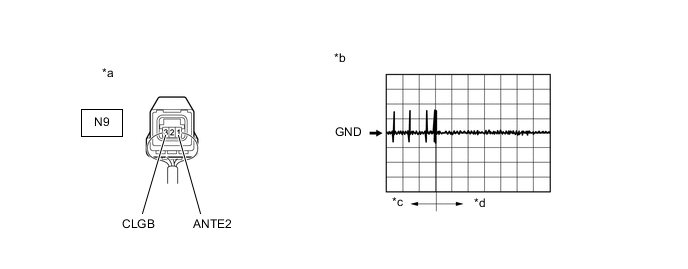
*a Component with harness connected
(No. 2 Indoor Electrical Key Antenna Assembly (Rear Floor))
*b Waveform 1 *c Door open *d After approximately 30 seconds from when the door is closed Standard Frequency: Tester Connection Condition Tool Setting Specified Condition N9-1 (ANTE2) - N9-3 (CLGB) Procedure:
-
All doors closed
-
Engine switch off
-
Electrical key transmitter sub-assembly not inside vehicle
-
Door is open
-
Door is closed
-
Within 30 seconds
2 V/DIV., 500 ms./DIV. Pulse generation
(See waveform 1)
Result Proceed to OK NG -
OK
REPLACE NO. 2 INDOOR ELECTRICAL KEY ANTENNA ASSEMBLY (REAR FLOOR) Click here
NG
REPLACE CERTIFICATION ECU (SMART KEY ECU ASSEMBLY)
-
-
CHECK HARNESS AND CONNECTOR (CERTIFICATION ECU (SMART KEY ECU ASSEMBLY) - NO. 2 INDOOR ELECTRICAL KEY ANTENNA ASSEMBLY (INSIDE LUGGAGE))
-
Disconnect the G17 certification ECU (smart key ECU assembly) connector.
-
Disconnect the N39 No. 2 indoor electrical key antenna assembly (inside luggage) connector.
-
Measure the resistance according to the value(s) in the table below.
Standard Resistance Tester Connection Condition Specified Condition G17-28 (CLG7) - N39-1 (ANTE7) Always Below 1 Ω G17-29 (CG7B) - N39-3 (CLGB) Always Below 1 Ω G17-28 (CLG7) or N39-1 (ANTE7) - Body ground Always 10 kΩ or higher G17-29 (CG7B) or N39-3 (CLGB) - Body ground Always 10 kΩ or higher Result Proceed to OK NG
NG
REPAIR OR REPLACE HARNESS OR CONNECTOR
OK
-
-
CHECK CONNECTOR CONNECTION CONDITION
-
Disconnect the G16 and G17 certification ECU (smart key ECU assembly) connectors.
-
Connect the G16 and G17 certification ECU (smart key ECU assembly) connectors.
-
Press the engine switch and check that the engine starts.
OK Engine starts. Result Proceed to OK NG
OK
CONNECT SECURELY
NG
-
-
CHECK CERTIFICATION ECU (SMART KEY ECU ASSEMBLY) (OUTPUT TO NO. 2 INDOOR ELECTRICAL KEY ANTENNA ASSEMBLY (INSIDE LUGGAGE))
-
Connect the G17 certification ECU (smart key ECU assembly) connector.
-
Connect the N39 No. 2 indoor electrical key antenna assembly (inside luggage) connector.
-
Using an oscilloscope, check the waveform.
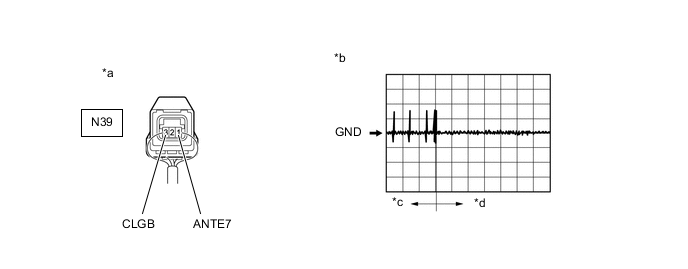
*a Component with harness connected
(No. 2 Indoor Electrical Key Antenna Assembly (Inside Luggage))
*b Waveform 1 *c Door open *d After approximately 30 seconds from when the door is closed Standard Frequency: Tester Connection Condition Tool Setting Specified Condition N39-1 (ANTE7) - N39-3 (CLGB) Procedure:
-
All doors closed
-
Engine switch off
-
Electrical key transmitter sub-assembly not inside vehicle
-
Door is open
-
Door is closed
-
Within 30 seconds
2 V/DIV., 500 ms./DIV. Pulse generation
(See waveform 1)
Result Proceed to OK NG -
OK
REPLACE NO. 2 INDOOR ELECTRICAL KEY ANTENNA ASSEMBLY (INSIDE LUGGAGE) Click here
NG
REPLACE CERTIFICATION ECU (SMART KEY ECU ASSEMBLY)
-
-
CHECK CONNECTOR CONNECTION CONDITION
-
Disconnect the G16 and G17 certification ECU (smart key ECU assembly) connectors.
-
Connect the G16 and G17 certification ECU (smart key ECU assembly) connectors.
-
Press the engine switch and check that the engine starts.
OK Engine starts. Result Proceed to OK NG
OK
CONNECT SECURELY
NG
REPLACE CERTIFICATION ECU (SMART KEY ECU ASSEMBLY)
-
-
READ VALUE USING GTS (STOP LIGHT SWITCH1, NEUTRAL SWITCH/ CLUTCH SW)
-
for Automatic Transmission
-
Connect the GTS to the DLC3.
-
Turn the engine switch on (IG).
-
Turn the GTS on.
-
Enter the following menus: Body Electrical / Power Source Control / Data List.
-
According to the display on the GTS, read the Data List.
Body Electrical > Power Source Control > Data ListTester Display Measurement Item Range Normal Condition Diagnostic Note Stop Light Switch1 State of brake pedal ON or OFF ON: Brake pedal depressed
OFF: Brake pedal released
-
Use this item to determine whether the stop light switch is malfunctioning.
-
The engine cannot be started when this item is "OFF".
-
When this item is malfunctioning, the engine can be started by pressing and holding the engine switch for a certain period of time.
Body Electrical > Power Source Control > Data ListTester Display Stop Light Switch1 OK The item in the Data List changes when the brake pedal is depressed and released. -
-
-
for Manual Transmission
-
Connect the GTS to the DLC3.
-
Turn the engine switch on (IG).
-
Turn the GTS on.
-
Enter the following menus: Body Electrical / Power Source Control / Data List.
-
According to the display on the GTS, read the Data List.
Body Electrical > Power Source Control > Data ListTester Display Measurement Item Range Normal Condition Diagnostic Note Neutral SW/ Clutch SW State of clutch pedal ON or OFF ON: Clutch pedal depressed
OFF: Clutch pedal released
-
Use this item to help determine if the clutch start switch is malfunctioning.
-
The engine cannot be started when this item is "OFF".
Body Electrical > Power Source Control > Data ListTester Display Neutral SW/ Clutch SW OK The item in the Data List changes when the clutch pedal is depressed and released. -
Result Proceed to OK NG (for Automatic Transmission) NG (for Manual Transmission) -
NG (for Automatic Transmission)
CHECK HARNESS AND CONNECTOR (CERTIFICATION ECU (SMART KEY ECU ASSEMBLY) - STOP LIGHT SWITCH ASSEMBLY) Click here
NG (for Manual Transmission)
INSPECT CLUTCH START SWITCH ASSEMBLY Click here
OK
-
-
CHECK CERTIFICATION ECU (SMART KEY ECU ASSEMBLY)
-
Connect the G16 certification ECU (smart key ECU assembly) connector.
-
Connect the 2E and 2J instrument panel junction block assembly connectors.
-
Read the Data List according to the display on the GTS.
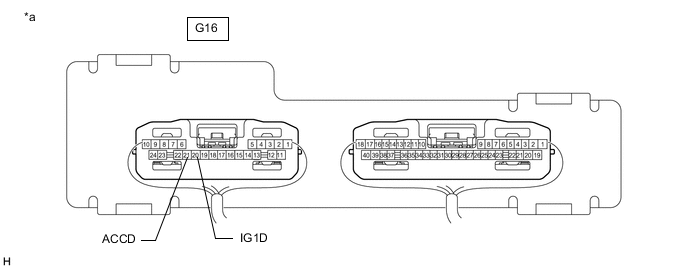
*a Component with harness connected
(Certification ECU (Smart Key ECU Assembly))
- -
Body Electrical > Power Source Control > Data ListTester Display Measurement Item Range Normal Condition Diagnostic Note Power Supply Condition Power supply state ST ON, All OFF, IG ON or ACC ON All OFF: Engine switch off (ACC and IG)
ACC ON: Engine switch on (ACC)
IG ON: Engine switch on (IG)
ST ON: Sending engine start request signal
-
Body Electrical > Power Source Control > Data ListTester Display Power Supply Condition -
Measure the voltage while checking the Data List on the GTS.
Standard Voltage Tester Connection Switch Condition Specified Condition G16-20 (IG1D) - Body ground Engine switch off 1 V or less Engine switch on (ACC) 1 V or less Engine switch on (IG) 9 V or higher G16-21 (ACCD) - Body ground Engine switch off 1 V or less Engine switch on (IG) 8.5 V or higher Engine switch on (ACC) 8.5 V or higher Result Proceed to OK NG
NG
READ VALUE USING GTS (START SWITCH1, START SWITCH2) Click here
OK
-
-
INSPECT IG1 NO. 1 RELAY
-
Remove the IG1 NO. 1 relay.
-
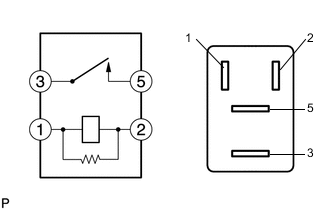
Measure the resistance according to the value(s) in the table below.
Standard Resistance Tester Connection Condition Specified Condition 3 - 5 Battery voltage not applied to terminals 1 and 2 10 kΩ or higher Battery voltage applied to terminals 1 and 2 Below 1 Ω Result Proceed to OK NG
NG
REPLACE IG1 NO. 1 RELAY
OK
-
-
CHECK HARNESS AND CONNECTOR (CERTIFICATION ECU (SMART KEY ECU ASSEMBLY) - IG1 NO. 1 RELAY)
-
Disconnect the G16 certification ECU (smart key ECU assembly) connector.
-
Remove the IG1 NO. 1 relay.
-
Measure the resistance according to the value(s) in the table below.
Standard Resistance Tester Connection Condition Specified Condition G16-20 (IG1D) - IG1 NO. 1 relay terminal 1 Always Below 1 Ω IG1 NO. 1 relay terminal 2 - Body ground Always Below 1 Ω G16-20 (IG1D) or IG1 NO. 1 relay terminal 1 - Body ground Always 10 kΩ or higher Result Proceed to OK NG
NG
REPAIR OR REPLACE HARNESS OR CONNECTOR
OK
-
-
INSPECT IG2 RELAY
-
Remove the IG2 relay.
-
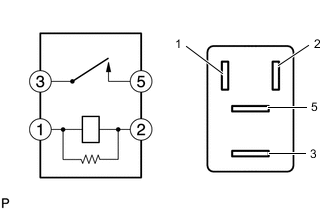
Measure the resistance according to the value(s) in the table below.
Standard Resistance Tester Connection Condition Specified Condition 3 - 5 Battery voltage not applied to terminals 1 and 2 10 kΩ or higher Battery voltage applied to terminals 1 and 2 Below 1 Ω Result Proceed to OK NG
NG
REPLACE IG2 RELAY
OK
-
-
CHECK HARNESS AND CONNECTOR (CERTIFICATION ECU (SMART KEY ECU ASSEMBLY) - IG2 RELAY)
-
Disconnect the G16 certification ECU (smart key ECU assembly) connector.
-
Remove the IG2 relay.
-
Measure the resistance according to the value(s) in the table below.
Standard Resistance Tester Connection Condition Specified Condition G16-20 (IG1D) - IG2 relay terminal 1 Always Below 1 Ω IG2 relay terminal 2 - Body ground Always Below 1 Ω G16-20 (IG1D) or IG2 relay terminal 1 - Body ground Always 10 kΩ or higher Result Proceed to OK NG
NG
REPAIR OR REPLACE HARNESS OR CONNECTOR
OK
-
-
INSPECT INSTRUMENT PANEL JUNCTION BLOCK ASSEMBLY (ACC RELAY)
-
Remove the instrument panel junction block assembly.
for LHD: Click here
for RHD: Click here
-
Remove the body ECU from the instrument panel junction block assembly.
for LHD: Click here
for RHD: Click here
-
Measure the resistance according to the value(s) in the table below.
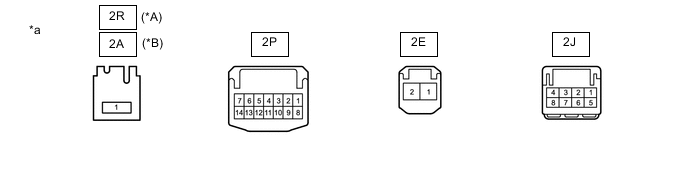
*A for LHD *B for RHD *a Component without harness connected (Instrument Panel Junction Block Assembly) - - Standard Resistance for LHD: Tester Connection Condition Specified Condition 2R-1 - 2P-5 Battery voltage not applied to terminals 2E-2 and 2J-5 10 kΩ or higher Battery voltage applied to terminals 2E-2 and 2J-5 Below 1 Ω for RHD: Tester Connection Condition Specified Condition 2A-1 - 2P-5 Battery voltage not applied to terminals 2E-2 and 2J-5 10 kΩ or higher Battery voltage applied to terminals 2E-2 and 2J-5 Below 1 Ω Result Proceed to OK NG
NG
REPLACE INSTRUMENT PANEL JUNCTION BLOCK ASSEMBLY for LHD: Click here
REPLACE INSTRUMENT PANEL JUNCTION BLOCK ASSEMBLY for RHD: Click hereOK
-
-
CHECK HARNESS AND CONNECTOR (CERTIFICATION ECU (SMART KEY ECU ASSEMBLY) - INSTRUMENT PANEL JUNCTION BLOCK ASSEMBLY)
-
Disconnect the G16 certification ECU (smart key ECU assembly) connector.
-
Disconnect the 2E and 2J instrument panel junction block assembly connectors.
-
Measure the resistance according to the value(s) in the table below.
Standard Resistance Tester Connection Condition Specified Condition G16-21 (ACCD) - 2E-2 Always Below 1 Ω 2J-5 - Body ground Always Below 1 Ω G16-21 (ACCD) or 2E-2 - Body ground Always 10 kΩ or higher Result Proceed to OK NG
OK
CHECK RELAY CONTACT SIDE CIRCUIT
NG
REPAIR OR REPLACE HARNESS OR CONNECTOR
-
-
READ VALUE USING GTS (START SWITCH1, START SWITCH2)
-
Connect the GTS to the DLC3.
-
Turn the engine switch on (IG).
-
Turn the GTS on.
-
Enter the following menus: Body Electrical / Power Source Control / Data List.
-
According to the display on the GTS, read the Data List.
Body Electrical > Power Source Control > Data ListTester Display Measurement Item Range Normal Condition Diagnostic Note Start Switch1 Engine switch 1 status ON or OFF ON: Engine switch pressed
OFF: Engine switch not pressed
-
If the engine switch is pressed for a short time, the display may not change.
-
Use this item to determine whether the engine switch input signal is malfunctioning.
Start Switch2 Engine switch 2 status ON or OFF ON: Engine switch pressed
OFF: Engine switch not pressed
-
Backup for engine switch 1. However, when the engine switch is pressed and held, the control functions only when both engine switch 1 and 2 are normal.
-
Behaves the same way as engine switch 1.
Body Electrical > Power Source Control > Data ListTester Display Start Switch1 Start Switch2 OK ON (Engine switch is pressed) and OFF (Engine switch is not pressed) appear on the screen. Result Proceed to OK NG -
OK
REPLACE CERTIFICATION ECU (SMART KEY ECU ASSEMBLY)
NG
-
-
INSPECT ENGINE SWITCH
-
Remove the engine switch.
for 1GR-FE (for LHD): Click here
for 1GR-FE (for RHD): Click here
for 2TR-FE (for LHD): Click here
for 2TR-FE (for RHD): Click here
for 1GD-FTV: Click here
for 2GD-FTV: Click here
-
Inspect the engine switch.
for 1GR-FE (for LHD): Click here
for 1GR-FE (for RHD): Click here
for 2TR-FE (for LHD): Click here
for 2TR-FE (for RHD): Click here
for 1GD-FTV: Click here
for 2GD-FTV: Click here
Result Proceed to OK NG
NG
REPLACE ENGINE SWITCH for 1GR-FE (for LHD): Click here
REPLACE ENGINE SWITCH for 1GR-FE (for RHD): Click here
REPLACE ENGINE SWITCH for 2TR-FE (for LHD): Click here
REPLACE ENGINE SWITCH for 2TR-FE (for RHD): Click here
REPLACE ENGINE SWITCH for 1GD-FTV: Click here
REPLACE ENGINE SWITCH for 2GD-FTV: Click hereOK
-
-
CHECK HARNESS AND CONNECTOR (CERTIFICATION ECU (SMART KEY ECU ASSEMBLY) - ENGINE SWITCH)
-
Disconnect the G16 certification ECU (smart key ECU assembly) connector.
-
Disconnect the G45 engine switch connector.
-
Measure the resistance according to the value(s) in the table below.
Standard Resistance Tester Connection Condition Specified Condition G16-18 (SSW1) - G45-5 (SS1) Always Below 1 Ω G16-16 (SSW2) - G45-1 (SS2) Always Below 1 Ω G16-24 (AGND) - G45-6 (AGND) Always Below 1 Ω G16-18 (SSW1) or G45-5 (SS1) - Body ground Always 10 kΩ or higher G16-16 (SSW2) or G45-1 (SS2) - Body ground Always 10 kΩ or higher G16-24 (AGND) or G45-6 (AGND) - Body ground Always 10 kΩ or higher Result Proceed to OK NG
OK
REPLACE CERTIFICATION ECU (SMART KEY ECU ASSEMBLY)
NG
REPAIR OR REPLACE HARNESS OR CONNECTOR
-
-
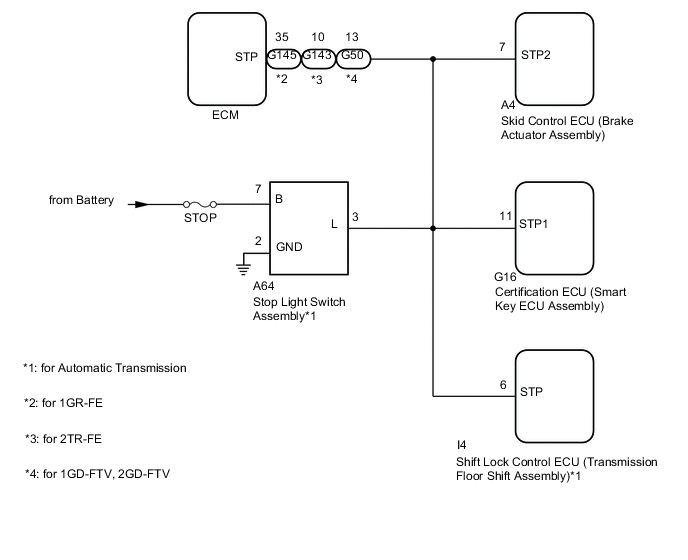
CHECK HARNESS AND CONNECTOR (CERTIFICATION ECU (SMART KEY ECU ASSEMBLY) - STOP LIGHT SWITCH ASSEMBLY)
-
Disconnect the G145*1, G143*2 or G50*3 ECM connector.
-
*1: for 1GR-FE
-
*2: for 2TR-FE
-
*3: for 1GD-FTV, 2GD-FTV
-
-
Disconnect the A4 skid control ECU (brake actuator assembly) connector.
-
Disconnect the G16 certification ECU (smart key ECU assembly) connector.
-
Disconnect the A64 stop light switch assembly connector.
-
Disconnect the I4 shift lock control ECU (transmission floor shift assembly) connector.
-
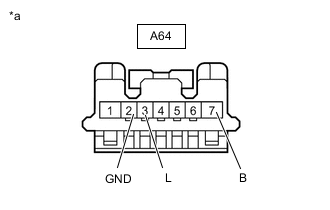
*a Front view of wire harness connector
(to Stop Light Switch Assembly)
Measure the voltage according to the value(s) in the table below.
Standard Voltage Tester Connection Condition Specified Condition A64-7 (B) - Body ground Always 11 to 14 V -
Measure the resistance according to the value(s) in the table below.
Standard Resistance Tester Connection Condition Specified Condition G16-11 (STP1) - A64-3 (L) Always Below 1 Ω G16-11 (STP1) or A64-3 (L) - Body ground Always 10 kΩ or higher A64-2 (GND) - Body ground Always Below 1 Ω Result Proceed to OK NG
NG
REPAIR OR REPLACE HARNESS OR CONNECTOR
OK
-
-
INSPECT STOP LIGHT SWITCH ASSEMBLY
-
Inspect the stop light switch assembly.
Result Proceed to OK NG
OK
REPLACE CERTIFICATION ECU (SMART KEY ECU ASSEMBLY)
NG
REPLACE STOP LIGHT SWITCH ASSEMBLY Click here
-
-
INSPECT CLUTCH START SWITCH ASSEMBLY
-
Remove the clutch start switch assembly.
-
Inspect the clutch start switch assembly.
Result Proceed to OK NG
NG
REPLACE CLUTCH START SWITCH ASSEMBLY Click here
OK
-
-
CHECK HARNESS AND CONNECTOR (CERTIFICATION ECU (SMART KEY ECU ASSEMBLY) - CLUTCH START SWITCH ASSEMBLY)
-
Disconnect the G17 certification ECU (smart key ECU assembly) connector.
-
Disconnect the B2 clutch start switch assembly connector.
-
Disconnect the C85*1, C147*2 or G49*3 ECM connector.
-
*1: for 1GR-FE
-
*2: for 2TR-FE
-
*3: for 1GD-FTV, 2GD-FTV
-
-
Measure the resistance according to the value(s) in the table below.
Standard Resistance Tester Connection Condition Specified Condition G17-16 (STAR) - B2-2 Always Below 1 Ω G17-16 (STAR) or B2-2 - Body ground Always 10 kΩ or higher Result Proceed to OK NG
OK
REPLACE CERTIFICATION ECU (SMART KEY ECU ASSEMBLY)
NG
REPAIR OR REPLACE HARNESS OR CONNECTOR
-