TELEMATICS SYSTEM(for ERA-GLONASS), Diagnostic DTC:B1572
| DTC Code | DTC Name |
|---|---|
| B1572 | Microphone Error |
DESCRIPTION
This DTC is stored when a microphone signal line is disconnected.
| DTC No. | Detection Item | DTC Detection Condition | Trouble Area |
|---|---|---|---|
| B1572 | Microphone Error | Current at terminal MCVD exceeds the malfunction threshold for 20 seconds while the ignition switch is ON. |
|
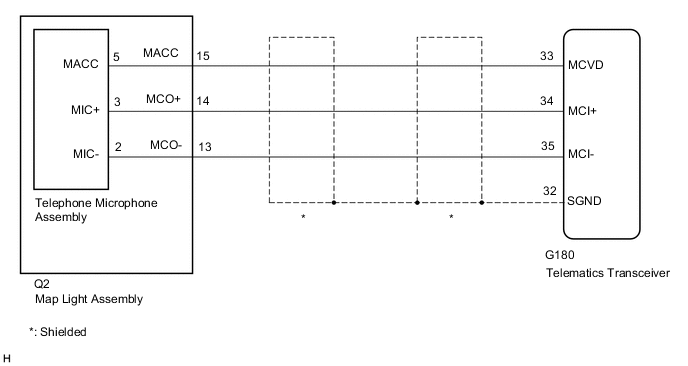
WIRING DIAGRAM
CAUTION / NOTICE / HINT
Note
Depending on the parts that are replaced during vehicle inspection or maintenance, performing initialization, registration or calibration may be needed. Refer to Registration for Telematics System.
PROCEDURE
-
CHECK DTC
-
Turn the ignition switch off.
-
Connect the GTS to the DLC3.
-
Turn the ignition switch to ON and wait for 20 seconds.
-
Turn the GTS on.
-
Check for DTCs and check that no DTCs are output.
Body Electrical > Telematics > Trouble CodesOK No DTCs are output. Result Proceed to OK NG
OK 
USE SIMULATION METHOD TO CHECK Click here
NG 
-
-
CHECK HARNESS AND CONNECTOR (TELEMATICS TRANSCEIVER - MAP LIGHT ASSEMBLY (TELEPHONE MICROPHONE ASSEMBLY))
-
Disconnect the G180 telematics transceiver connector.
-
Disconnect the Q2 map light assembly (telephone microphone assembly) connector.
-
Measure the resistance according to the value(s) in the table below.
Standard Resistance Tester Connection Condition Specified Condition G180-33 (MCVD) - Q2-15 (MACC) Always Below 1 Ω G180-34 (MCI+) - Q2-14 (MCO+) Always Below 1 Ω G180-35 (MCI-) - Q2-13 (MCO-) Always Below 1 Ω G180-33 (MCVD) or Q2-15 (MACC) - Body ground Always 10 kΩ or higher G180-34 (MCI+) or Q2-14 (MCO+) - Body ground Always 10 kΩ or higher G180-35 (MCI-) or Q2-13 (MCO-) - Body ground Always 10 kΩ or higher G180-32 (SGND) - Body ground Always 10 kΩ or higher Result Proceed to OK NG
NG
REPAIR OR REPLACE HARNESS OR CONNECTOR
OK
-
-
INSPECT MAP LIGHT ASSEMBLY
-
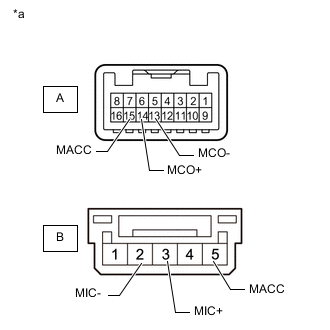
*a Component without harness connected
(Map Light Assembly)
Remove the map light assembly.
-
Remove the telephone microphone assembly.
-
Measure the resistance according to the value(s) in the table below.
Standard Resistance Tester Connection Condition Specified Condition A-15 (MACC) - B-5 (MACC) Always Below 1 Ω A-14 (MCO+) - B-3 (MIC+) Always Below 1 Ω A-13 (MCO-) - B-2 (MIC-) Always Below 1 Ω A-15 (MACC) - A-14 (MCO+) Always 10 kΩ or higher A-15 (MACC) - A-13 (MCO-) Always 10 kΩ or higher A-14 (MCO+) - A-13 (MCO-) Always 10 kΩ or higher Result Proceed to OK NG
NG
REPLACE MAP LIGHT ASSEMBLY Click here
OK
-
-
CHECK TELEPHONE MICROPHONE ASSEMBLY
-
Replace the telephone microphone assembly with a new one.
-
Clear the DTCs.
Body Electrical > Telematics > Clear DTCs -
Recheck for DTCs and check that no DTCs are output.
Body Electrical > Telematics > Trouble CodesOK No DTCs are output. Result Proceed to OK NG
OK
END (TELEPHONE MICROPHONE ASSEMBLY IS DEFECTIVE)
NG
-
-
REPLACE TELEMATICS TRANSCEIVER
-
Replace the telematics transceiver with a new one.
Result Proceed to NEXT
NEXT
PERFORM REGISTRATION Click here
-