AUDIO AND VISUAL SYSTEM(for Radio and Display Type) CD cannot be Inserted or is Ejected Right After Insertion
PROCEDURE
-
CHECK IF A PROPER CD IS INSERTED
-
Make sure that the CD is an audio CD or a CD with an MP3, WMA or AAC file, and that it is not deformed, flawed, stained, deteriorated or otherwise defective.
OK CD is normal. Tech Tips
-
Translucent or uniquely-shaped CDs cannot be played.
-
CDs with adhesive paper labels should not be played.
-
Commercial audio CDs can be played.
-
CD-DA files on CD-ROMs, CD-Rs and CD-RWs can be played.
-
MP3, WMA and AAC files on CD-ROMs, CD-Rs and CD-RWs can be played.
-
For details on playable CDs and DVDs, refer to the Owner's Manual.
Result Proceed to OK NG -
NG 
CHANGE CD
OK 
-
-
CHECK THAT CD IS INSERTED PROPERLY
-
Check if the CD is inserted upside down.
OK CD is properly inserted. Result Proceed to OK NG
NG
SET CD PROPERLY
OK
-
-
CLEAN CD AND RECHECK
-
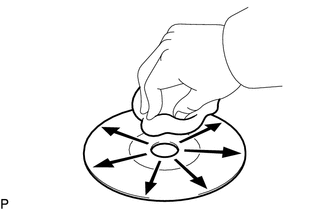
CD cleaning
-
If dirt is on the CD surface, wipe it clean with a soft cloth from the inside to the outside in a radial direction.
OK Malfunction disappears. Note
Do not use a conventional record cleaner or antistatic preservative.
Result Proceed to OK NG -
OK
END (CD IS DIRTY)
NG
-
-
REPLACE CD AND RECHECK
-
Replace the CD with a known good one and check that the malfunction disappears.
OK Malfunction disappears. Result Proceed to OK NG
OK
END (CD IS DEFECTIVE)
NG
REPLACE RADIO AND DISPLAY RECEIVER ASSEMBLY Click here
-