AUDIO AND VISUAL SYSTEM(for Radio Receiver Type) CD cannot be Inserted or is Ejected Right After Insertion
PROCEDURE
-
CHECK IF A PROPER CD IS INSERTED
-
Make sure that the CD is an audio CD or a CD with an MP3 or WMA file, and that it is not deformed, flawed, stained, burred, or otherwise defective.
OK Normal CD. Tech Tips
-
Translucent or uniquely-shaped CDs cannot be played.
-
CDs with adhesive paper labels should not be played.
-
Commercial audio CDs can be played.
-
CD-DA files on CD-ROMs, CD-Rs, and CD-RWs can be played.
-
MP3 and WMA files on CD-ROMs, CD-Rs, and CD-RWs can be played.
-
For details on playable CDs, refer to the Owner's Manual.
Result Proceed to OK NG -
NG 
CHANGE CD
OK 
-
-
CHECK THAT CD IS INSERTED PROPERLY
-
Check whether or not the CD is inserted upside down.
OK CD is properly inserted. Result Proceed to OK NG
NG
INSERT CD PROPERLY
OK
-
-
CHECK CD
-
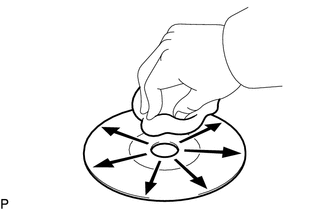
Clean the CD by wiping it with a soft cloth from the inside to the outside in a radial direction.
OK Malfunction disappears. Note
Do not use a conventional record cleaner or antistatic preservative.
Result Proceed to OK NG
OK
END (CD IS DIRTY)
NG
-
-
REPLACE CD WITH ANOTHER AND RECHECK
-
Replace the CD with a normal one and check that the malfunction disappears.
OK Malfunction disappears. Result Proceed to OK NG
OK
END (CD IS DEFECTIVE)
NG
REPLACE RADIO RECEIVER ASSEMBLY Click here
-