POWER WINDOW REGULATOR MOTOR(for Front Door) INSTALLATION
CAUTION / NOTICE / HINT
Tech Tips
-
Use the same procedure for the RH and LH sides.
-
The procedure listed below is for the RH side.
-
A bolt without a torque specification is shown in the standard bolt chart Click here.
PROCEDURE
-
INSTALL POWER WINDOW REGULATOR MOTOR ASSEMBLY RH
-
Apply MP grease to the sliding and rotating areas of the regulator motor.
-
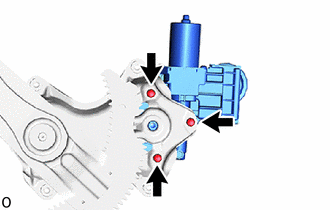
Using a T25 "TORX" socket wrench, install the power window regulator motor assembly RH with the 3 screws.
- Torque:
- 5.4 N*m { 55 kgf*cm, 48 in.*lbf }
Tech Tips
A new power window regulator motor assembly RH uses self-tapping screws to thread new installation holes when the self-tapping screws are inserted.
-
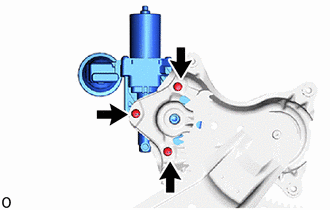
for Front Passenger Side, w/o Jam Protection Function:
Using a T25 "TORX" socket wrench, install the power window regulator motor assembly LH with the 3 screws.
- Torque:
- 5.4 N*m { 55 kgf*cm, 48 in.*lbf }
Tech Tips
A new power window regulator motor assembly LH uses self-tapping screws to thread new installation holes when the self-tapping screws are inserted.
-
-
INSTALL FRONT DOOR WINDOW REGULATOR SUB-ASSEMBLY RH
-
INSTALL FRONT DOOR GLASS SUB-ASSEMBLY RH
-
INSTALL FRONT DOOR GLASS RUN RH
-
INSTALL FRONT DOOR SERVICE HOLE COVER RH
-
INSTALL FRONT DOOR TRIM BOARD SUB-ASSEMBLY RH
-
INSTALL FRONT DOOR INSIDE HANDLE BEZEL PLUG RH
-
INSTALL POWER WINDOW REGULATOR SWITCH ASSEMBLY WITH FRONT DOOR ARMREST BASE PANEL (for Front Passenger Side)
-
INSTALL POWER WINDOW REGULATOR MASTER SWITCH ASSEMBLY WITH FRONT DOOR ARMREST BASE PANEL (for Driver Side)
-
INSTALL FRONT ARMREST ASSEMBLY RH
-
INSTALL FRONT DOOR LOWER FRAME BRACKET GARNISH RH
-
CONNECT CABLE TO NEGATIVE BATTERY TERMINAL
Note
When disconnecting the cable, some systems need to be initialized after the cable is reconnected.