AIR CONDITIONING PANEL(for RHD) REMOVAL
PROCEDURE
-
INSTALL NO. 2 BOX BOTTOM MAT (for Integrated Console Box Type)
-
REMOVE INSTRUMENT PANEL FINISH PANEL END RH (for Integrated Console Box Type)
-
REMOVE INSTRUMENT PANEL FINISH PANEL END LH (for Integrated Console Box Type)
-
REMOVE CENTER NO. 2 INSTRUMENT CLUSTER FINISH PANEL (for Separate Console Box Type)
-
REMOVE CENTER NO. 1 INSTRUMENT CLUSTER FINISH PANEL (for Separate Console Box Type)
-
REMOVE UPPER INSTRUMENT PANEL FINISH PANEL
-
REMOVE CENTER INSTRUMENT CLUSTER FINISH PANEL SUB-ASSEMBLY (w/o Navigation System)
-
REMOVE NO. 3 INSTRUMENT PANEL REGISTER ASSEMBLY (w/ Navigation System)
-
REMOVE NO. 4 INSTRUMENT PANEL REGISTER ASSEMBLY (w/ Navigation System)
-
REMOVE NAVIGATION RECEIVER ASSEMBLY (w/ Navigation System)
-
REMOVE AIR CONDITIONING CONTROL ASSEMBLY
-
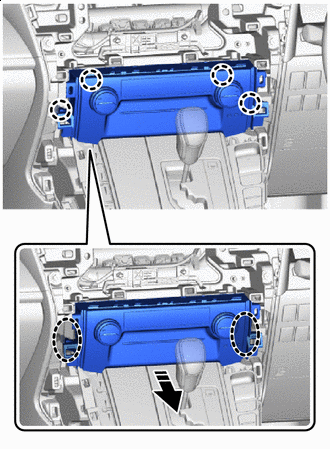

Place hand here 
Remove in this Direction Pull the air conditioning control assembly to detach the claw in the direction indicated by the arrow.
-
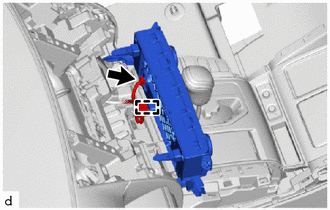
Disconnect the connector.
-
Detach the clamp and remove the air conditioning control assembly.
-