FRONT POWER SEAT CONTROL SYSTEM OPERATION CHECK
-
CHECK POWER SEAT FUNCTION (for Driver Seat)
-
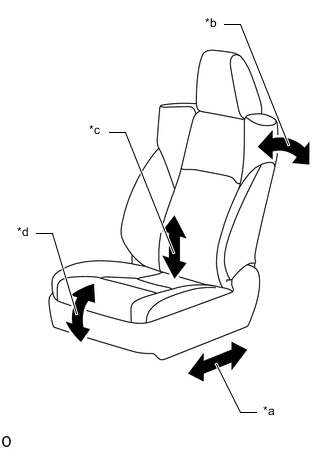
*a Slide Function *b Reclining Function *c Rear Lifter Function *d Front Vertical Function Check the basic functions.
-
Operate the power seat switches and check that the following seat functions operate properly:
-
Slide function
-
Reclining function
-
Rear lifter function
-
Front vertical function
-
-
-
-
CHECK POWER SEAT FUNCTION (for Front Passenger Seat)
-
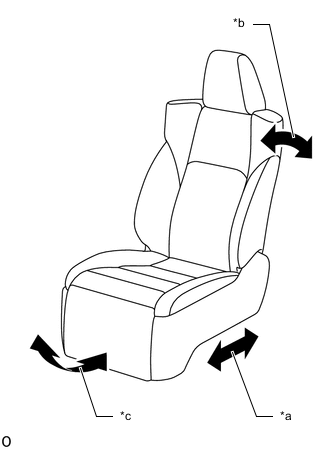
*a Slide Function *b Reclining Function *c Ottoman Function Check the basic functions.
-
Operate the power seat switches and check that the following seat functions operate properly:
-
Slide function
-
Reclining function
-
Ottoman function
-
-
-
-
CHECK POWER SEAT MOTOR (for Driver Seat)
-
Check the PTC operation inside the power seat motor.
Note
-
The inspection should be performed with the seat installed in the vehicle.
-
Perform the 4 steps below to check the full range of motion for each power seat function.
Tech Tips
The resistance of the PTC thermistor increases when a switch of the front power seat switch LH*1 or RH*2 is held down even after the seat has been moved to the farthest possible position in one direction. If the resistance increases beyond a specified level, the current is shut off to prevent a short circuit.
-
Operate the seat to the furthest position in either the front/rear or up/down direction, and then wait for approximately 60 seconds.
-
Further operate the seat in the same direction for 90 seconds, and then check that the motor does not operate when operating the seat in the opposite direction.
-
Turn the front power switch LH*1 or RH*2 off. After approximately 60 seconds, check that the motor operates when operating the seat in the opposite direction.
-
*1: for LHD
-
*2: for RHD
-
-
-
-
CHECK POWER SEAT MOTOR (for Front Passenger Seat)
-
Check the PTC operation inside the power seat motor.
Note
-
The inspection should be performed with the seat installed in the vehicle.
-
Perform the 4 steps below to check the full range of motion for each power seat function.
Tech Tips
The resistance of the PTC thermistor increases when a switch of the front power seat switch RH*1 or LH*2 or front power seat switch assembly RH*1 or LH*2 is held down even after the seat has been moved to the farthest possible position in one direction. If the resistance increases beyond a specified level, the current is shut off to prevent a short circuit.
-
Operate the seat to the furthest position in either the front/rear or up/down direction, and then wait for approximately 60 seconds.
-
Further operate the seat in the same direction for 90 seconds, and then check that the motor does not operate when operating the seat in the opposite direction.
-
Turn the front power switch RH*1 or LH*2 or front power seat switch aseembly RH*1 or LH*2 off. After approximately 60 seconds, check that the motor operates when operating the seat in the opposite direction.
-
*1: for LHD
-
*2: for RHD
-
-
-
-
CHECK POWER SEAT POWER EASY ACCESS SYSTEM (for Driver Seat)
Tech Tips
When troubleshooting a function, first make sure that the function is set to the default setting.
-
Check that the seat slides backward when either of the following conditions is met:
-
The driver seat belt is unfastened with the engine switch off and the shift lever in P.
-
The engine switch is turned from on (IG) or on (ACC) to off with the shift lever in P or N and the driver seat belt unfastened.
-
-
Check that the seat slides forward when either of the following conditions is met:
-
The driver seat belt is fastened with the engine switch on (IG) or on (ACC) and the shift lever in P or N.
-
The engine switch is turned from off to on (IG) or on (ACC) with the shift lever in P or N and the driver seat belt unfastened.
-
-
-
CHECK SEAT POSITION MEMORY AND RESTORING FUNCTION (for Driver Seat)
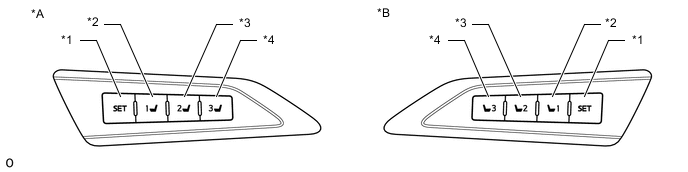
*A for RHD *B for LHD *1 SET Switch *2 M1 Switch *3 M2 Switch *4 M3 Switch Tech Tips
-
The SET, M1, M2 and M3 seat memory switches are shown in the illustration.
-
The seat position will not be stored if the SET switch and 2 or more of the seat memory switches (for example, M1 switch and M2 switch) are pressed simultaneously.
If a memorizing operation has failed, release all switches. The seat memory function does not operate unless the switches are released.
-
The seat will not return to the memorized position if 2 or more of the seat memory switches (for example, M1 switch and M2 switch) are pressed simultaneously.
If a restoring operation has failed, release all switches. The seat memory restoring function does not operate unless the switches are released.
-
*1: for LHD
-
*2: for RHD
-
Turn the engine switch on (IG) and check that the P position indicator is on.
-
Move the seat to the foremost and uppermost positions using the front power seat switch LH*1 or RH*2.
-
Check that the buzzer sounds for 0.5 seconds and the seat position is memorized when the M1 switch is pressed within 3 seconds of the SET switch being pressed or the M1 switch is pressed while the SET switch is being pressed.
-
Move the seat out of the foremost and uppermost positions using the front power seat switch LH*1 or RH*2.
-
Check that the buzzer sounds for 0.5 seconds and the seat position is memorized when the M2 switch is pressed within 3 seconds of the SET switch being pressed or the M2 switch is pressed while the SET switch is being pressed.
-
Move the seat to the rearmost and lowermost positions using the front power seat switch LH*1 or RH*2.
-
Check that the buzzer sounds for 0.5 seconds and the seat position is memorized when the M3 switch is pressed within 3 seconds of the SET switch being pressed or the M3 switch is pressed while the SET switch is being pressed.
-
Check that the buzzer sounds for 0.1 seconds and the seat automatically moves into the foremost and uppermost positions (memorized positions) when the M1 switch is pressed.
-
Check that the buzzer sounds for 0.1 seconds and the seat automatically moves out of the foremost and uppermost positions (memorized positions) when the M2 switch is pressed.
-
Check that the buzzer sounds for 0.1 seconds and the seat automatically moves into the rearmost and lowermost positions (memorized positions) when the M3 switch is pressed.
-
Turn the engine switch off and open the driver door. Check that the buzzer sounds for 0.1 seconds and the seat automatically moves to the memorized position by pressing the M1, M2 or M3 switch within 180 seconds after the engine switch is turned off.
-
Turn the engine switch off and close the driver door. Check that the buzzer sounds for 0.1 seconds and the seat automatically moves to the memorized position by pressing the M1, M2 or M3 switch within 60 seconds after the engine switch is turned off.
-
Operate the front vertical function of the front power seat switch LH*1 or RH*2 to tilt the seat down 3 times.
Within 10 seconds after operating the front vertical function of the front power seat switch LH*1 or RH*2, operate the lifter function of the front power seat switch LH*1 or RH*2 to tilt up and the reclining function of the front power seat switch LH*1 or RH*2 to recline the seat simultaneously. Hold both switches for 10 seconds.
Tech Tips
The buzzer sounds for 0.5 seconds when the memory is cleared.
-
-
CHECK MEMORY CALL FUNCTION (for Driver Seat)
-
Memory registration
Note
-
Do not bring 2 or more electrical key transmitter sub-assemblies into the cabin.
-
Do not press and hold the door control switch on the power window regulator master switch assembly for 3 seconds or more.
-
Register the seat position to a seat memory switch (M1, M2 or M3 switch) in advance.
-
Sit on the driver seat carrying only the electrical key transmitter sub-assembly to be registered to the vehicle.
-
With the engine switch on (IG) and the shift lever in P, restore the memorized position to be registered.
-
With the engine switch on (IG), the shift lever in P, the driver door closed, and a seat memory switch (M1, M2 or M3 switch) being pressed and held, press and hold the door control switch on the power window regulator master switch assembly until the buzzer answer-back function operates.
Tech Tips
-
The door control switch on the power window regulator master switch assembly can be pressed to either the lock or unlock side.
-
The buzzer sounds for 0.5 seconds when the registration is complete.
-
The buzzer sounds for 3 seconds when the registration fails.
-
-
-
Automatic memory call function
-
With the identification code of the electrical key transmitter sub-assembly registered and the entry unlock function operated or wireless door unlock operation performed, check that the buzzer sounds for 0.1 seconds and the seat automatically moves to the memorized position when the driver door is opened.
Tech Tips
When the customize function "Seat Move Distance" is set to "Standard", the seat slides backward to a position 50 mm (1.97 in.) from the memorized position.
-
-
Memory deletion
Note
-
Do not bring 2 or more electrical key transmitter sub-assemblies into the cabin.
-
Do not press and hold the door control switch on the power window regulator master switch assembly for 3 seconds or more.
-
Sit on the driver seat carrying only the electrical key transmitter sub-assembly to be deleted from the vehicle.
-
With the engine switch on (IG), the shift lever in P, the driver door closed, and the SET seat memory switch being pressed and held, press and hold the door control switch on the power window regulator master switch assembly until the answerback by the buzzer is confirmed.
Tech Tips
-
The door control switch on the power window regulator master switch assembly can be pressed to either the lock or unlock side.
-
The buzzer sounds for 0.5 seconds when the registration is complete.
-
The buzzer sounds for 3 seconds when the registration fails.
-
-
-
-
MEMORY CALL EMERGENCY STOP FUNCTION (for Driver Seat)
-
While a memory call function is operating, check that performing one of the following will stop the memory call operation: 1) press the SET switch, M1 switch, M2 switch or M3 switch 2) press the front power seat switch LH*1 or RH*2.
-
*1: for LHD
-
*2: for RHD
-
-