CENTER AIRBAG SENSOR ASSEMBLY(w/o Navigation System) INSTALLATION
CAUTION / NOTICE / HINT
Tech Tips
-
Use the same procedure for RHD and LHD vehicles.
-
The procedure listed below is for LHD vehicles.
PROCEDURE
-
INSTALL AIRBAG ECU ASSEMBLY
-
Check that the engine switch is off.
-
Check that the cable is disconnected from the negative (-) battery terminal.
CAUTION:
-
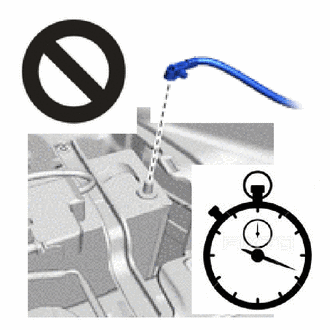
Wait at least 90 seconds after disconnecting the cable from the negative (-) battery terminal to disable the SRS system.
-
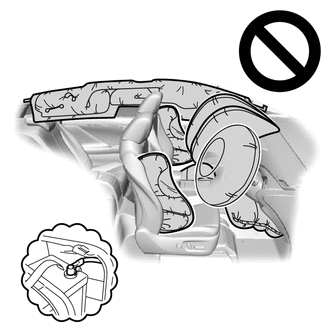
If this procedure is performed without disconnecting the negative (-) terminal of the battery, the airbag may deploy even if an impact is applied only to the airbag ECU assembly. Therefore, make sure that the negative (-) terminal of the battery is disconnected before performing this procedure.
-
-
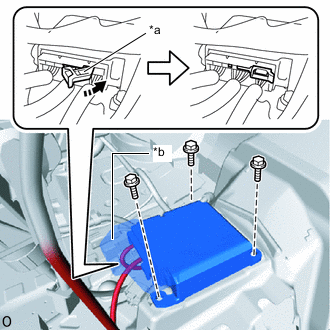
*a Connector Lock *b Waterproof Sheet 
Lock Direction Check that the waterproof sheet is properly set.
-
Install the airbag ECU assembly with the 3 bolts.
- Torque:
- 17.5 N*m { 178 kgf*cm, 13 ft.*lbf }
Note
-
If the airbag ECU assembly has been dropped, or there are any cracks, dents or other defects in the case or connector, replace the airbag ECU assembly with a new one.
-
When installing the airbag ECU assembly, be careful that the SRS wiring does not interfere with or is not pinched between other parts.
-
When the engine switch is first turned on (IG) after the airbag ECU assembly has been replaced, make sure that no one is in the vehicle.
-
Connect the airbag connector and push the connector lock to lock the airbag connector.
Note
-
When connecting any airbag connector, take care not to damage the airbag wire harness.
-
Do not allow the water proof sheet to become pinched.
-
-
Check that there is no looseness in the installation parts of the airbag ECU assembly.
-
-
INSTALL INSTRUMENT CLUSTER FINISH PANEL ASSEMBLY (for Separate Console Box Type)
-
INSTALL CONSOLE BOX ASSEMBLY (for Integrated Console Box Type)
-
INSTALL CONSOLE BOX CARPET (for Integrated Console Box Type)
-
INSTALL CONSOLE REAR END PANEL SUB-ASSEMBLY (for Integrated Console Box Type)
-
INSTALL NO. 2 CONSOLE REAR END PANEL GARNISH (for Integrated Console Box Type)
-
INSTALL UPPER INSTRUMENT PANEL FINISH PANEL
for LHD:
for RHD:
-
INSTALL CENTER NO. 2 INSTRUMENT CLUSTER FINISH PANEL (for Separate Console Box Type)
-
INSTALL CENTER NO. 1 INSTRUMENT CLUSTER FINISH PANEL (for Separate Console Box Type)
-
INSTALL INSTRUMENT PANEL FINISH PANEL END RH (for Integrated Console Box Type)
-
INSTALL INSTRUMENT PANEL FINISH PANEL END LH (for Integrated Console Box Type)
-
INSTALL NO. 2 BOX BOTTOM MAT (for Integrated Console Box Type)
-
INSTALL CENTER FLOOR CARPET COVER LH (for Integrated Console Box Type)
-
INSTALL CENTER FLOOR CARPET COVER RH (for Integrated Console Box Type)
-
INSTALL NO. 1 INSTRUMENT PANEL UNDER COVER SUB-ASSEMBLY
for LHD:
for RHD:
-
CONNECT CABLE TO NEGATIVE BATTERY TERMINAL
Note
When disconnecting the cable, some systems need to be initialized after the cable is reconnected.
-
PERFORM DIAGNOSTIC SYSTEM CHECK
-
CHECK SRS WARNING LIGHT