MAYDAY SWITCH INSPECTION
PROCEDURE
-
INSPECT MANUAL (SOS) SWITCH (MAP LIGHT ASSEMBLY)
-
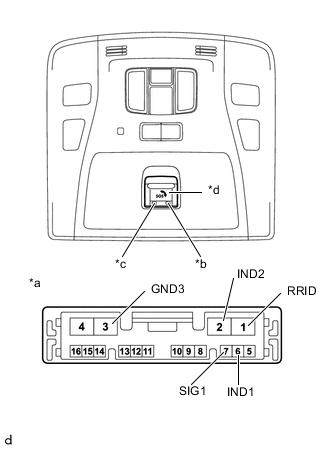
*a Component without harness connected
(Manual (SOS) Switch (Map Light Assembly))
*b RED indicator *c GREEN indicator *d Indicator Check the resistance.
-
Measure the resistance according to the value(s) in the table below.
Standard Resistance Tester Connection Condition Specified Condition 7 (SIG1) - 3 (GND3) Switch pressed 81.9 Ω - 83.8 Ω Switch not pressed 407.9 Ω - 417.1 Ω If the result is not as specified, replace the manual (SOS) switch (map light assembly).
-
-
Check the indicator illuminates.
-
Apply 3 V to the connector, and check that the indicator illuminates.
Tech Tips
Connect 2 new dry-cell batteries (1.5 V each) in series.
OK Connection Specified Condition Battery positive (+) → 6 (IND1)
Battery negative (-) → 3 (GND3)
RED indicator illuminates Battery positive (+) → 5 (IND2)
Battery negative (-) → 3 (GND3)
GREEN indicator illuminates If the result is not as specified, replace the manual (SOS) switch (map light assembly).
-
-
Check the back light illuminates.
-
Apply 9 V to the connector, and check that the indicator illuminates.
Tech Tips
Connect new 6 dry-cell batteries (1.5 V each) in series.
OK Connection Specified Condition Battery positive (+) → 1 (RRID)
Battery negative (-) → 3 (GND3)
Illuminates If the result is not as specified, replace the manual (SOS) switch (map light assembly).
-
-