TELEPHONE ANTENNA CORD REMOVAL
CAUTION / NOTICE / HINT
The necessary procedures (adjustment, calibration, initialization, or registration) that must be performed after parts are removed, installed, or replaced during the No. 4 antenna cord sub-assembly removal/installation are shown below.
| Replacement Part or Procedure | Necessary Procedure | Effect/Inoperative when not Performed | Link |
|---|---|---|---|
| Disconnect cable from negative battery terminal | Drive the vehicle until stop and start control is permitted (approximately 15 to 40 minutes) |
Stop and start system | |
| Memorize steering angle neutral point | Panoramic view monitor system | ||
| Initialize back door lock | Power door lock control system | ||
| Initialize servo motor | Air conditioning system | ||
| Reset slide door close position | Power slide door system | ||
| Reset back door close position | Power back door system |
PROCEDURE
-
REMOVE FRONT ROOF HEADLINING TRIM SUB-ASSEMBLY
-
REMOVE CONSOLE BOX ASSEMBLY
-
REMOVE FRONT SEAT ASSEMBLY RH
-
for Power Captain Seat with Memory:
-
for Power Captain Seat without Memory:
-
-
REMOVE REAR NO. 1 SEAT ASSEMBLY RH
-
for Power Captain Seat with Memory:
-
for Power Captain Seat without Memory:
-
-
REMOVE REAR SEAT TRACK SLIDE STOPPER
-
REMOVE REAR SEAT LOCK STRIKER COVER
-
REMOVE NO. 3 FLOOR CARPET MOULDING
-
REMOVE NO. 4 FLOOR CARPET MOULDING
-
REMOVE LOWER NO. 1 SEAT TRACK RAIL PROTECTOR
-
REMOVE LOWER NO. 2 SEAT TRACK RAIL PROTECTOR
-
REMOVE LOWER SEAT TRACK RAIL PROTECTOR
-
REMOVE REAR OUTER SEAT TRACK ASSEMBLY RH
-
REMOVE NO. 4 ANTENNA CORD SUB-ASSEMBLY
-
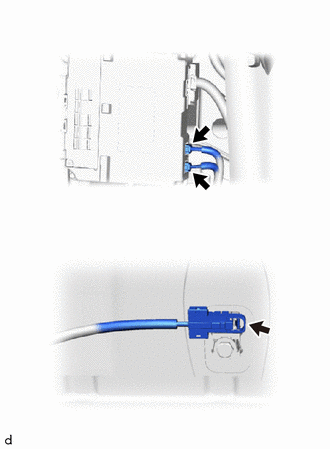
Disconnect the 3 connectors.
-
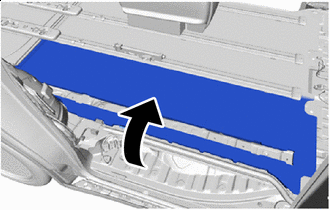

Peel back Peel back the rear floor mat assembly RH as shown in the illustration.
Note
Do not use excessive force when peeling back the rear floor mat assembly RH.
-
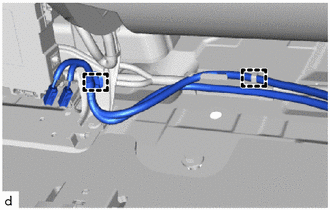
Disengage the clamps.
Note
Do not use excessive force when peeling back the rear floor mat assembly RH.
-
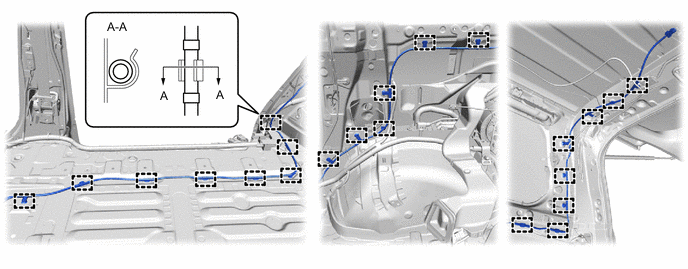
Disengage the clamps to remove the No. 4 antenna cord sub-assembly as shown in the illustration.
-