REAR SEAT ENTERTAINMENT SYSTEM(for 12 Inch), Diagnostic DTC:B1577
| DTC Code | DTC Name |
|---|---|
| B1577 | GVIF Disconnected (from EMV/MM Integrated Device to RSE) |
DESCRIPTION
The navigation receiver assembly and television display assembly are connected by GVIF cable.
When a GVIF cable error occurs between the navigation receiver assembly and television display assembly, this DTCs will be stored.
| DTC No. | Detection Item | DTC Detection Condition | Trouble Area |
|---|---|---|---|
| B1577 | GVIF Disconnected (from EMV/MM Integrated Device to RSE) | GVIF disconnected (from navigation receiver assembly to television display assembly) |
|
WIRING DIAGRAM
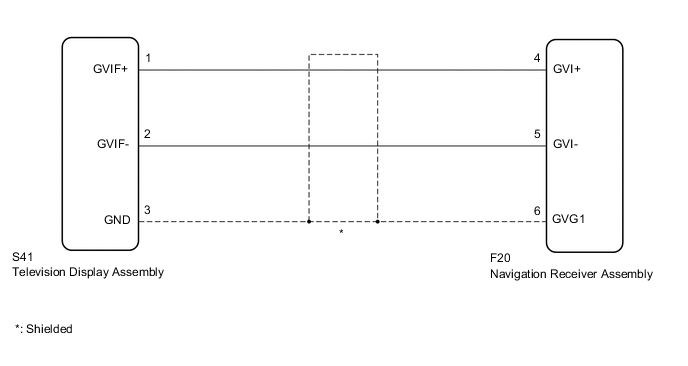
PROCEDURE
-
CLEAR DTC
-
Clear the DTCs.
Body Electrical > Navigation System > Clear DTCsResult Proceed to NEXT
NEXT 
-
-
CHECK DTC
-
Recheck for DTCs and check if the same DTC is output again.
Body Electrical > Navigation System > Trouble CodesOK No DTCs are output. Result Proceed to OK NG
OK 
USE SIMULATION METHOD TO CHECK Click here
NG
-
-
CHECK HARNESS AND CONNECTOR (NAVIGATION RECEIVER ASSEMBLY - TELEVISION DISPLAY ASSEMBLY)
-
Disconnect the navigation receiver assembly connector.
-
Disconnect the television display assembly connector.
-
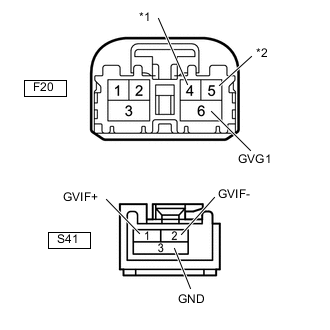
*1 GVI+ *2 GVI- Measure the resistance according to the value(s) in the table below.
Standard Resistance Tester Connection Condition Specified Condition S41-1 (GVIF+) - F20-4 (GVI+) Always Below 1 Ω S41-2 (GVIF-) - F20-5 (GVI-) Always Below 1 Ω S41-3 (GND) - F20-6 (GVG1) Always Below 1 Ω S41-1 (GVIF+) or F20-4 (GVI+) - Body ground Always 10 kΩ or higher S41-2 (GVIF-) or F20-5 (GVI-) - Body ground Always 10 kΩ or higher S41-3 (GND) or F20-6 (GVG1) - Body ground Always 10 kΩ or higher Result Proceed to OK NG
NG
REPAIR OR REPLACE HARNESS AND CONNECTOR
OK
-
-
REPLACE TELEVISION DISPLAY ASSEMBLY
-
Replace the television display assembly with a new or normally functioning one.
Result Proceed to NEXT
NEXT
-
-
CLEAR DTC
-
Clear the DTCs.
Body Electrical > Navigation System > Clear DTCsResult Proceed to NEXT
NEXT
-
-
CHECK DTC
-
Recheck for DTCs and check if the same DTC is output again.
Body Electrical > Navigation System > Trouble CodesOK No DTCs are output. Result Proceed to OK NG
OK
END (TELEVISION DISPLAY ASSEMBLY WAS DEFECTIVE)
NG
REPLACE NAVIGATION RECEIVER ASSEMBLY Click here
-