REAR SEAT ENTERTAINMENT SYSTEM(for 12 Inch) OPERATION CHECK
-
ENTER DIAGNOSTIC MODE
-
Enter diagnostic mode.
-
Turn the engine switch on (IG).
-
While pressing and holding the "SETTING" switch on the remote control, operate the light control switch: Off → Tail → Off → Tail → Off → Tail → Off.
-
Diagnostic mode starts and the "REAR Check" screen will be displayed.
-
-
-
COLOR BAR CHECK
Tech Tips
-
Use the rear switch and volume assembly for each inspection.
-
The television display assembly is not a touch panel type. Do not touch the screen.
-
The display color on the screen is checked in the following procedure.
-
Illustrations may differ from the actual vehicle screen depending on the device settings and options. Therefore, some detailed areas may not be shown exactly the same as on the actual vehicle screen.
-
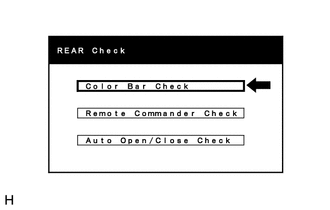
Select "Color Bar Check".
-
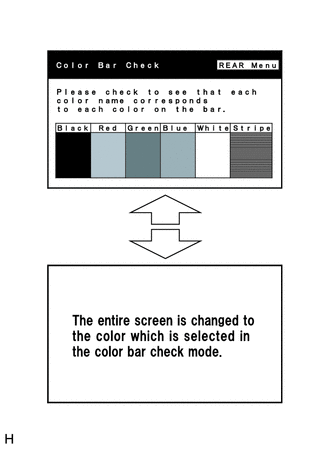
Color Bar Check
-
Check the display color.
Tech Tips
-
The entire screen turns to the color or stripe selected.
-
The screen returns to the "Color Bar Check" screen if the rear switch and volume assembly is operated again.
-
-
-
-
REMOTE COMMANDER CHECK
Tech Tips
-
Use the rear switch and volume assembly for each inspection.
-
The television display assembly is not a touch panel type. Do not touch the screen.
-
The rear switch and volume assembly switches are checked in the following procedure.
-
Illustrations may differ from the actual vehicle screen depending on the device settings and options. Therefore, some detailed areas may not be shown exactly the same as on the actual vehicle screen.
-
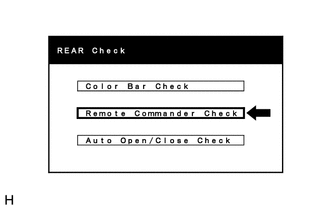
Select "Remote Commander Check".
-
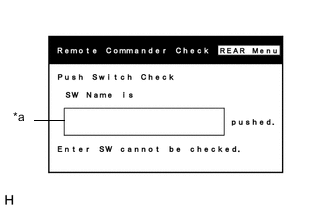
Remote Commander Check
-
Operate each switch and check that the switch name is correctly displayed.
Screen Description Display Content *a: Name of switch being pushed Name of the pushed switch is displayed
-
-
-
AUTO OPEN/CLOSE CHECK
Tech Tips
-
Use the rear switch and volume assembly for each inspection.
-
The television display assembly is not a touch panel type. Do not touch the screen.
-
The number of times the display has opened/closed will be checked in the following procedure.
-
Illustrations may differ from the actual vehicle screen depending on the device settings and options. Therefore, some detailed areas may not be shown exactly the same as on the actual vehicle screen.
-
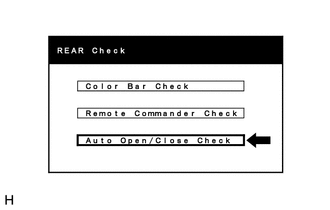
Select "Auto Open/Close Check".
-
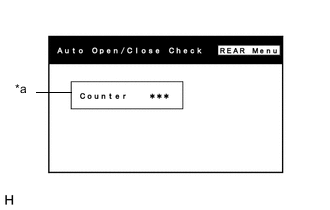
Auto Open/Close Check
-
Check the condition of the display automatic open/close mechanism.
Screen Description Display Content *a: Count Displays the number of times the display has opened/closed
-
-