POWER BACK DOOR SYSTEM, Diagnostic DTC:B222B
| DTC Code | DTC Name |
|---|---|
| B222B | PBD Touch Sensor RH Circuit |
DESCRIPTION
This DTC is output when the multiplex network door ECU detects a power back door sensor assembly RH touch sensor malfunction.
| DTC No. | Detection Item | DTC Detection Condition | Trouble Area |
|---|---|---|---|
| B222B | PBD Touch Sensor RH Circuit | Multiplex network door ECU detects power back door sensor assembly RH touch sensor malfunction |
|
WIRING DIAGRAM
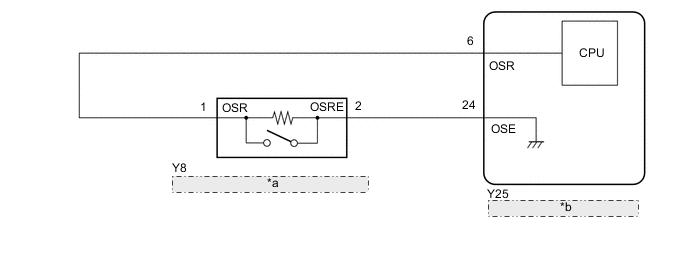
| *a | Power Back Door Sensor Assembly RH |
| *b | Multiplex Network Door ECU |
CAUTION / NOTICE / HINT
Note
If the replacement, removal and installation of the multiplex network door ECU or disconnection of the connectors of the multiplex network door ECU has been performed, initialize the power back door system.
PROCEDURE
-
CHECK FOR DTC
-
Clear the DTCs.
Body Electrical > Back Door > Clear DTCs -
Check for DTCs.
Body Electrical > Back Door > Trouble CodesOK DTC B222B is not output Result Proceed to OK NG
OK 
USE SIMULATION METHOD TO CHECK Click here
NG 
-
-
READ VALUE USING GTS
-
Read the Data List according to the display on the GTS.
Body Electrical > Back Door > Data ListTester Display Measurement Item Range Normal Condition Diagnostic Note PBD Touch Sensor (Right) Power back door sensor assembly RH signal ON, OFF or Open ON: Power back door sensor assembly RH pressed
OFF: Power back door sensor assembly RH not pressed
Open: Power back door sensor assembly RH circuit open
-
Body Electrical > Back Door > Data ListTester Display PBD Touch Sensor (Right) Result Result Proceed to On the GTS screen, ON or OFF is displayed accordingly A On the GTS screen, ON or OFF is not displayed accordingly or Open is displayed for power back door sensor assembly RH B
A
REPLACE MULTIPLEX NETWORK DOOR ECU Click here
B
-
-
INSPECT POWER BACK DOOR SENSOR ASSEMBLY RH
-
Remove the power back door sensor assembly RH.
-
Inspect the power back door sensor assembly RH.
Result Proceed to OK NG
NG
REPLACE POWER BACK DOOR SENSOR ASSEMBLY RH Click here
OK
-
-
CHECK HARNESS AND CONNECTOR (MULTIPLEX NETWORK DOOR ECU - POWER BACK DOOR SENSOR ASSEMBLY RH)
-
Disconnect the Y25 multiplex network door ECU connector.
-
Disconnect the Y8 power back door sensor assembly RH connector.
-
Measure the resistance according to the value(s) in the table below.
Standard Resistance Tester Connection Condition Specified Condition Y25-6 (OSR) - Y8-1 (OSR) Always Below 1 Ω Y25-24 (OSE) - Y8-2 (OSRE) Always Below 1 Ω Y25-6 (OSR) or Y8-1 (OSR) - Body ground Always 10 kΩ or higher Y25-24 (OSE) or Y8-2 (OSRE) - Body ground Always 10 kΩ or higher Result Proceed to OK NG
OK
REPLACE MULTIPLEX NETWORK DOOR ECU Click here
NG
REPAIR OR REPLACE HARNESS OR CONNECTOR
-