POWER BACK DOOR SYSTEM Power Back Door cannot be Operated Using Kick Sensor
DESCRIPTION
The kick door control sensor receives vehicle speed, IG and ACC signals from the main body ECU (multiplex network body ECU) via LIN communication and uses the information to stop sensor oscillation.
When the kick door control sensor detects a kick operation, it sends a operation signal to the multiplex network door ECU.
WIRING DIAGRAM
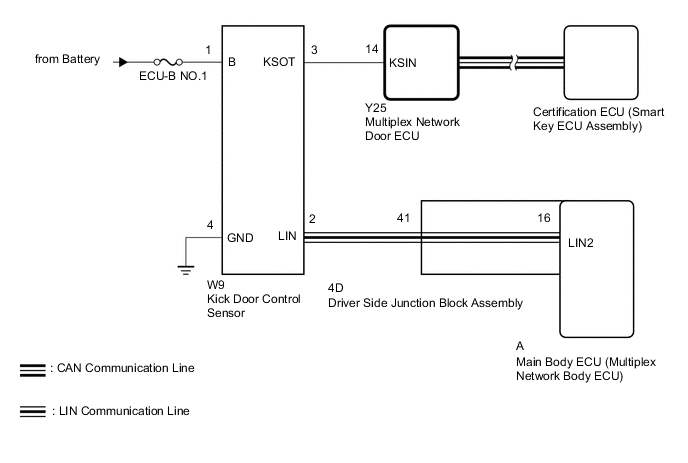
CAUTION / NOTICE / HINT
Note
-
Before troubleshooting, make sure that the "Kick Sensor Function" customize setting is set to "ON".
-
Before troubleshooting, be sure to read Precautions for Hands Free Power Back Door.
-
If the multiplex network door ECU has been removed and installed or replaced, or if any of the connectors has been disconnected, initialize the power back door system.
-
After performing work, using the GTS, read the Data List item "Kick Sensor Connection" and check that the kick door control sensor is connected.
PROCEDURE
-
CHECK FOR DTC
-
Check for DTCs.
Body Electrical > Back Door > Trouble CodesResult Result Proceed to DTC is not output A DTC is output B
B 
GO TO DIAGNOSTIC TROUBLE CODE CHART Click here
A 
-
-
READ VALUE USING GTS
-
Read the Data List according to the display on the GTS.
Body Electrical > Back Door > Data ListTester Display Measurement Item Range Normal Condition Diagnostic Note Kick Sensor Error Status of the kick door control sensor error Normal or Error Normal: Kick door control sensor is normal
Error: Kick door control sensor is abnormal
-
Body Electrical > Back Door > Data ListTester Display Kick Sensor Error OK On the GTS, Normal is displayed. Result Proceed to OK NG
NG
REPLACE KICK DOOR CONTROL SENSOR Click here
OK
-
-
READ VALUE USING GTS
-
Read the Data List according to the display on the GTS.
Body Electrical > Back Door > Data ListTester Display Measurement Item Range Normal Condition Diagnostic Note Kick Sensor Detection Status of the kick door control sensor detection OFF or ON OFF: Kick door control sensor not detecting a foot
ON: Kick door control sensor detecting a foot
-
Body Electrical > Back Door > Data ListTester Display Kick Sensor Detection OK On GTS screen, item changes between ON and OFF according to above chart. Result Proceed to OK NG
NG 
CHECK HARNESS AND CONNECTOR (KICK DOOR CONTROL SENSOR - BATTERY AND BODY GROUND) Click here
OK
-
-
CHECK HARNESS AND CONNECTOR (KICK DOOR CONTROL SENSOR - DRIVER SIDE JUNCTION BLOCK ASSEMBLY)
-
Disconnect the W9 kick door control sensor connector.
-
Disconnect the 4D driver side junction block assembly connector.
-
Measure the resistance according to the value(s) in the table below.
Standard Resistance Tester Connection Condition Specified Condition W9-2 (LIN) - 4D-41 Always Below 1 Ω Result Proceed to OK NG
OK
REPLACE MULTIPLEX NETWORK DOOR ECU Click here
NG
REPAIR OR REPLACE HARNESS OR CONNECTOR
-
-
CHECK HARNESS AND CONNECTOR (KICK DOOR CONTROL SENSOR - BATTERY AND BODY GROUND)
-
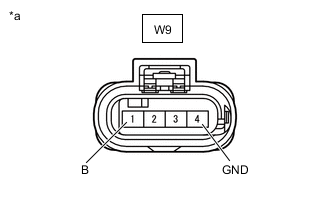
*a Front view of wire harness connector
(to Kick Door Control Sensor)
Disconnect the kick door control sensor connector.
-
Measure the voltage according to the value(s) in the table below.
Standard Resistance Tester Connection Condition Specified Condition W9-4 (GND) - Body ground Always Below 1 Ω -
Measure the voltage according to the value(s) in the table below.
Standard Voltage Tester Connection Condition Specified Condition W9-1 (B) - Body ground Always 11 to 14 V Result Proceed to OK NG
NG
REPAIR OR REPLACE HARNESS OR CONNECTOR
OK
-
-
CHECK HARNESS AND CONNECTOR (KICK DOOR CONTROL SENSOR - MULTIPLEX NETWORK DOOR ECU)
-
Disconnect the W9 kick door control sensor connector.
-
Disconnect the Y25 multiplex network door ECU connector.
-
Measure the resistance according to the value(s) in the table below.
Standard Resistance Tester Connection Condition Specified Condition W9-3 (KSOT) - Y25-14 (KSIN) Always Below 1 Ω W9-3 (KSOT) or Y25-14 (KSIN) - Body ground Always 10 kΩ or higher Result Proceed to OK NG
NG
REPAIR OR REPLACE HARNESS OR CONNECTOR
OK
-
-
CHECK MULTIPLEX NETWORK DOOR ECU
-
Remove the multiplex network door ECU with the connector(s) still connected.
-
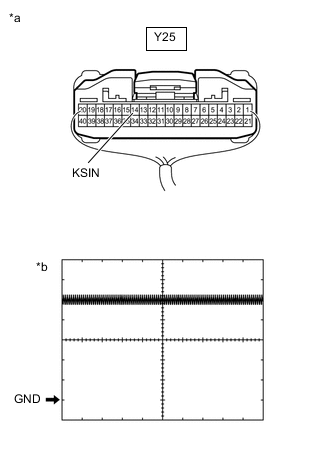
*a Component with harness connected
(Multiplex Network Door ECU)
Check the signal waveform according to the condition(s) in the table below.
Measurement Condition Item Condition Tester Connection Y25-14 (KSIN) - Body ground Tool Setting 2 V/DIV., 50 ms./DIV. Vehicle Condition Kick door control sensor not detecting a foot OK The waveform displayed is as shown in the illustration. Result Proceed to OK NG
OK
REPLACE KICK DOOR CONTROL SENSOR Click here
NG
REPLACE MULTIPLEX NETWORK DOOR ECU Click here
-