FRONT CONSOLE BOX REMOVAL
CAUTION / NOTICE / HINT
Tech Tips
-
Use the same procedure for RHD and LHD vehicles.
-
The procedure listed below is for LHD vehicles.
PROCEDURE
-
REMOVE DOOR SCUFF PLATE ASSEMBLY RH (for RHD)
-
REMOVE COWL SIDE TRIM BOARD RH (for RHD)
-
REMOVE CONSOLE ARMREST ASSEMBLY
-
REMOVE UPPER REAR CONSOLE PANEL
-
REMOVE UPPER NO. 2 CONSOLE PANEL GARNISH
-
REMOVE UPPER NO. 1 CONSOLE PANEL GARNISH
-
REMOVE INSTRUMENT SIDE PANEL LH
-
REMOVE NO. 1 INSTRUMENT PANEL SAFETY PAD SUB-ASSEMBLY
-
REMOVE NO. 1 INSTRUMENT PANEL UNDER COVER SUB-ASSEMBLY
-
REMOVE LOWER NO. 1 INSTRUMENT PANEL FINISH PANEL
-
REMOVE NO. 1 SWITCH HOLE BASE
-
REMOVE INSTRUMENT SIDE PANEL RH
-
REMOVE NO. 2 INSTRUMENT PANEL SAFETY PAD SUB-ASSEMBLY
-
REMOVE CENTER INSTRUMENT CLUSTER FINISH PANEL ASSEMBLY
-
REMOVE SHIFT LEVER KNOB SUB-ASSEMBLY
-
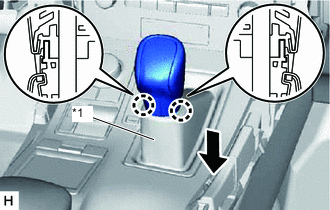
*1 Shifting Hole Cover Sub-assembly 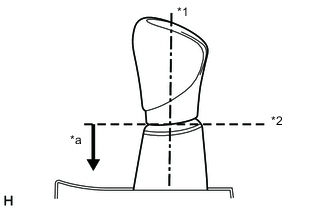
*1 Knob Axis *2 Separation *a Downward direction to pull shifting hole cover sub-assembly Hold the shift lever knob sub-assembly and shifting hole cover sub-assembly, and then pull down the shifting hole cover sub-assembly to detach the 2 claws.
Tech Tips
Do not rotate the shift lever knob sub-assembly. Pull down the shifting hole cover sub-assembly along the knob axis shown in the illustration.
-
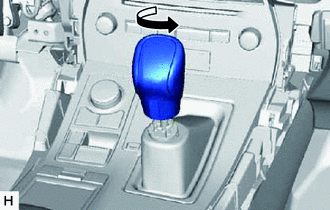
Twist the shift lever knob sub-assembly in the direction indicated by the arrow and remove it.
-
-
REMOVE UPPER REAR CONSOLE PANEL SUB-ASSEMBLY
-
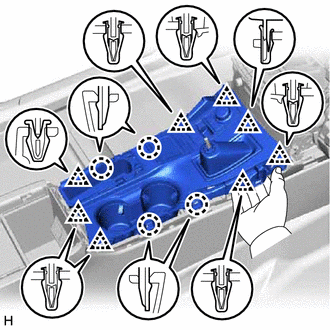
Place your hand as shown in the illustration and detach the 4 claws and 8 clips.
-
Disconnect the connectors and detach the clamp and remove the upper rear console panel sub-assembly.
-
-
REMOVE INNER NO. 1 INSTRUMENT PANEL BRACE COVER LH
-
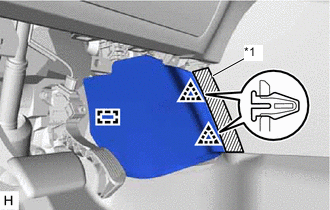
*1 Protective Tape for LHD:
-
Put protective tape around the inner No. 1 instrument panel brace cover LH.
-
Detach the 2 clips and guide and remove the inner No. 1 instrument panel brace cover LH.
-
-
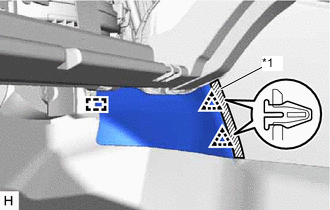
*1 Protective Tape for RHD:
-
Put protective tape around the inner No. 1 instrument panel brace cover LH.
-
Detach the 2 clips and guide and remove the inner No. 1 instrument panel brace cover LH.
-
-
-
REMOVE INNER NO. 1 INSTRUMENT PANEL BRACE COVER RH
-
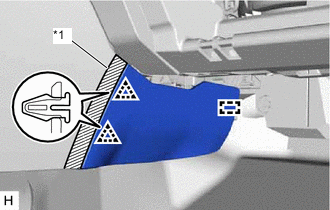
*1 Protective Tape for LHD:
-
Put protective tape around the inner No. 1 instrument panel brace cover RH.
-
Detach the 2 clips and guide and remove the inner No. 1 instrument panel brace cover RH.
-
-
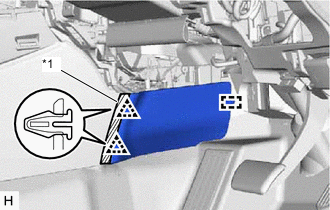
*1 Protective Tape for RHD:
-
Put protective tape around the inner No. 1 instrument panel brace cover RH.
-
Detach the 2 clips and guide and remove the inner No. 1 instrument panel brace cover RH.
-
-
-
REMOVE REAR CONSOLE END PANEL SUB-ASSEMBLY
-
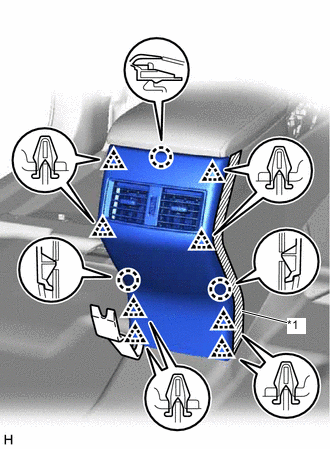
*1 Protective Tape Put protective tape around the rear console end panel sub-assembly.
-
Using moulding remover B, detach the 8 clips and 3 claws.
-
Disconnect the connectors and remove the rear console end panel sub-assembly.
-
-
REMOVE CONSOLE BOX POCKET (w/o Wireless Charger)
-
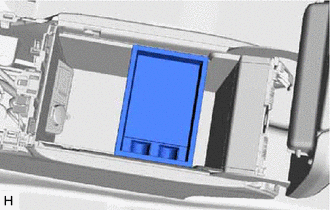
Remove the console box pocket.
-
-
REMOVE CONSOLE BOX CARPET
-
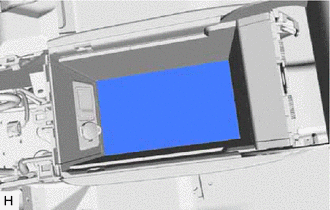
Remove the console box carpet.
-
-
REMOVE CONSOLE BOX ASSEMBLY
-
Disconnect the connectors and detach the clamps.
-
Remove the 6 bolts.
-
Detach the 4 guides and remove the console box assembly.
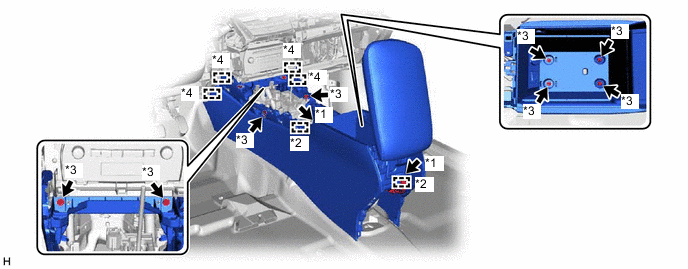
*1 Connector *2 Clamp *3 Bolt *4 Guide
-