POWER DOOR LOCK CONTROL SYSTEM All Doors LOCK/UNLOCK Functions do not Operate Via Door Control Switch or Door Key Cylinder
DESCRIPTION
The main body ECU (multiplex network body ECU) receives switch signals from the multiplex network master switch assembly and driver door key cylinder lock or unlock switch signals from the front door lock assembly LH*1 or front door lock assembly RH*2. The main body ECU (multiplex network body ECU) activates the door lock motor on each door according to these signals.
-
*1: for LHD
-
*2: for RHD
WIRING DIAGRAM
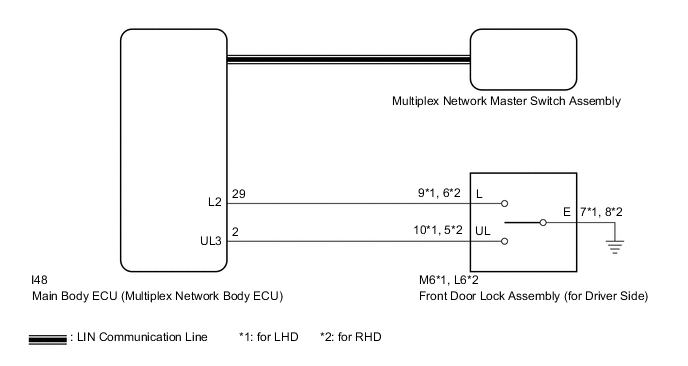
CAUTION / NOTICE / HINT
Note
-
When using the GTS with the vehicle engine switch off, connect the GTS to the DLC3 and turn a courtesy light switch on and off at intervals of 1.5 seconds or less until communication between the GTS and the vehicle begins. Then select Model Code "KEY REGIST" under manual mode and enter the following menus: Body Electrical / Entry&Start(CAN). While using the GTS, periodically turn a courtesy light switch on and off at intervals of 1.5 seconds or less to maintain communication between the GTS and the vehicle.
-
The power door lock control system uses the LIN communication system. Inspect the communication function by following How to Proceed with Troubleshooting. Troubleshoot the power door lock control system after confirming that the communication systems are functioning properly.
-
If the main body ECU (multiplex network body ECU) is replaced, refer to the Service Bulletin.
-
As the door control battery is installed between the vehicle battery and main body ECU (multiplex network body ECU), first perform the inspections in On-Vehicle Inspection to confirm that there are no malfunctions in the power source circuit for the main body ECU (multiplex network body ECU) before performing this troubleshooting procedure.*
*: w/ Door Control Battery
PROCEDURE
-
CHECK DOOR LOCK OPERATION
-
Check door lock operation.
Result Result Proceed to All doors cannot be locked by multiplex network master switch assembly A All doors cannot be locked by driver door key cylinder B
B 
READ VALUE USING GTS (Door Key SW-Lock, D Door Key SW-UL) Click here
A 
-
-
READ VALUE USING GTS (Door Lock Switch Status, Door Unlock Switch Status)
-
Connect the GTS to the DLC3.
-
Turn the engine switch on (IG).
-
Turn the GTS on.
-
Enter the following menus: Body Electrical / Master Switch / Data List.
-
Read the Data List according to the display on the GTS.
Body Electrical > Master Switch > Data ListTester Display Measurement Item Range Normal Condition Diagnostic Note Door Lock Switch Status Multiplex network master switch assembly lock signal OFF or ON OFF: Lock side of multiplex network master switch assembly not pushed
ON: Lock side of multiplex network master switch assembly pushed
- Door Unlock Switch Status Multiplex network master switch assembly unlock signal OFF or ON OFF: Unlock side of multiplex network master switch assembly not pushed
ON: Unlock side of multiplex network master switch assembly pushed
-
Body Electrical > Master Switch > Data ListTester Display Door Lock Switch Status Door Unlock Switch Status OK On the GTS screen, ON or OFF is displayed for each item according to the table above. Result Proceed to OK NG
OK 
REPLACE MAIN BODY ECU (MULTIPLEX NETWORK BODY ECU) for LHD: Click here for RHD: Click here
NG
-
-
REPLACE MULTIPLEX NETWORK MASTER SWITCH ASSEMBLY
-
Replace the multiplex network master switch assembly.
Result Proceed to NEXT
NEXT
-
-
CHECK DOOR LOCK OPERATION
-
Check that all doors can be locked and unlocked by the multiplex network master switch assembly.
OK All doors can be locked and unlocked by the multiplex network master switch assembly. Result Proceed to OK NG
OK
END (MULTIPLEX NETWORK MASTER SWITCH ASSEMBLY WAS DEFECTIVE)
NG
REPLACE MAIN BODY ECU (MULTIPLEX NETWORK BODY ECU) for LHD: Click here for RHD: Click here
-
-
READ VALUE USING GTS (Door Key SW-Lock, D Door Key SW-UL)
-
Connect the GTS to the DLC3.
-
Turn the engine switch on (IG).
-
Turn the GTS on.
-
Enter the following menus: Body Electrical / Main Body / Data List.
-
Read the Data List according to the display on the GTS.
Body Electrical > Main Body > Data ListTester Display Measurement Item Range Normal Condition Diagnostic Note Door Key SW-Lock Driver door key-linked lock/unlock switch lock signal OFF or ON OFF: Driver door key cylinder not turned to lock position
ON: Driver door key cylinder turned to lock position
- D Door Key SW-UL Driver door key-linked lock/unlock switch unlock signal OFF or ON OFF: Driver door key cylinder not turned to unlock position
ON: Driver door key cylinder turned to unlock position
-
Body Electrical > Main Body > Data ListTester Display Door Key SW-Lock D Door Key SW-UL OK On the GTS screen, ON or OFF is displayed for each item according to the table above. Result Proceed to OK NG
OK
REPLACE MAIN BODY ECU (MULTIPLEX NETWORK BODY ECU) for LHD: Click here for RHD: Click here
NG
-
-
INSPECT FRONT DOOR LOCK ASSEMBLY (for Driver Side)
-
for LHD:
-
Remove the front door lock assembly LH.
-
Inspect the front door lock assembly LH.
-
-
for RHD:
-
Remove the front door lock assembly RH.
-
Inspect the front door lock assembly RH.
Result Proceed to OK NG -
NG
REPLACE FRONT DOOR LOCK ASSEMBLY (for Driver Side) Click here
OK
-
-
CHECK HARNESS AND CONNECTOR (FRONT DOOR LOCK ASSEMBLY [for Driver Side] - MAIN BODY ECU [MULTIPLEX NETWORK BODY ECU] AND BODY GROUND)
-
for LHD:
-
Disconnect the M6 front door lock assembly LH connector.
-
Disconnect the I48 main body ECU (multiplex network body ECU) connector.
-
Measure the resistance according to the value(s) in the table below.
Standard Resistance Tester Connection Condition Specified Condition M6-9 (L) - I48-29 (L2) Always Below 1 Ω M6-10 (UL) - I48-2 (UL3) Always Below 1 Ω M6-7 (E) - Body ground Always Below 1 Ω M6-9 (L) or I48-29 (L2) - Body ground Always 10 kΩ or higher M6-10 (UL) or I48-2 (UL3) - Body ground Always 10 kΩ or higher
-
-
for RHD:
-
Disconnect the L6 front door lock assembly RH connector.
-
Disconnect the I48 main body ECU (multiplex network body ECU) connector.
-
Measure the resistance according to the value(s) in the table below.
Standard Resistance Tester Connection Condition Specified Condition L6-6 (L) - I48-29 (L2) Always Below 1 Ω L6-5 (UL) - I48-2 (UL3) Always Below 1 Ω L6-8 (E) - Body ground Always Below 1 Ω L6-6 (L) or I48-29 (L2) - Body ground Always 10 kΩ or higher L6-5 (UL) or I48-2 (UL3) - Body ground Always 10 kΩ or higher
Result Proceed to OK NG -
OK
REPLACE MAIN BODY ECU (MULTIPLEX NETWORK BODY ECU) for LHD: Click here for RHD: Click here
NG
REPAIR OR REPLACE HARNESS OR CONNECTOR
-