ULTRASONIC SENSOR(for Rear) REMOVAL

PROCEDURE
-
PRECAUTION
-
REMOVE REAR BUMPER COVER
-
REMOVE NO. 2 LUGGAGE ROOM WIRE
-
REMOVE NO. 3 ULTRASONIC SENSOR
-
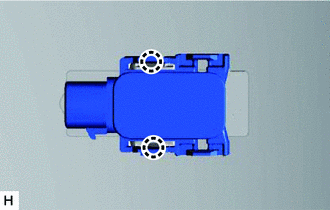
Detach the 2 claws and remove the No. 3 ultrasonic sensor.
Tech Tips
-
The illustration shows the No. 3 ultrasonic sensor for the RH. The horizontal orientation of the No. 3 ultrasonic sensor for the LH corner is opposite that of the image shown in the illustration.
-
Use the same procedure for both No. 3 ultrasonic sensors.
-
-
-
REMOVE NO. 4 ULTRASONIC SENSOR
-
Detach the 2 claws and remove the No. 4 ultrasonic sensor.
Tech Tips
-
The illustration shows the No. 4 ultrasonic sensor for the back sensor RH. The horizontal orientation of the No. 4 ultrasonic sensor for the back sensor LH is opposite that of the image shown in the illustration.
-
Use the same procedure for both No. 4 ultrasonic sensors.
-
-
-
REMOVE NO. 3 ULTRASONIC SENSOR RETAINER
-
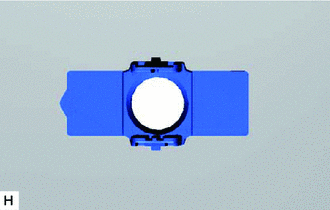
Remove the No. 3 ultrasonic sensor retainer from the rear bumper cover.
-
Remove the old double-sided tape from the rear bumper cover.
Tech Tips
-
The illustration shows the No. 3 ultrasonic sensor retainer for the RH corner. The horizontal orientation of the No. 3 ultrasonic sensor retainer for the LH corner is opposite that of the image shown in the illustration.
-
Use the same procedure for both No. 3 ultrasonic sensor retainers.
-
-
-
REMOVE NO. 4 ULTRASONIC SENSOR RETAINER
-
Remove the No. 4 ultrasonic sensor retainer from the rear bumper cover.
Tech Tips
-
The illustration shows the No. 4 ultrasonic sensor retainer for the back sensor retainer RH. The horizontal orientation of the No. 4 ultrasonic sensor retainer for the back sensor retainer LH is opposite that of the image shown in the illustration.
-
Use the same procedure for both No. 4 ultrasonic sensor retainers.
-
-
Remove the old double-sided tape from the rear bumper cover.
-