ULTRASONIC SENSOR(for Rear) INSTALLATION

PROCEDURE
-
INSTALL NO. 4 ULTRASONIC SENSOR RETAINER
Tech Tips
-
Perform this step only when necessary.
-
If a No. 4 ultrasonic sensor retainer has been removed, replace it with a new one. Install the No. 4 ultrasonic sensor with a new No. 4 ultrasonic sensor retainer as a set to the rear bumper cover.
-
Clean the rear bumper cover surface.
-
Remove the double-sided tape from the rear bumper cover.
-
Wipe off any tape adhesive residue with cleaner.
-
-
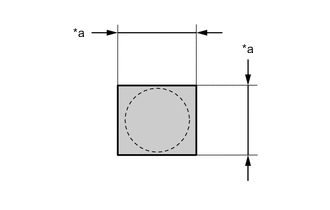
*a 16 mm (0.63 in.) Cover the sensor installation hole with a 16 mm (0.63 in.) square piece of tape.
-
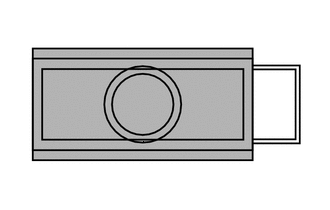

Primer Using a brush or felt, apply primer or equivalent to the No. 4 ultrasonic sensor retainer installation area.
Note
-
Use a clean brush or felt.
-
Do not touch the rear bumper cover until the primer has dried.
-
-
Peel off the release paper from the 2 No. 4 ultrasonic sensor retainers.
-

*a Protrusion of the mark Align the No. 4 ultrasonic sensor retainer with the mark on the rear bumper cover and install it as shown in the illustration.
Note
The double-sided tape of a No. 4 ultrasonic sensor retainer will deteriorate if it is detached. Make sure to replace the No. 4 ultrasonic sensor retainer with a new one when reattachment is necessary.
Tech Tips
-
Align the connector with the protrusion of the mark and connect it.
-
Press the No. 4 ultrasonic sensor retainer with a force of 30 N (3.0 kgf) for 3 seconds and install the No. 4 ultrasonic sensor retainer firmly so that there is no clearance between the No. 4 ultrasonic sensor retainer and rear bumper cover.
-
-
-
INSTALL NO. 3 ULTRASONIC SENSOR RETAINER
Tech Tips
-
Perform this step only when necessary.
-
If a No. 3 ultrasonic sensor retainer has been removed, replace it with a new one. Install the No. 3 ultrasonic sensor with a new No. 3 ultrasonic sensor retainer as a set to the rear bumper cover.
-
Clean the rear bumper cover surface.
-
Remove the double-sided tape from the rear bumper cover.
-
Wipe off any tape adhesive residue with cleaner.
-
-
*a 16 mm Cover the sensor installation hole with a 16 mm (0.63 in.) square piece of tape.
-
Primer Using a brush or felt, apply primer or equivalent to the No. 3 ultrasonic sensor retainer installation area.
Note
-
Use a clean brush or felt.
-
Do not touch the rear bumper cover until the primer has dried.
-
-
Peel off the release paper from the 2 No. 3 ultrasonic sensor retainers.
-
*a Protrusion of the mark Align the No. 3 ultrasonic sensor retainer with the mark on the rear bumper cover and install it as shown in the illustration.
Note
The double-sided tape of a No. 3 ultrasonic sensor retainer will deteriorate if it is detached. Make sure to replace the No. 3 ultrasonic sensor retainer with a new one when reattachment is necessary.
Tech Tips
-
Align the connector with the protrusion of the mark and connect it.
-
Press the No. 3 ultrasonic sensor retainer with a force of 30 N (3.0 kgf) for 3 seconds and install the No. 3 ultrasonic sensor retainer firmly so that there is no clearance between the No. 3 ultrasonic sensor retainer and rear bumper cover.
-
-
-
INSTALL NO. 4 ULTRASONIC SENSOR
-
Attach the 2 claws to install the No. 4 ultrasonic sensor.
Tech Tips
Use the same procedure for both No. 4 ultrasonic sensors.
-
-
INSTALL NO. 3 ULTRASONIC SENSOR
-
Attach the 2 claws to install the No. 3 ultrasonic sensor.
Tech Tips
Use the same procedure for both No. 3 ultrasonic sensors.
-
-
INSTALL NO. 2 LUGGAGE ROOM WIRE
-
INSTALL REAR BUMPER COVER