TELEMATICS TRANSCEIVER REMOVAL
PROCEDURE
-
PRECAUTION
Note
After turning the engine switch off, waiting time may be required before disconnecting the cable from the battery terminal. Therefore, make sure to read the disconnecting the cable from the battery terminal notice before proceeding with work.
-
DISCONNECT CABLE FROM NEGATIVE BATTERY TERMINAL
Note
When disconnecting the cable, some systems need to be initialized after the cable is reconnected.
-
REMOVE INSTRUMENT PANEL FINISH PLATE
-
REMOVE MULTI-DISPLAY ASSEMBLY WITH BRACKET
-
REMOVE DOOR SCUFF PLATE ASSEMBLY RH (for RHD)
-
REMOVE COWL SIDE TRIM BOARD RH (for RHD)
-
REMOVE CONSOLE ARMREST ASSEMBLY
-
REMOVE UPPER REAR CONSOLE PANEL
-
REMOVE UPPER NO. 1 CONSOLE PANEL GARNISH
-
REMOVE UPPER NO. 2 CONSOLE PANEL GARNISH
-
REMOVE INSTRUMENT SIDE PANEL RH
-
REMOVE INSTRUMENT SIDE PANEL LH
-
REMOVE NO. 1 INSTRUMENT PANEL SAFETY PAD SUB-ASSEMBLY
-
REMOVE NO. 1 INSTRUMENT PANEL UNDER COVER SUB-ASSEMBLY
-
REMOVE LOWER NO. 1 INSTRUMENT PANEL FINISH PANEL
-
REMOVE NO. 1 SWITCH HOLE BASE
-
REMOVE NO. 2 INSTRUMENT PANEL SAFETY PAD SUB-ASSEMBLY
-
REMOVE CENTER INSTRUMENT CLUSTER FINISH PANEL ASSEMBLY
-
REMOVE SHIFT LEVER KNOB SUB-ASSEMBLY
-
REMOVE UPPER REAR CONSOLE PANEL SUB-ASSEMBLY
-
REMOVE AIR CONDITIONING CONTROL ASSEMBLY
-
REMOVE RADIO RECEIVER ASSEMBLY WITH BRACKET
-
REMOVE TELEMATICS TRANSCEIVER WITH BRACKET
-
w/ Telematics Transceiver except G-BOOK
-
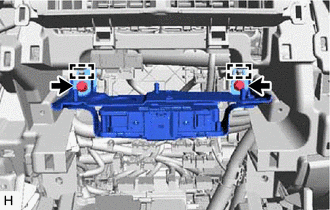
Remove the 2 bolts.
-
Detach the 2 guides and remove the telematics transceiver with bracket.
-
Disconnect each connector.
-
-
w/ Telematics Transceiver for G-BOOK
-
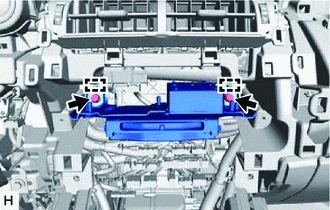
Remove the 2 bolts.
-
Detach the 2 guides and remove the telematics transceiver with bracket.
-
Disconnect each connector.
-
-
-
REMOVE TELEMATICS TRANSCEIVER
-
w/ Telematics Transceiver except G-BOOK
-
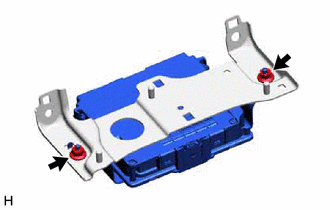
Remove the 2 nuts and telematics transceiver assembly.
-
-
w/ Telematics Transceiver for G-BOOK
-
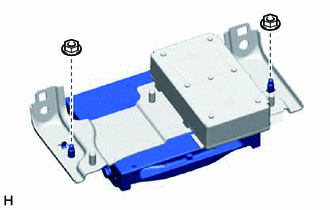
Remove the 2 nuts and telematics transceiver assembly.
-
-
-
REMOVE MAYDAY BATTERY (w/ Telematics Transceiver except G-BOOK)
-
REMOVE NO. 1 TELEPHONE BRACKET (w/ Telematics Transceiver for G-BOOK)
-
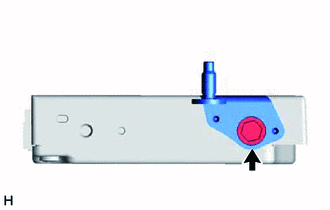
Remove the bolt and No. 1 telephone bracket.
-
-
REMOVE NO. 2 TELEPHONE BRACKET (w/ Telematics Transceiver for G-BOOK)
-
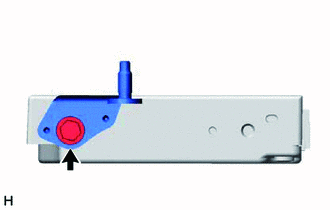
Remove the bolt and No. 2 telephone bracket.
-