NAVIGATION SYSTEM, Diagnostic DTC:B1579
| DTC Code | DTC Name |
|---|---|
| B1579 | Voice Recognition Microphone Disconnected |
DESCRIPTION
The radio receiver assembly and telephone microphone assembly are connected to each other using the microphone connection detection signal lines.
This DTC is stored when a microphone connection detection signal line is disconnected.
| DTC No. | Detection Item | DTC Detection Condition | Trouble Area |
|---|---|---|---|
| B1579 | Voice Recognition Microphone Disconnected | Telephone microphone signal is lost. |
|
WIRING DIAGRAM
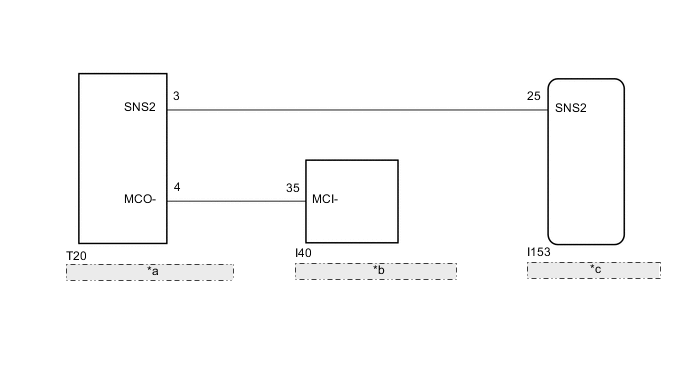
| *a | Telephone Microphone Assembly |
| *b | DCM (Telematics Transceiver) |
| *c | Radio Receiver Assembly |
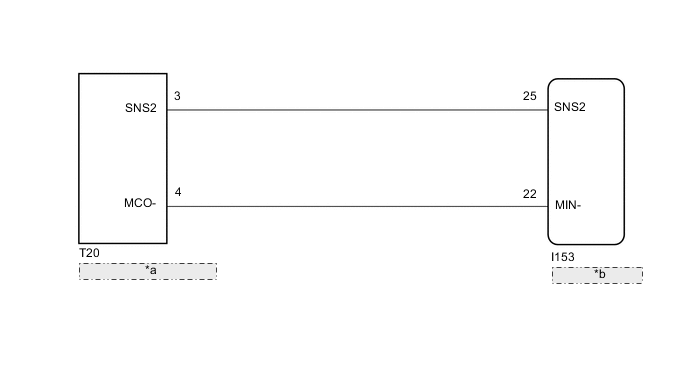
| *a | Telephone Microphone Assembly |
| *b | Radio Receiver Assembly |
CAUTION / NOTICE / HINT
Note
-
When replacing the radio receiver assembly, always replace it with a new one.
If a radio receiver assembly which was installed to another vehicle is used, the following may occur:
-
A communication malfunction DTC may be stored.
-
The radio receiver assembly may not operate normally.
-
When replacing the DCM (telematics transceiver), make sure to replace it with a new one (w/ Telematics Transceiver for G-BOOK).
Tech Tips
Depending on the parts that are replaced during vehicle inspection or maintenance, performing initialization, registration or calibration may be needed. Refer to Precaution for Navigation System.
PROCEDURE
-
CHECK VEHICLE TYPE
-
Check the vehicle type.
Result Result Proceed to w/ Telematics Transceiver for G-BOOK A w/o Telematics Transceiver or w/ Telematics Transceiver except G-BOOK B
B 
CHECK HARNESS AND CONNECTOR (RADIO RECEIVER ASSEMBLY - TELEPHONE MICROPHONE ASSEMBLY) Click here
A 
-
-
CHECK HARNESS AND CONNECTOR (RADIO RECEIVER ASSEMBLY - TELEPHONE MICROPHONE ASSEMBLY)
-
Disconnect the I153 radio receiver assembly connector.
-
Disconnect the T20 telephone microphone assembly connector.
-
Measure the resistance according to the value(s) in the table below.
Standard Resistance Tester Connection Condition Specified Condition I153-25 (SNS2) - T20-3 (SNS2) Always Below 1 Ω I153-25 (SNS2) - Body ground Always 10 kΩ or higher Result Proceed to OK NG
NG 
REPAIR OR REPLACE HARNESS OR CONNECTOR
OK
-
-
CHECK HARNESS AND CONNECTOR (DCM [TELEMATICS TRANSCEIVER] - TELEPHONE MICROPHONE ASSEMBLY)
-
Disconnect the I40 DCM (telematics transceiver) connector.
-
Disconnect the T20 telephone microphone assembly connector.
-
Measure the resistance according to the value(s) in the table below.
Standard Resistance Tester Connection Condition Specified Condition I40-35 (MCI-) - T20-4 (MCO-) Always Below 1 Ω I40-35 (MCI-) - Body ground Always 10 kΩ or higher Result Proceed to OK NG
NG
REPAIR OR REPLACE HARNESS OR CONNECTOR
OK
-
-
CHECK DCM (TELEMATICS TRANSCEIVER) (MCI-)
-
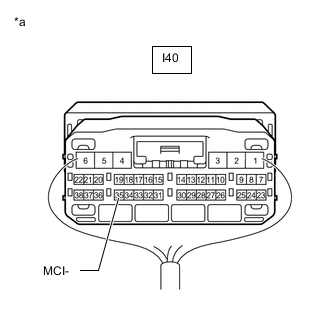
*a Component with harness connected
(DCM [Telematics Transceiver])
Remove the DCM (telematics transceiver) with the connector(s) still connected.
-
Measure the resistance according to the value(s) in the table below.
Standard Resistance Tester Connection Condition Specified Condition I40-35 (MCI-) - Body ground Always Below 1 Ω Result Proceed to OK NG
NG
REPLACE DCM (TELEMATICS TRANSCEIVER) Click here
OK
-
-
INSPECT TELEPHONE MICROPHONE ASSEMBLY (SNS2, MCO-)
-
Remove the telephone microphone assembly.
-
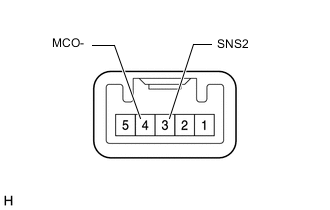
Measure the resistance according to the value(s) in the table below.
Standard Resistance Tester Connection Condition Specified Condition 3 (SNS2) - 4 (MCO-) Always Below 1 Ω Result Proceed to OK NG
OK
REPLACE RADIO RECEIVER ASSEMBLY Click here
NG
REPLACE TELEPHONE MICROPHONE ASSEMBLY Click here
-
-
CHECK HARNESS AND CONNECTOR (RADIO RECEIVER ASSEMBLY - TELEPHONE MICROPHONE ASSEMBLY)
-
Disconnect the I153 radio receiver assembly connector.
-
Disconnect the T20 telephone microphone assembly connector.
-
Measure the resistance according to the value(s) in the table below.
Standard Resistance Tester Connection Condition Specified Condition I153-25 (SNS2) - T20-3 (SNS2) Always Below 1 Ω I153-22 (MIN-) - T20-4 (MCO-) Always Below 1 Ω I153-25 (SNS2) - Body ground Always 10 kΩ or higher I153-22 (MIN-) - Body ground Always 10 kΩ or higher Result Proceed to OK NG
NG
REPAIR OR REPLACE HARNESS OR CONNECTOR
OK
-
-
INSPECT TELEPHONE MICROPHONE ASSEMBLY (SNS2, MCO-)
-
Remove the telephone microphone assembly.
-
Measure the resistance according to the value(s) in the table below.
Standard Resistance Tester Connection Condition Specified Condition 3 (SNS2) - 4 (MCO-) Always Below 1 Ω Result Proceed to OK NG
OK
REPLACE RADIO RECEIVER ASSEMBLY Click here
NG
REPLACE TELEPHONE MICROPHONE ASSEMBLY Click here
-