VEHICLE STABILITY CONTROL SYSTEM TEST MODE PROCEDURE

-
WARNING LIGHT AND INDICATOR LIGHT INITIAL CHECK
-
When the engine switch is turned on (IG), check that the ABS warning light, brake system warning light (red indicator), VSC OFF indicator light, multi-information display (TRC OFF message), brake hold standby indicator light, brake hold operated indicator light and slip indicator light come on for approximately 3 seconds.
Tech Tips
-
When the brake fluid level is low, the brake system warning light (red indicator) comes on.
-
If the skid control ECU (brake actuator assembly) stores any DTCs, the ABS warning and slip indicator lights will come on.
-
If any of the indicators remain on or do not come on, proceed to troubleshooting for the light circuits listed below.
Trouble Area See Procedure ABS warning light circuit (Remains on) ABS warning light circuit (Does not come on) Brake system warning light (red indicator) circuit (Remains on) Brake system warning light (red indicator) circuit (Does not come on) Slip indicator light circuit (Remains on) Slip indicator light circuit (Does not come on) Brake hold standby indicator light circuit Brake hold operated indicator light circuit -
-
-
ACTIVATE TEST MODE (SIGNAL CHECK) (When Using GTS)
Tech Tips
-
VSC does not operate in Test Mode (signal check), regardless of whether the sensor check is normal or abnormal.
-
When a malfunction occurs in an ABS system sensor, the ABS warning light illuminates.
-
When a malfunction occurs in a VSC system sensor, the slip indicator light illuminates.
-
Procedure to enter Test Mode (signal check).
-
Turn the engine switch on (IG).
-
Make sure the shift lever is in P.
-
Apply the parking brake.
-
Put the steering wheel in the neutral position.
-
Turn the engine switch off and connect the GTS to the DLC3.
-
Turn the engine switch on (IG) and turn the GTS on.
-
Enter the following menus: Chassis / ABS/VSC/TRC / Utility / Signal Check.
Chassis > ABS/VSC/TRC > UtilityTester Display Signal Check Tech Tips
Signals related to the VSC system can be inspected by performing a Test Mode (signal check) inspection. During the inspection, the display of items determined normal by the skid control ECU (brake actuator assembly) changes from incomplete to complete.
Test Mode (Signal Check) Inspection Item Chart Item Name Range Judgment Description Trouble Area Output Signal of Front Speed Sensor RH Incomplete/complete Check for foreign matter, evaluate the gap between the sensor and rotor
-
Open or short in speed sensor
-
Open or short in sensor system wire harness
-
Defective connector contact or increased terminal resistance
-
Speed sensor installation defect
-
Sensor rotor system malfunction
Output Signal of Front Speed Sensor LH Incomplete/complete Check for foreign matter, evaluate the gap between the sensor and rotor
-
Open or short in speed sensor
-
Open or short in sensor system wire harness
-
Defective connector contact or increased terminal resistance
-
Speed sensor installation defect
-
Sensor rotor system malfunction
Output Signal of Rear Speed Sensor RH Incomplete/complete Check for foreign matter, evaluate the gap between the sensor and rotor
-
Open or short in speed sensor
-
Open or short in sensor system wire harness
-
Defective connector contact or increased terminal resistance
-
Speed sensor installation defect
-
Sensor rotor system malfunction
Output Signal of Rear Speed Sensor LH Incomplete/complete Check for foreign matter, evaluate the gap between the sensor and rotor
-
Open or short in speed sensor
-
Open or short in sensor system wire harness
-
Defective connector contact or increased terminal resistance
-
Speed sensor installation defect
-
Sensor rotor system malfunction
Change in Output Signal of Front Speed Sensor RH Incomplete/complete
-
Evaluate the stability of the sensor input waveform
-
Evaluate the straight ahead / reverse signal inputs
-
Foreign object attached to speed sensor
-
Sensor rotor system malfunction
Change in Output Signal of Front Speed Sensor LH Incomplete/complete
-
Evaluate the stability of the sensor input waveform
-
Evaluate the straight ahead / reverse signal inputs
-
Foreign object attached to speed sensor
-
Sensor rotor system malfunction
Change in Output Signal of Rear Speed Sensor RH Incomplete/complete
-
Evaluate the stability of the sensor input waveform
-
Evaluate the straight ahead / reverse signal inputs
-
Foreign object attached to speed sensor
-
Sensor rotor system malfunction
Change in Output Signal of Rear Speed Sensor LH Incomplete/complete
-
Evaluate the stability of the sensor input waveform
-
Evaluate the straight ahead / reverse signal inputs
-
Foreign object attached to speed sensor
-
Sensor rotor system malfunction
Output Voltage Deceleration Sensor Incomplete/complete Evaluate the acceleration sensor output voltage
-
Acceleration sensor zero point stored incorrectly
-
Acceleration sensor (airbag ECU assembly) connector connection malfunction
-
Acceleration sensor (airbag ECU assembly) internally stuck
-
Defective acceleration sensor (airbag ECU assembly) installation
Memory System Information Incomplete/complete Evaluate stored system information (skid control ECU (brake actuator assembly)) against vehicle specification
-
ECM incorrectly installed
-
Brake actuator assembly incorrectly installed
-
CAN communication between ECM and skid control ECU (brake actuator assembly)
Output Master Cylinder Pressure Sensor Incomplete/complete
-
Evaluate the master cylinder pressure sensor zero point voltage
-
Check that the sensitivity of the master cylinder pressure sensor is normal
-
Open circuit or short in master cylinder pressure sensor circuit
-
Open or short in stop light switch assembly circuit or defective connector connection
-
Stop light switch assembly stuck OFF
-
-
-
-
ACTIVATE TEST MODE (SIGNAL CHECK) (When Using SST Check Wire)
Tech Tips
-
VSC does not operate in Test Mode (signal check), regardless of whether the sensor check is normal or abnormal.
-
When a malfunction occurs in an ABS system sensor, the ABS warning light illuminates.
-
When a malfunction occurs in a VSC system sensor, the slip indicator light illuminates.
-
Procedure to enter Test Mode (signal check).
-
Turn the engine switch on (IG).
-
Make sure the shift lever is in P.
-
Apply the parking brake.
-
Put the steering wheel in the neutral position.
-
Turn the engine switch off.
-
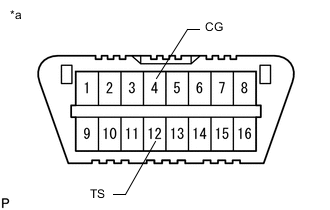
*a Front view of DLC3 Using SST, connect terminals 12 (TS) and 4 (CG) of the DLC3.
- SST
- 09843-18040
-
Turn the engine switch on (IG).
-
Check that the ABS warning and slip indicator lights come on for several seconds and then blink in Test Mode (signal check).
Tech Tips
If the ABS warning and slip indicator lights do not blink, inspect the TS and CG terminal circuit and ABS warning and slip indicator light circuits.
Trouble Area See Procedure TS and CG terminal circuit ABS warning light circuit (Remains on) ABS warning light circuit (Does not come on) Slip indicator light circuit (Remains on) Slip indicator light circuit (Does not come on)
-
-
-
ACCELERATION SENSOR CHECK
-
Enter Test Mode (signal check).
-
Keep the vehicle stationary on a level surface for 1 second or more.
Tech Tips
The acceleration sensor check can be performed with the master cylinder pressure sensor check below.
-
-
MASTER CYLINDER PRESSURE SENSOR CHECK
-
Enter Test Mode (signal check).
-
Start the engine.
-
Leave the vehicle in a stationary condition and release the brake pedal for 1 second or more, and quickly and continuously depress the brake pedal with a force of 98 N (10 kgf, 22 lbf) or more for 1 second.
-
Check that the ABS warning light stays on for 3 seconds.
Tech Tips
-
Ensure that the ABS warning light comes on.
-
While the ABS warning light stays on, continue to depress the brake pedal with a force of 98 N (10 kgf, 22 lbf) or more.
-
The ABS warning light comes on for 3 seconds every time the brake pedal operation above is performed.
-
If the master cylinder pressure sensor check is not completed, depressing the brake pedal causes further decreases in vacuum in the brake booster, making the sensor check difficult to complete.
-
If the vacuum is insufficient, the master cylinder pressure sensor check may not be completed. In this case, run the engine at idle to obtain sufficient vacuum.
-
If the brake pedal is strongly depressed when the vacuum is insufficient, the brake system warning light (red indicator) may come on in accordance with booster pressure control. In this case, run the engine at idle to obtain sufficient vacuum.
-
-
-
SPEED SENSOR CHECK
Note
Before performing the speed sensor signal check, complete the acceleration sensor and master cylinder pressure sensor checks.
-
Enter Test Mode (signal check).
-
Start the engine.
-
Drive the vehicle straight ahead.
Accelerate the vehicle to a speed of 45 km/h (28 mph) or more for several seconds and check that the ABS warning light goes off.
-
The sensor check may not be completed if wheelspin occurs.
-
The ABS warning light blinks when the sensor check has been completed and the brake pedal is depressed.
-
The ABS warning light comes on immediately after a malfunction has been detected during the speed sensor check.
-
-
Stop the vehicle.
Note
-
The speed sensor check may not be completed if the sensor check is started with the steering wheel turned or one or more wheels spinning.
-
After the ABS warning light goes off and if the vehicle speed exceeds 80 km/h (50 mph), a sensor check code will be stored again. Decelerate or stop the vehicle before the speed reaches 80 km/h (50 mph).
-
If the sensor check has not been completed, the ABS warning light blinks during driving and the ABS system does not operate.
Tech Tips
When the sensor check has been completed, the ABS warning light remains off during driving and blinks in the Test Mode (signal check) pattern while the vehicle is stationary.
-
-
-
END OF SENSOR CHECK
-
If the sensor check is completed, the ABS warning light and slip indicator light blink (Test Mode (signal check)) when the vehicle stops and the ABS warning light is off while the vehicle is being driven.
Note
-
When Test Mode (signal check) is started with the GTS and all items display complete, the sensor check ends.
-
If the sensor check is not complete, the ABS warning light blinks when the vehicle is in motion and the ABS does not operate.
-
If a DTC is detected in Test Mode (signal check), the ABS warning light or slip indicator light illuminates.
-
-
-
END OF TEST MODE (SIGNAL CHECK)
-
End Test Mode (signal check) using the GTS
-
Turn the engine switch off and enter normal mode.
-
Remove the GTS.
-
-
End Test Mode (signal check) by connecting DLC3 terminals
-
Turn the engine switch off and disconnect terminals 13 (TC), 12 (TS) and 4 (CG) of the DLC3.
-
Turn the engine switch on (IG).
Tech Tips
-
Test Mode (signal check) is continued if 12 (TS) and 4 (CG) are disconnected while the engine switch is on (IG).
-
If the engine switch is turned on (IG) with terminals 12 (TS) and 4 (CG) connected, the previous Test Mode (signal check) is maintained.
-
-
-