REAR BUMPER REASSEMBLY
PROCEDURE
-
INSTALL REAR BUMPER PAD
Tech Tips
-
When installing the rear bumper pad, heat the rear bumper cover and rear bumper pad using a heat light.
-
Use the same procedure described for the other side.
Standard Item Temperature Rear Bumper Cover 20 to 30°C (68 to 86°F) Rear Bumper Pad 20 to 30°C (68 to 86°F) Note
Do not heat the rear bumper cover and rear bumper pad excessively.
-
Clean the rear bumper cover surface.
-
Using a heat light, heat the rear bumper cover surface.
-
Remove the double-sided tape from the rear bumper cover.
-
Wipe off any tape adhesive residue with cleaner.
-
-
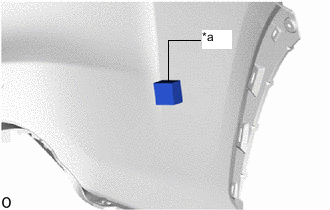
*a Scribed Line Install a new rear bumper pad.
-
Using a heat light, heat the rear bumper cover and rear bumper pad.
-
Remove the peeling paper from the face of the rear bumper pad.
Tech Tips
After removing the peeling paper, keep the exposed adhesive free from foreign matter.
-
Align the rear bumper pad with the scribed line on the rear bumper cover and install it as shown in the illustration.
Tech Tips
Press the rear bumper pad firmly to install it.
-
-
-
INSTALL NO. 1 MOULDING TAPE
Tech Tips
-
When installing the No. 1 moulding tape, heat the rear bumper cover and No. 1 moulding tape using a heat light.
-
Use the same procedure described for the other side.
Note
Do not heat the rear bumper cover and No. 1 moulding tape excessively.
Standard Item Temperature Rear Bumper Cover 20 to 30°C (68 to 86°F) No. 1 Moulding Tape 20 to 30°C (68 to 86°F)
-
Clean the rear bumper cover surface.
-
Using a heat light, heat the rear bumper cover surface.
-
Remove the double-sided tape from the rear bumper cover.
-
Wipe off any tape adhesive residue with cleaner.
-
-
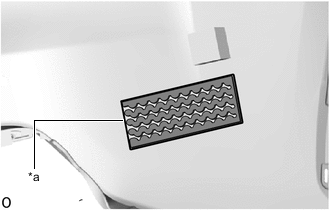
*a Scribed Line Install a new rear bumper pad.
-
Using a heat light, heat the rear bumper cover and No. 1 moulding tape.
-
Remove the peeling paper from the face of the No. 1 moulding tape.
Tech Tips
After removing the peeling paper, keep the exposed adhesive free from foreign matter.
-
Align the No. 1 moulding tape with the scribed line on the rear bumper cover and install it as shown in the illustration.
Tech Tips
Press the No. 1 moulding tape firmly to install it.
-
-
-
INSTALL REAR BUMPER LOWER RETAINER LH (for 3ZR-FAE)
-
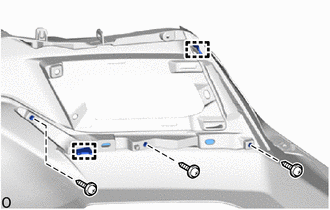
Attach the 2 guides and install the rear bumper lower retainer LH.
-
Install the 3 screws.
-
-
INSTALL REAR BUMPER LOWER RETAINER RH (for 3ZR-FAE)
-
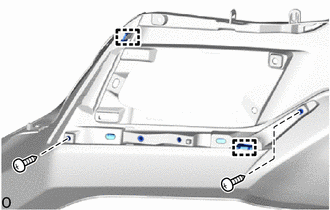
Attach the 2 guides and install the rear bumper lower retainer RH.
-
Install the 2 screws.
-
-
INSTALL REAR BUMPER LOWER SIDE RETAINER LH (for 3ZR-FAE)
-
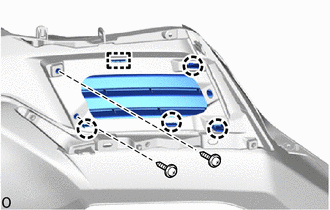
Attach the guide and 4 claws and install the rear bumper lower side retainer LH.
-
Install the 2 screws.
-
-
INSTALL REAR BUMPER LOWER SIDE RETAINER RH (for 3ZR-FAE)
Tech Tips
Use the same procedure described for the LH side.
-
INSTALL REAR BUMPER CORNER EXTENSION RH (for 3ZR-FAE)
-
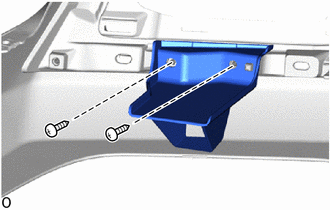
Install the rear bumper corner extension RH with the 2 screws.
-
-
INSTALL REFLEX REFLECTOR ASSEMBLY LH
-
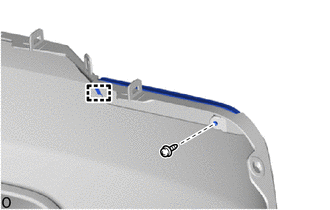
Attach the guide to install the reflex reflector assembly LH.
-
Install the screw.
-
-
INSTALL REFLEX REFLECTOR ASSEMBLY RH
Tech Tips
Use the same procedure as for the LH side.
-
INSTALL REAR BUMPER EXTENSION (for 8AR-FTS)
-
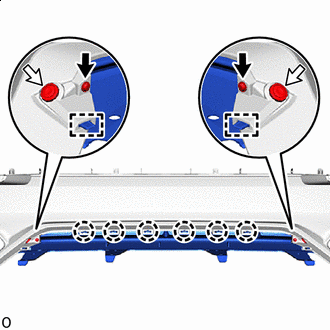

Screw 
Clip Attach the 6 claws and 2 guides and install the rear bumper extension.
-
Install the 2 clips.
-
Install the 2 screws.
-
-
INSTALL REAR BUMPER EXTENSION SUB-ASSEMBLY LH (for 8AR-FTS)
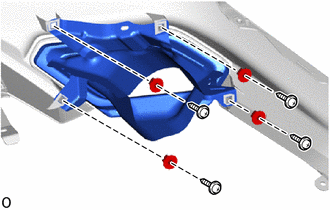
-
Install the rear bumper extension sub-assembly LH with the 4 grommets.
-
Install the 4 screws.
-
-
INSTALL REAR BUMPER EXTENSION SUB-ASSEMBLY RH (for 8AR-FTS)
Tech Tips
Use the same procedure as for the LH side.
-
INSTALL REAR BUMPER LOWER COVER
-
for 8AR-FTS:
-
Attach the 4 claws to install the rear bumper lower cover.
-
Install the 8 outside moulding retainers in the figure direction.
-
Install the 2 clips.
-
Install the 4 screws.
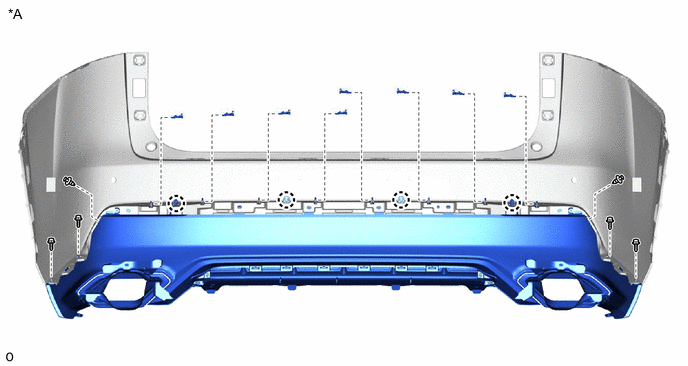
*A for 8AR-FTS - -
-
-
for 3ZR-FAE:
-
Attach the 4 claws to install the rear bumper lower cover.
-
Install the 8 outside moulding retainers in the figure direction.
-
Install the 2 clips.
-
Install the 4 screws.
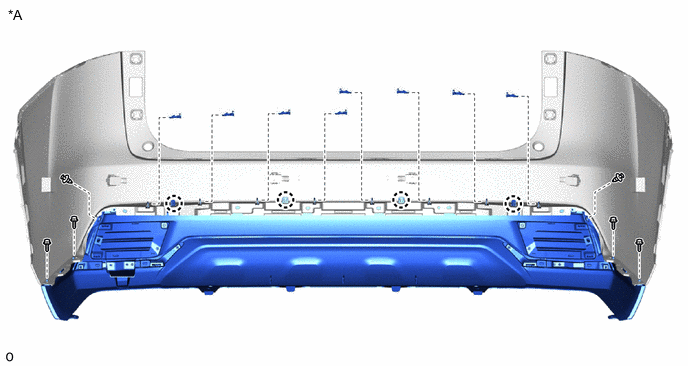
*A for 3ZR-FAE - -
-
-
-
INSTALL REAR CORNER ULTRASONIC SENSOR RETAINER (w/ LEXUS Parking Assist-sensor System)
-
INSTALL REAR CENTER ULTRASONIC SENSOR RETAINER (w/ LEXUS Parking Assist-sensor System)
-
INSTALL REAR CORNER ULTRASONIC SENSOR (w/ LEXUS Parking Assist-sensor System)
-
INSTALL REAR CENTER ULTRASONIC SENSOR (w/ LEXUS Parking Assist-sensor System)
-
INSTALL NO. 2 LUGGAGE ROOM WIRE (for 3ZR-FAE)
-
w/o Rear Fog Light:
-
w/ LEXUS Parking Assist-sensor System:
Connect the 4 connectors.
Note
Do not apply excessive loads to the retainer. Otherwise, it may peel off.
Tech Tips
Connect the connector while pressing the ultrasonic sensor with your hand.
-
w/o Hands Free Power Back Door:
Attach the 6 clamps and install the No. 2 luggage room wire.
-
w/ Hands Free Power Back Door:
Attach the 10 clamps and install the No. 2 luggage room wire.
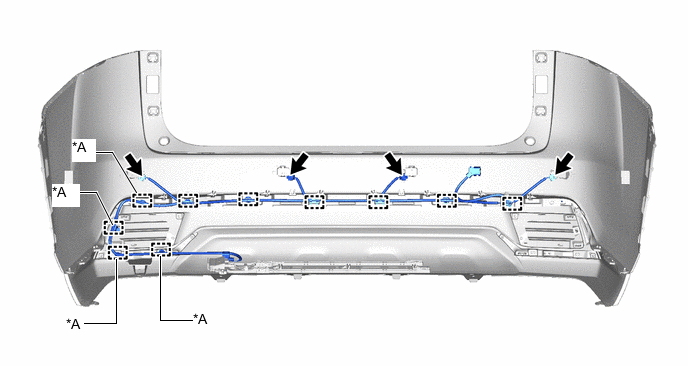
*A w/ Hands Free Power Back Door - -
-
-
w/ Rear Fog Light:
-
w/o LEXUS Parking Assist-sensor System, Hands Free Power Back Door:
Attach the 5 clamps and install the No. 2 luggage room wire.
-
w/ LEXUS Parking Assist-sensor System:
Connect the 4 connectors.
Note
Do not apply excessive loads to the retainer. Otherwise, it may peel off.
Tech Tips
Connect the connector while pressing the ultrasonic sensor with your hand.
-
w/o Hands Free Power Back Door:
Attach the 10 clamps and install the No. 2 luggage room wire.
-
w/ Hands Free Power Back Door:
Attach the 14 clamps and install the No. 2 luggage room wire.
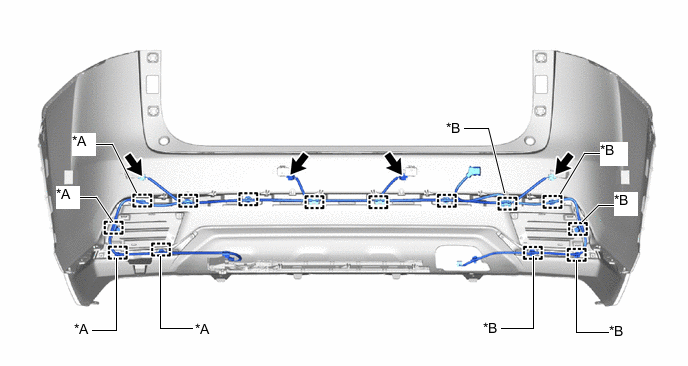
*A w/ Hands Free Power Back Door *B w/ Rear Fog Light
-
-
-
INSTALL NO. 2 LUGGAGE ROOM WIRE (for 8AR-FTS)
-
w/o Rear Fog Light:
-
w/ LEXUS Parking Assist-sensor System:
Connect the 4 connectors.
Note
Do not apply excessive loads to the retainer. Otherwise, it may peel off.
Tech Tips
Connect the connector while pressing the ultrasonic sensor with your hand.
-
w/o Hands Free Power Back Door:
Attach the 7 clamps and install the No. 2 luggage room wire.
-
w/ Hands Free Power Back Door:
Attach the 8 clamps and install the No. 2 luggage room wire.
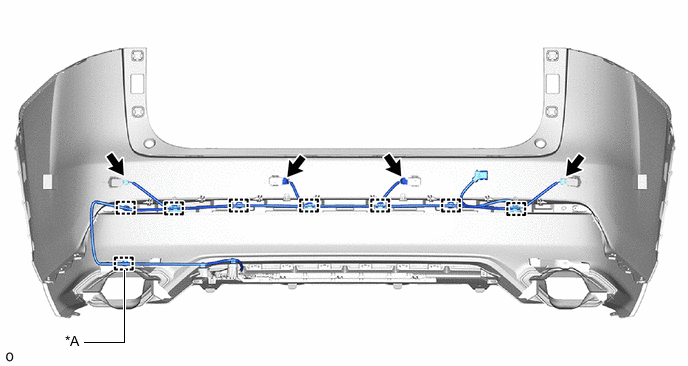
*A w/ Hands Free Power Back Door - -
-
-
w/ Rear Fog Light:
-
w/o LEXUS Parking Assist-sensor System, Hands Free Power Back Door:
Attach the 3 clamps and install the No. 2 luggage room wire.
-
w/ LEXUS Parking Assist-sensor System:
Connect the 4 connectors.
Note
Do not apply excessive loads to the retainer. Otherwise, it may peel off.
Tech Tips
Connect the connector while pressing the ultrasonic sensor with your hand.
-
w/o Hands Free Power Back Door:
Attach the 9 clamps and install the No. 2 luggage room wire.
-
w/ Hands Free Power Back Door:
Attach the 10 clamps and install the No. 2 luggage room wire.
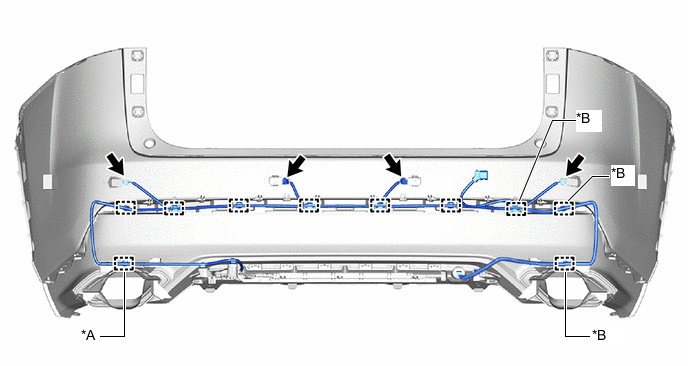
*A w/ Hands Free Power Back Door *B w/ Rear Fog Light
-
-
-
INSTALL FOG LIGHT COVER LH (w/ Rear Fog Light)
-
INSTALL REAR FOG LIGHT SET (w/ Rear Fog Light)
-
for 8AR-FTS:
-
for 3ZR-FAE:
-
-
INSTALL KICK DOOR CONTROL SENSOR (w/ Hands Free Power Back Door)
-
INSTALL KICK DOOR CONTROL BRACKET (w/ Hands Free Power Back Door)