CLEARANCE LIGHT ASSEMBLY(for LED Type Turn Signal Light) DISASSEMBLY

PROCEDURE
-
PRECAUTION
Note
-
Be sure to read Precaution thoroughly before servicing.
-
Handle components indoors as much as possible to prevent foreign matter from entering and adhering to clearance light assembly components.
-
Do not reuse parts which have reduced fastening ability due to thread damage.
-
Do not touch the inner surface of the lens and metallic surfaces as much as possible, or they may become dirty
-
Do not allow metallic surfaces to become dirty, as such surfaces become damaged even if they are only lightly wiped with a soft cloth.
-
When installing components, make sure that the wire harness is not pinched or pulled.
-
Do not use solvent to clean components. Only clean them with a dry cloth.
Tech Tips
-
Use the same procedure for the RH and LH sides.
-
The procedure listed below is for the LH side.
-
-
REMOVE PARKING AND CLEARANCE LIGHT LENS LH
Note
-
Perform work using clean rubber gloves.
-
Do not touch the inner surface of the lens and metallic surfaces as much as possible, or they may become dirty.
-
Do not allow metallic surfaces to become dirty, as such surfaces become damaged even if they are only lightly wiped with a soft cloth.
-
Do not use solvent to clean components. Only clean them with a dry cloth.
-
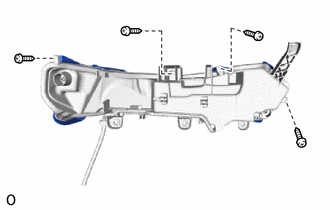
Remove the 4 screws.
-
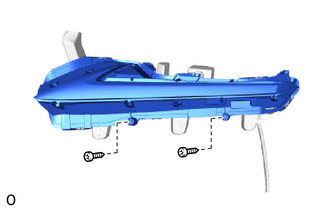
Using a T20H "TORX" screwdriver, remove the 2 screws.
-
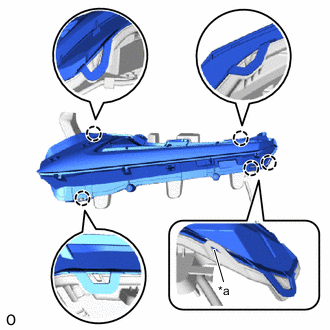
*a Base Point Detach the 4 claws.
Tech Tips
It is not necessary to detach the claw at the base point as the claw is detached in the later step.
-
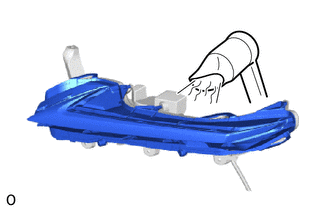
Using a dryer, heat the backside of the clearance light assembly LH.
Note
If the clearance light assembly LH is heated unevenly, it will deform or melt.
-
Insert a finger between the clearance light lens LH and clearance light housing and lift up the clearance light lens LH.
Tech Tips
-
With all of the claws detached, lift up the clearance light lens LH.
-
When the clearance light lens LH is lifted up, the claws may re-attach.
-
-
Using a screwdriver, pull out the clearance light lens gasket through the opening.
Tech Tips
Tape the screwdriver tip before use.
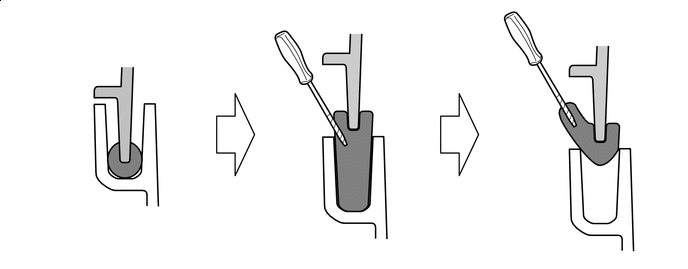

Clearance light gasket 
Parking and clearance light lens LH 
Clearance light housing 
Protective Tape -
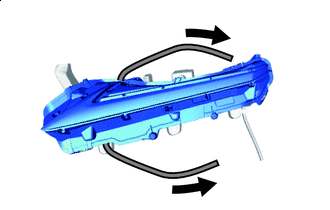
Clearance Light Gasket Pull out the parking and clearance light lens LH until it detaches from the clearance light lens gasket.
Tech Tips
If the clearance light lens gasket is disconnected while being pulled out, lift up the parking and clearance light lens LH and pull the clearance light lens gasket again.
-
Detach the base point claw and remove the parking and clearance light lens LH.
-
-
REMOVE CLEARANCE LIGHT GASKET
Note
-
The clearance light gasket must not be reused.
-
Perform work using clean rubber gloves.
-
Do not touch the inner surface of the lens and metallic surfaces as much as possible, or they may become dirty.
-
Do not allow metallic surfaces to become dirty, as such surfaces become damaged even if they are only lightly wiped with a soft cloth.
-
If there are fingerprints on the inner surface of the lens, lightly wiped with a soft cloth.
-
Do not use solvent to clean components. Only clean them with a dry cloth.
-
Remove remaining clearance light gasket.
-
-
REMOVE CLEARANCE LIGHT LED UNIT ASSEMBLY LH
Note
-
Prevention of static electricity is required during this procedure.
-
Use static electricity countermeasures SST (desktop antistatic mat set) and observe all precautions to prevent damage to the system by electrostatic discharge (ESD).
-
Perform work using clean rubber gloves.
-
Do not touch the clearance light LED unit assembly LH with bare hands.
-
Do not allow metallic surfaces to become dirty, as such surfaces become damaged even if they are only lightly wiped with a soft cloth.
-
If there are fingerprints on the inner surface of the lens, lightly wiped with a soft cloth.
-
Do not use solvent to clean components. Only clean them with a dry cloth.
- SST
- 09890-47010 ( 09891-04010, 09891-04020, 09891-04030, 09891-04040 )
-
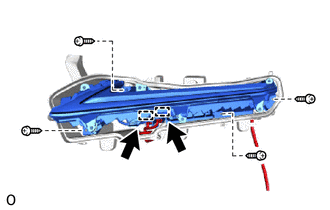
Disconnect the 2 connectors.
-
Remove the 4 screws and clearance light LED unit assembly LH.
-