DYNAMIC RADAR CRUISE CONTROL SYSTEM Distance Control Switch Circuit
DESCRIPTION
The vehicle-to-vehicle distance control switch is used to set the distance for vehicle-to-vehicle distance control mode. The distance control switch is installed in the steering pad switch assembly. The vehicle-to-vehicle distance set value can be changed by operating the vehicle-to-vehicle distance control switch while the dynamic radar cruise control system is controlling vehicle speed in vehicle-to-vehicle distance control mode.
WIRING DIAGRAM
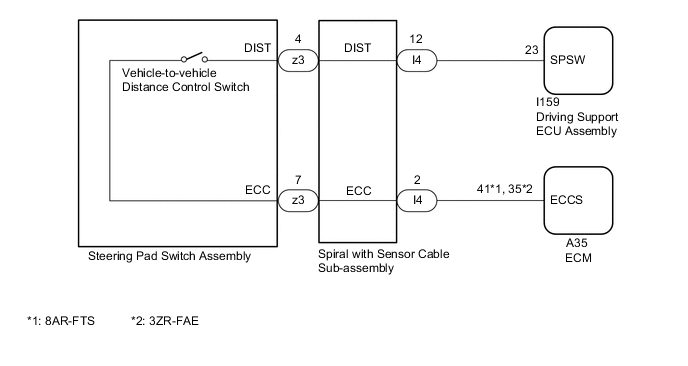
CAUTION / NOTICE / HINT
Note
-
The vehicle is equipped with a Supplemental Restraint System (SRS) which includes components such as airbags. Before servicing (including removal or installation of parts), be sure to read the precaution for Supplemental Restraint System.
-
When replacing the driving support ECU assembly, always replace it with a new one. If a driving support ECU assembly which was installed to another vehicle is used, the information stored in the driving support ECU assembly will not match the information from the vehicle. As a result, a DTC may be stored.
PROCEDURE
-
READ VALUE USING GTS (DISTANCE CONTROL SWITCH)
-
Connect the GTS to the DLC3.
-
Turn the engine switch on (IG).
-
Turn the GTS on.
-
Enter the following menus: Powertrain / Radar Cruise 2 / Data List.
-
Read the Data List according to the display on the GTS.
Powertrain > Radar Cruise2 > Data ListTester Display Measurement Item Range Normal Condition Diagnostic Note Distance Control Switch Distance control switch signal ON or OFF ON: Vehicle-to-vehicle distance control switch pushed
OFF: Vehicle-to-vehicle distance control switch not pushed
-
Powertrain > Radar Cruise2 > Data ListTester Display Distance Control Switch OK The Data List item shown in the table changes according to the operation of the vehicle-to-vehicle distance control switch (steering pad switch assembly). Result Proceed to OK NG
OK 
PROCEED TO NEXT SUSPECTED AREA SHOWN IN PROBLEM SYMPTOMS TABLE Click here
NG 
-
-
INSPECT STEERING PAD SWITCH ASSEMBLY
-
Remove the steering pad switch assembly.
-
Inspect the steering pad switch assembly.
Result Proceed to OK NG
NG
REPLACE STEERING PAD SWITCH ASSEMBLY Click here
OK
-
-
INSPECT SPIRAL WITH SENSOR CABLE SUB-ASSEMBLY
-
Remove the spiral with sensor cable sub-assembly.
-
Inspect the spiral with sensor cable sub-assembly.
Result Proceed to OK NG
NG
REPLACE SPIRAL WITH SENSOR CABLE SUB-ASSEMBLY Click here
OK
-
-
CHECK HARNESS AND CONNECTOR (SPIRAL WITH SENSOR CABLE SUB-ASSEMBLY - DRIVING SUPPORT ECU ASSEMBLY, ECM AND BODY GROUND)
-
Disconnect the I4 spiral with sensor cable sub-assembly connector.
-
Disconnect the I159 driving support ECU assembly connector.
-
Disconnect the A35 ECM connector.
-
Measure the resistance according to the value(s) in the table below.
Standard Resistance for 8AR-FTS Tester Connection Condition Specified Condition I4-12 (DIST) - I159-23 (SPSW) Always Below 1 Ω I4-2 (ECC) - A35-41 (ECCS) Always Below 1 Ω I4-12 (DIST) or I159-23 (SPSW) - Body ground Always 10 kΩ or higher I4-2 (ECC) or A35-41 (ECCS) - Body ground Always 10 kΩ or higher for 3ZR-FAE Tester Connection Condition Specified Condition I4-12 (DIST) - I159-23 (SPSW) Always Below 1 Ω I4-2 (ECC) - A35-35 (ECCS) Always Below 1 Ω I4-12 (DIST) or I159-23 (SPSW) - Body ground Always 10 kΩ or higher I4-2 (ECC) or A35-35 (ECCS) - Body ground Always 10 kΩ or higher -
Connect the A35 ECM connector.
-
Connect the I159 driving support ECU assembly connector.
-
Connect the I4 spiral with sensor cable sub-assembly connector.
Result Result Proceed to OK A NG B
A
REPLACE DRIVING SUPPORT ECU ASSEMBLY Click here
B
REPAIR OR REPLACE HARNESS OR CONNECTOR
-