REAR AXLE HUB INSTALLATION

CAUTION / NOTICE / HINT
Tech Tips
-
Use the same procedure for the RH and LH sides.
-
The procedure listed below is for the LH side.
PROCEDURE
-
INSTALL REAR AXLE HUB AND BEARING ASSEMBLY LH (for 2WD)
-
Install the rear axle hub and bearing assembly with the 4 bolts.
- Torque:
- 90 N*m { 918 kgf*cm, 66 ft.*lbf }
-
-
INSTALL REAR AXLE HUB AND BEARING ASSEMBLY LH (for AWD)
-
Align the shaft splines and drive shaft to the axle hub and bearing assembly.
-
Install the axle hub and bearing to the rear axle carrier with the 4 bolts.
- Torque:
- 90 N*m { 918 kgf*cm, 66 ft.*lbf }
Note
Be careful not to damage the drive shaft boot and speed sensor rotor.
-
-
INSTALL REAR AXLE SHAFT NUT LH (for AWD)
-
Clean the threaded parts on the drive shaft and a new axle shaft nut using a non-residue solvent.
Note
-
Be sure to perform this work for a new drive shaft.
-
Keep the threaded parts free of oil and foreign objects.
-
-
Using a 30 mm socket wrench, install a new axle shaft nut.
- Torque:
- 216 N*m { 2203 kgf*cm, 159 ft.*lbf }
Tech Tips
Stake the nut after inspecting for looseness and runout in the following steps.
-
-
INSPECT REAR AXLE HUB BEARING LOOSENESS
-
INSPECT REAR AXLE HUB RUNOUT
-
CONNECT REAR SKID CONTROL SENSOR WIRE LH (for 2WD)
-
w/ AVS:
-
w/o AVS:
-
-
CONNECT REAR SPEED SENSOR LH (for AWD)
-
w/ AVS:
-
w/o AVS:
-
-
INSTALL REAR DISC
-
CONNECT REAR DISC BRAKE CALIPER ASSEMBLY LH
-
STAKE REAR AXLE SHAFT NUT LH (for AWD)
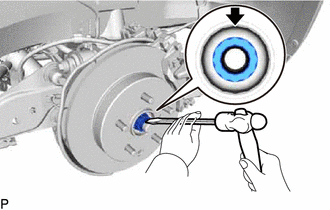
-
Using a chisel and hammer, stake the rear axle shaft nut.
-
-
INSTALL REAR WHEEL
-
INSPECT AND ADJUST REAR WHEEL ALIGNMENT
-
CHECK FOR SPEED SENSOR SIGNAL
-
PERFORM INITIALIZATION