REAR BUMPER REASSEMBLY
PROCEDURE
-
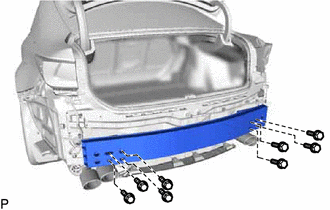
INSTALL REAR BUMPER REINFORCEMENT SUB-ASSEMBLY
-
Install the rear bumper reinforcement sub-assembly with the 8 bolts.
- Torque:
- 20 N*m { 204 kgf*cm, 15 ft.*lbf }
-
-
INSTALL REAR BUMPER ENERGY ABSORBER
-
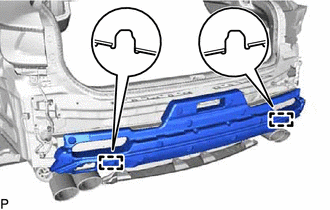
Engage the 2 guides to install the rear bumper energy absorber.
-
-
INSTALL REAR BUMPER SIDE SUPPORT LH
-
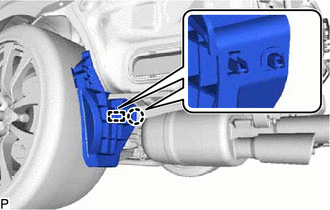
Engage the guide and claw.
-
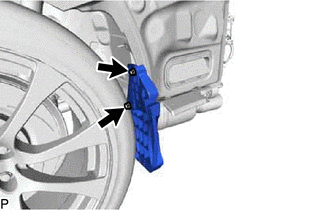
Install the 2 screws.
-
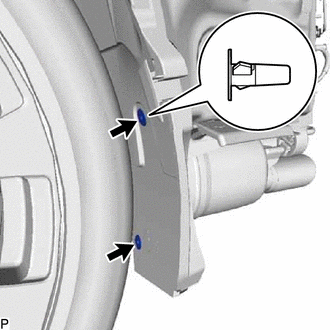
Install the rear bumper side support LH with 2 new grommets.
-
-
INSTALL REAR BUMPER SIDE SUPPORT RH
Tech Tips
Use the same procedure as for the LH side.
-
INSTALL NO. 2 REAR BUMPER SIDE SUPPORT LH
-
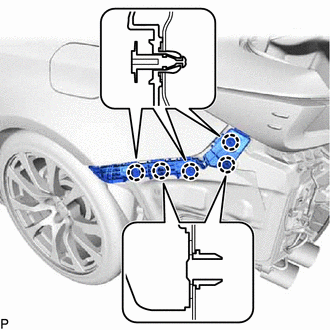
Engage the 5 claws.
-
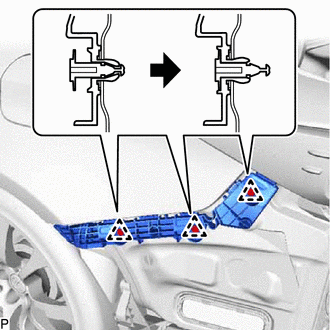
Engage the 3 clips to install the No. 2 rear bumper side support LH as shown in the illustration.
-
-
INSTALL NO. 2 REAR BUMPER SIDE SUPPORT RH
Tech Tips
Use the same procedure as for the LH side.
-
INSTALL REAR BUMPER CENTER EXTENSION SUB-ASSEMBLY
-
Engage the 6 claws.
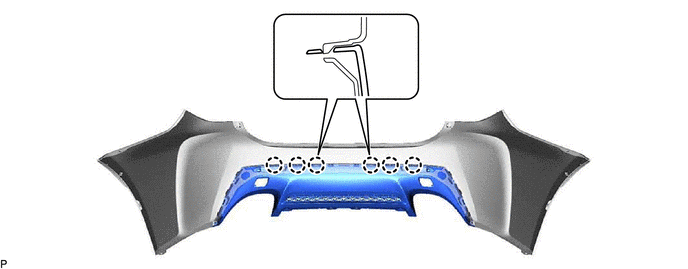
-
Engage the 2 guides.
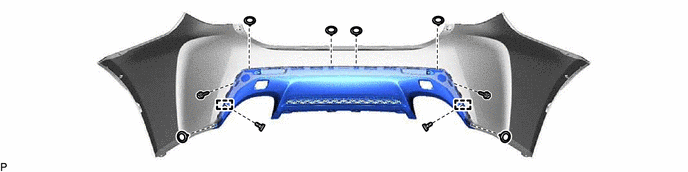
-
Install the 2 outside moulding retainers.
-
Install the 2 screws.
-
Install the rear bumper center extension sub-assembly with the 6 clips.
-
-
INSTALL REFLEX REFLECTOR ASSEMBLY LH
-
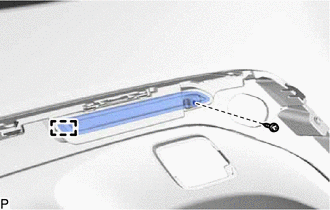
Engage the guide.
-
Install the reflex reflector assembly LH with the screw.
-
-
INSTALL REFLEX REFLECTOR ASSEMBLY RH
Tech Tips
Use the same procedure as for the LH side.
-
INSTALL REAR BUMPER PIECE LH
-
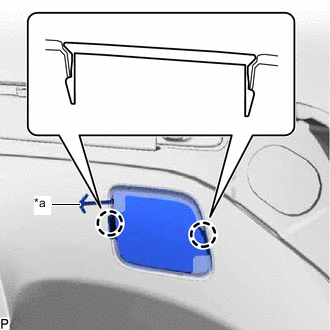
*a Hook Engage the hook.
-
Engage the 2 claws to install the rear bumper piece LH.
-
-
INSTALL REAR BUMPER PIECE RH
Tech Tips
Use the same procedure as for the LH side.
-
INSTALL NO. 2 MOULDING TAPE
Tech Tips
Use the same procedure for the RH side and LH side.
-
Clean the installation surface of the No. 2 moulding tape.
-
Remove any remaining double-sided tape from the rear bumper cover.
Note
-
If there is any foreign matter on the rear bumper cover when the No. 2 moulding tape is installed, adhesion failure may occur.
-
Do not use a screwdriver or other tool to remove the double-sided tape as the rear bumper cover may be damaged, possibly leading to adhesion failure.
-
-
Wipe off any tape adhesive residue with cleaner.
-
-
Install a new No. 2 moulding tape.
CAUTION:
-
Do not touch the heat light, as doing so may cause in burns.
-
Touching heated parts for a long time may result in burns.
Tech Tips
If the temperature of the No. 2 moulding tape or its installation surface on the rear bumper cover is below 15°C (59°F), adhesion failure may occur. Use a heat light to heat the No. 2 moulding tape and its installation surface on the rear bumper cover to the recommended temperature (15 to 40°C (59 to 104°F)).
-
Remove the release paper from the No. 2 moulding tape.
Tech Tips
After removing the release paper, keep the exposed adhesive free from foreign matter.
-
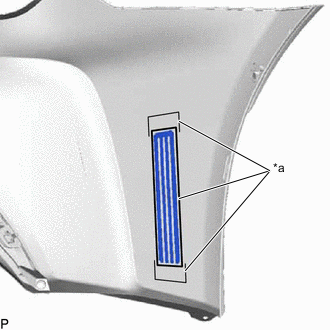
*a Line Install the No. 2 moulding tape to the rear bumper cover as shown in the illustration.
Note
If the No. 2 moulding tape has been removed, it must be replaced with a new one as it may be deformed or the strength of its adhesive may be deteriorated.
Tech Tips
Make sure not to touch the exposed adhesive of the No. 2 moulding tape or the installation surface on the rear bumper cover.
-
Using a squeegee, evenly press the No. 2 moulding tape to the rear bumper cover with a force of 29 N (3 kgf, 6.5lbf) or more.
Tech Tips
-
Make sure that the corners of the No. 2 moulding tape are not damaged or peeling off.
-
After installing the No. 2 moulding tape, leave the rear bumper cover in an area with an ambient temperature of 15°C (59°F) or more for 30 minutes or more to allow the adhesive to set.
-
-
Remove the protector sheet from the No. 2 moulding tape.
-
-
-
INSTALL REAR BUMPER PAD
Tech Tips
Use the same procedure for the RH side and LH side.
-
Clean the rear bumper cover.
-
Remove any remaining double-sided tape from the rear bumper cover.
-
Wipe off any tape adhesive residue with cleaner.
-
-
Remove the release paper from a new rear bumper pad.
Tech Tips
After removing the release paper, keep the exposed adhesive free from foreign matter.
-
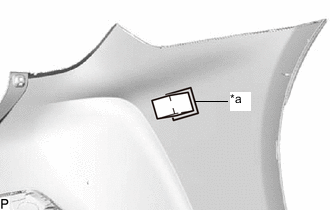
*a Line Install the rear bumper pad as shown in the illustration.
Tech Tips
-
Install the rear bumper pad along the line on the rear bumper cover.
-
Press the rear bumper pad firmly to install it.
-
-
-
INSTALL REAR BUMPER SIDE MOULDING SUB-ASSEMBLY LH
-
INSTALL REAR BUMPER SIDE MOULDING SUB-ASSEMBLY RH
Tech Tips
Use the same procedure as for the LH side.
-
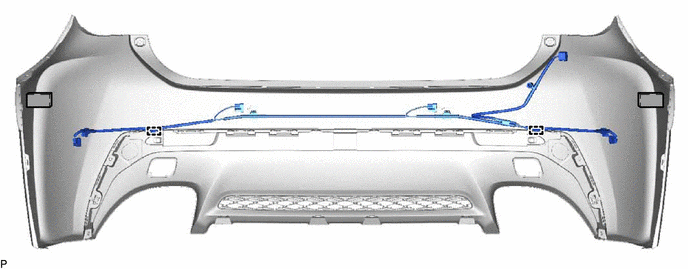
INSTALL NO. 3 LUGGAGE ROOM WIRE (w/ LEXUS Parking Assist-sensor System)
-
Engage the 2 clamps to install the No. 3 luggage room wire.
-
-
INSTALL NO. 1 ULTRASONIC SENSOR RETAINER (w/ LEXUS Parking Assist-sensor System)
-
INSTALL ULTRASONIC SENSOR WITH CLIP (w/ LEXUS Parking Assist-sensor System)