Click here
-
DATA LIST
Tip:Using the GTS to read the Data List allows the values or states of switches, sensors, actuators and other items to be read without removing any parts. This non-intrusive inspection can be very useful because intermittent conditions or signals may be discovered before parts or wiring is disturbed. Reading the Data List information early in troubleshooting is one way to save diagnostic time.
Note:
-
In the table below, the values listed under "Normal Condition" are reference values. Do not depend solely on these reference values when deciding whether a part is faulty or not.
-
Follow the speed limit when performing a road test.
-
Be careful not to get pinched by the rear spoiler sub-assembly when operating the active rear wing.
-
Connect the GTS to the DLC3.
-
Turn the engine switch on (IG).
-
Turn the GTS on.
-
Enter the following menus: Body Electrical / Active Rear Wing / Data List.
-
Read the Data List according to the display on the GTS.
- Body Electrical > Active Rear Wing > Data List
Tester Display Measurement Item Range Normal Condition Diagnostic Note Manual Switch Spoiler control switch condition OFF or ON OFF: Spoiler control switch not pressed
ON: Spoiler control switch pressed
- Vehicle Speed Vehicle speed 0 to 326 km/h Actual vehicle speed displayed (km/h) - ECU Battery Voltage Spoiler control ECU assembly power supply voltage 1.1 to 21 V 11 to 14 V - Motor Hall IC Voltage Hall IC power supply voltage 1.1 to 21 V 11 to 14 V - Active Rear Wing Failure Active rear wing system malfunction information Normal or Abnormal Normal: Active rear wing system normal
Abnormal: Active rear wing system malfunctioning
- ECO Mode ECO mode status OFF or ON OFF: When not in ECO mode
ON: When in ECO mode
- RSC SW Active rear wing system ON/OFF setting selection operation signal status No Operation, ON or OFF No Operation: Cursor not being moved
ON: Cursor moved to "ON"
OFF: Cursor moved to "OFF"
- Luggage Door Luggage compartment door open/closed status Close or Open Close: Luggage compartment door closed
Open: Luggage compartment door open
- Vehicle Speed Information Vehicle speed signal reception condition OK or NG OK: Vehicle speed signal is valid
NG: Vehicle speed signal is invalid
- Active Rear Wing Control Active rear wing system permission/prohibition setting Permission or Prohibition Customized value displayed - Status of Active Rear Wing Active rear wing status Position Not Found, Moving Up, Moving Down, Fully Up, Fully Down, Abnormal Failure or Partially Up/Down Position Not Found: Active rear wing status not determined
Moving Up: Active rear wing rising
Moving Down: Active rear wing retracting
Fully Up: Active rear wing in fully raised position
Fully Down: Active rear wing in fully retracted position
Abnormal Failure: Active rear wing stopped due to malfunction
Partially Up/Down: Active rear wing stopped during operation
- Manual SW No Operation Request Spoiler control switch operation prohibition request signal status OFF or ON OFF: Spoiler control switch operation not prohibited
ON: Spoiler control switch operation prohibited
- Motor Hall IC1 Hall IC1 signal status Lo or Hi Lo: Pulse output is Lo
Hi: Pulse output is Hi
- Motor Hall IC2 Hall IC2 signal status Lo or Hi Lo: Pulse output is Lo
Hi: Pulse output is Hi
- Initialization Status Active rear wing system initialization status No Init, In Progress or Init No Init: Initialization not completed
In Progress: Initialization being performed
Init: Initialization completed
- Motor Position No. 2 rear spoiler motor assembly position -9998 to 9999 edge* Displays value between -9998 and 9999 - Activetest Wing Extend Result Result of Active Test "Wing Extend" OK or NG OK: Normal
NG: Abnormal
- Activetest Wing Fold Result Result of Active Test "Wing Fold" OK or NG OK: Normal
NG: Abnormal
- Operation Direction History Previous active rear wing operation Unknown, Up or Down Unknown: Previous operation not determined
Up: Rise operation
Down: Retract operation
- Operation Mode History Previous active rear wing operation mode Unknown, Manual Mode or Auto Mode Unknown: Previous operation mode not determined
Manual Mode: Manual operation
Auto Mode: Automatic operation
- Number of DTC Number of stored trouble codes 0 to 255 - - -
-
Tip: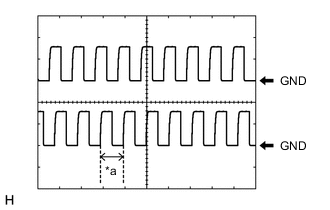
*a 1 edge *: In a waveform shown on an oscilloscope, 1 edge (a*) is the measurement of a waveform from the beginning of the leading edge to the beginning of the leading edge of the next waveform.
- Body Electrical > Active Rear Wing > Data List
-
Enter the following menus: Chassis / ABS/VSC/TRAC /Data List.
-
Read the Data List according to the display on the GTS.
- Chassis > ABS/VSC/TRAC > Data List
Tester Display Measurement Item Range Normal Condition Diagnostic Note Vehicle Speed Vehicle speed 0 to 326.4 km/h Actual vehicle speed displayed (km/h) - -
-
- Chassis > ABS/VSC/TRAC > Data List
-
-
ACTIVE TEST
Tip:Using the GTS to perform Active Test allows relays, VSVs, actuators and other items to be operated without removing any parts. This non-intrusive functional inspection can be very useful because intermittent operation may be discovered before parts or wiring is disturbed. Performing Active Tests early in troubleshooting is one way to save diagnostic time. Data List information can be displayed while performing Active Tests.
-
Connect the GTS to the DLC3.
-
Turn the engine switch on (IG).
-
Turn the GTS on.
-
Enter the following menus: Body Electrical / Active Rear Wing / Active Test.
-
Perform the Active Test according to the display on the GTS.
- Body Electrical > Active Rear Wing > Active Test
Tester Display Measurement Item Control Range Diagnostic Note Wing Extend Active rear wing rise operation*1,*2 OFF/ON - Wing Fold Active rear wing retract operation*1,*2 OFF/ON - Manual SW Indicator Spoiler control switch indicator light OFF/ON - -
-
Note:
-
*1: Before performing the Active Test, check that "Init" is displayed for the Data List item "Initialization Status". If "Init" is not displayed, initialize the active rear wing system.
-
*2: While performing the Active Test, if the active rear wing is stopped during an operation, it is necessary to perform initialization.
- Body Electrical > Active Rear Wing > Active Test
-