CLEARANCE LIGHT ASSEMBLY DISASSEMBLY
PROCEDURE
-
REMOVE CLEARANCE LIGHT LENS
-
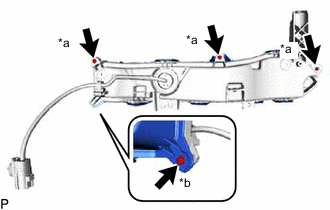
*a Screw *b "TORX" Screw Remove the 3 screws.
-
Using a T20H "TORX" driver, remove the "TORX" screw.
-
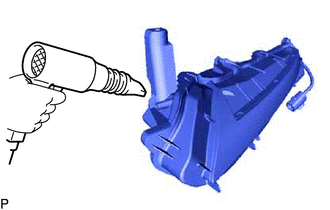
Using a dryer, heat the backside of the clearance light assembly.
Note
If the clearance light assembly is heated unevenly, it will deform or melt.
-
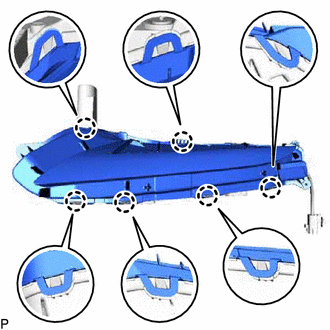
Disengage the 6 claws.
-
Remove the clearance light lens.
Note
-
Be sure to wear clean rubber gloves.
-
Do not allow dirt or foreign matter to get on the clearance light lens.
-
If there are any fingerprints on the back of the clearance light lens, wipe them off with a soft cloth.
Tech Tips
If the clearance light lens cannot be removed even after heating, using a screwdriver with its tip wrapped with protective tape, lift the clearance light lens. Be careful not to damage the clearance light lens and housing.
-
-
-
REMOVE CLEARANCE LIGHT LENS GASKET
-
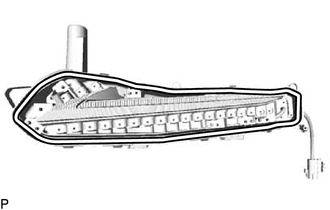
Remove the clearance light lens gasket from the housing.
Note
After the clearance light lens is removed, be sure to replace clearance light lens gasket with a new one. Failure to do so may cause water ingress.
-
-
REMOVE CLEARANCE LIGHT LED UNIT ASSEMBLY
Note
-
Do not allow dirt or foreign matter to get on the clearance light LED unit assembly.
-
If there are any fingerprints on the clearance light LED unit assembly, wipe them off with a soft cloth.
-
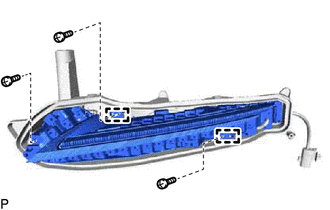
Remove the 3 screws.
-
Disengage the 2 guides.
-
Disconnect the connector to remove the clearance light LED unit assembly.
-