Click here
Click here
Click here
-
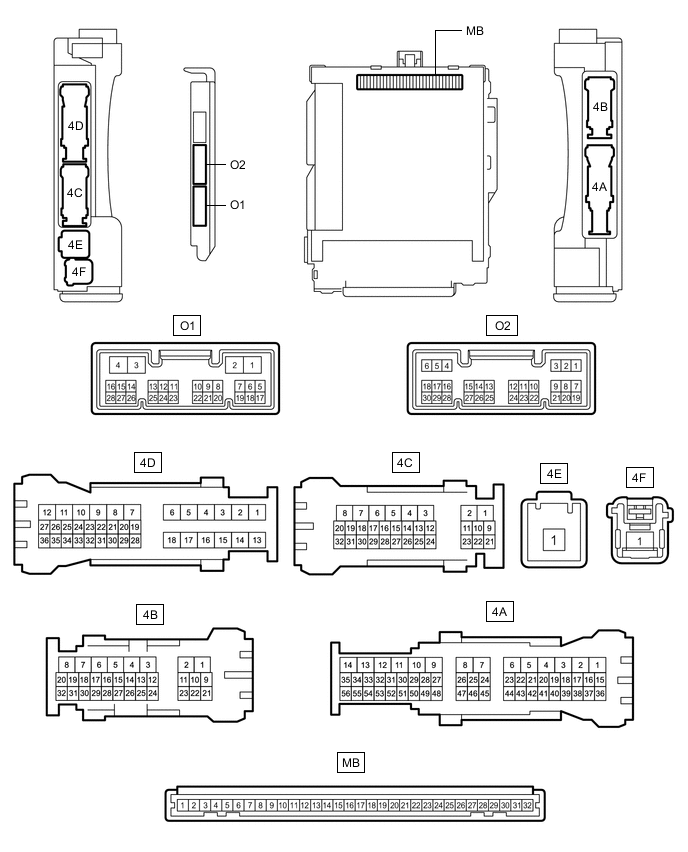
CHECK MAIN BODY ECU (MULTIPLEX NETWORK BODY ECU) AND INSTRUMENT PANEL JUNCTION BLOCK ASSEMBLY
-
Measure the voltage and check for pulses according to the value(s) in the table below.
Terminal No. (Symbol) Wiring Color Terminal Description Condition Specified Condition 4C-29 - Body ground R - Body ground H-LP LH relay drive output Light control switch in head position Below 1 V Light control switch not in head position 11 to 14 V O1-23 (AHBI) - Body ground SB - Body ground Auto high beam switch signal input Auto high beam switch on Below 1 V Auto high beam switch off 11 to 14 V O2-1 (DIM) - Body ground V - Body ground
-
H-LP RH/MIR HTR relay drive output*1
-
H-LP RH relay drive output*2
Light control switch in head position Below 1 V Light control switch not in head position 11 to 14 V O2-8 (A) - Body ground P - Body ground Light control switch AUTO position signal input Light control switch in AUTO position Below 1 V Light control switch not in AUTO position Pulse generation O2-19 (CLTB) - O2-21 (CLTE) GR - W Automatic light control sensor power supply output Engine switch off Below 1 V Engine switch on (IG), light control switch in AUTO position 11 to 14 V O2-20 (CLTS) - Body ground R - Body ground Automatic light control sensor signal input Engine switch off Below 1 V Engine switch on (IG) Pulse generation
(See waveform 1)
O2-24 (HU) - Body ground V - Body ground Dimmer switch high position signal input Dimmer switch in high position Below 1 V Dimmer switch not in high position Pulse generation
-
*1: for LHD
-
*2: for RHD
-
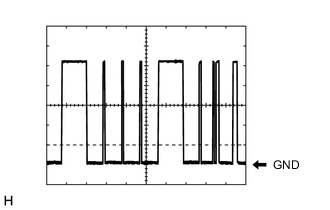
Waveform 1
Item Content Tester Connection O2-20 (CLTS) - Body ground Tool setting 2 V/DIV., 10 ms./DIV. Condition Engine switch on (IG) Tip:The communication waveform changes according to the surrounding brightness.
-
-
-
CHECK FORWARD RECOGNITION CAMERA