| DTC Code | DTC Name |
|---|---|
| HOW TO PROCEED WITH TROUBLESHOOTING |
CAUTION / NOTICE / HINT
-
Use these procedures to troubleshoot the pre-collision system.
-
*: Use the GTS.
PROCEDURE
- Click here
VEHICLE BROUGHT TO WORKSHOP
Result Proceed to NEXT
- NEXTClick here
- Click here
CUSTOMER PROBLEM ANALYSIS AND SYMPTOM CHECK
Pre-collision System Customer Problem Analysis Vehicle Brought to Workshop Year Month Day Dealer name Person in charge at headquarters Telephone number Shop name Person in charge at shop Frame type Frame No. First Registered Year Total distance traveled Customer Concerns (Include details) Does not operate Operates abnormally Date of malfunction occurrence (Since when) Year Month Day Approx. Time Date of last inspection Year Month Day Frequency of problem symptoms Once / Occasionally (times per day, times per month) / Every time certain conditions are met ( ) Weather Sunny / Cloudy / Rain / Snow (Amount of snowfall cm) / Other ( ) Vehicle speed Approximately ( ) km/h Place Prefecture
(Attach a map if possible)
Driving path (where vehicle turned, where driver attempted to drive to, etc.)
* Describe the conditions immediately after the occurrence in as much detail as possible.
Conditions of Occurrence Diagram

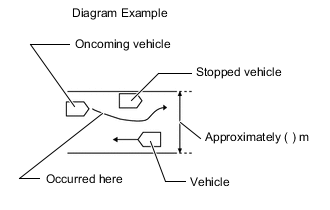
Surrounding road conditions
Describe whether there were any billboards, metal objects on the road (manholes), guardrails, pipes, cat's eyes, gate bars, etc.
Urban area / Suburbs / Highway / Other ( ) Road surface conditions Temperature About °C ( °F) Direction of travel Straight / Right turn / Left turn / Right curve / Left curve Snow wall(s) Y / N Driving lane Number of lanes on one side (lanes) / ( ) lane(s) from left Backlighting Y / N Condition of external area around detection sensor No foreign matter / Foreign matter (water, snow, ice, other) Additional information about condition of vehicle exterior (other than above) DTC First Time (when vehicle brought to workshop) Second Time (after clearing DTC) Status of operation switch Pre-collision system cancel switch Far / Medium / Near / OFF VSC OFF switch ON / OFF Serial number of main part
* Fill in when removing, installing or replacing part
Forward recognition camera Describe the items to the right in as much detail as possible. Driver operation Accelerator pedal operated / Brake pedal operated / Steering wheel operated Time elapsed after engine was started Approximately ( ) minutes Tire pressure inspection result Front: LH ( ) kPa RH ( ) kPa Standard ( ) kPa Rear: LH ( ) kPa RH ( ) kPa Standard ( ) kPa Sensor optical axis inspection result Forward recognition camera Accident history Y / N Millimeter wave radar sensor assembly Accident history Y / N Vehicle modified Y ( ) / N Items installed or attached around windshield glass Drive recorder* / Radar detector / Navigation unit (genuine/non-genuine) / ETC / Charms or toys / Other:
*: As information regarding the item is important for the investigation, make sure to obtain the item if permission is given by the customer.
Result Proceed to NEXT
- NEXTClick here
- Click here
INSPECT BATTERY VOLTAGE
-
Measure the battery voltage.
Standard Voltage 11 to 14 V If the voltage is below 11 V, replace or recharge the battery before proceeding to the next step.
Result Proceed to NEXT
- NEXTClick here
-
- Click here
INSPECT MILLIMETER WAVE RADAR SENSOR ASSEMBLY (BEAM AXIS MISALIGNMENT READING)*
-
Adjust the reflector height.
-
Place the reflector.
-
Connect the GTS to the DLC3.
-
Turn the engine switch on (IG).
-
Turn the GTS on.
-
Turn the cruise control main switch on.
-
Enter the following menus: Body Electrical / Pre-Collision 2 / Utility / Front Beam Axis Misalignment Reading.
-
Check the amount of misalignment and make a note.
- Body Electrical > Pre-Collision 2 > Utility
Tester Display Front Beam Axis Misalignment Reading -
-
-
-
- Body Electrical > Pre-Collision 2 > Utility
-
Enter the following menus: Body Electrical / Pre-Collision 2 / Utility / Front Beam Axis Offset Reading.
-
Check the amount of misalignment and make a note.
- Body Electrical > Pre-Collision 2 > Utility
Tester Display Front Beam Axis Offset Reading -
-
-
-
- Body Electrical > Pre-Collision 2 > Utility
-
Calculate the "Dealership Axis Offset Angle (with On-line Calibration Angle)" using the values "Front Beam Axis Misalignment Reading" and "Front Beam Axis Offset Reading".
-
"Dealership Axis Offset Angle (with On-line Calibration Angle)" = "Front Beam Axis Misalignment Reading" - "Front Beam Axis Offset Reading"
Standard Dealership Axis Offset Angle (with On-line Calibration Angle) Vertical -2.2 to 1.6 deg. Horizontal -0.6 to 0.6 deg.
Result Result Proceed to The dealership axis offset angle (with on-line calibration angle) is within the specified range. A The dealership axis offset angle (with on-line calibration angle) is not within the specified range. B -
-
- Click here
CHECK CAN COMMUNICATION SYSTEM*
-
Using the GTS, check if the CAN communication system is functioning normally.
OK CAN communication system is functioning normally. Result Proceed to OK NG
- OKClick here
- NG
GO TO CAN COMMUNICATION SYSTEMClick here
-
- Click here
INSPECT WARNING LIGHT
-
Check the condition of the warning lights on the combination meter assembly.
Result Result Proceed to Only the PCS warning light is illuminated A The PCS warning light is not illuminated The PCS warning light and other warning lights are illuminated or blinking B
- AClick here
- B
GO TO MALFUNCTIONING SYSTEM
-
- Click here
INSPECT MULTI-INFORMATION DISPLAY
-
Check if a pre-collision system warning message is displayed on the multi-information display in the combination meter assembly.
Result Result Proceed to "Pre-Collision System Malfunction Visit Your Dealer" is displayed A Any of the following messages is displayed:
-
"Pre-Collision System Unavailable"
-
"Pre-Collision System Unavailable Clean Sensor"
-
"Front Camera Unavailable"
-
"Front Camera Vision Blocked Clean and Demist Windshield"
B Warning message is not displayed C -
- AClick here
- B
GO TO PROBLEM SYMPTOMS TABLEClick here
- C
CHECK CONDITIONS WHEN PRE-COLLISION SYSTEM DID NOT OPERATEClick here
-
- Click here
CHECK FOR DTCs* (PRE-COLLISION SYSTEM)
-
Check for DTCs and note any codes that are output.
- Body Electrical > Pre-Collision 2 > Trouble Codes
-
-
-
Clear the DTCs.
- Body Electrical > Pre-Collision 2 > Clear DTCs
-
-
-
Recheck for DTCs.
-
Attempt to duplicate the malfunction and check if the DTCs are output again.
- Body Electrical > Pre-Collision 2 > Trouble Codes
-
-
Result Result Proceed to Malfunction is duplicated but DTCs are not output A Malfunction cannot be duplicated and DTCs are not output B DTCs are output C -
- AClick here
- B
GO TO SYMPTOM SIMULATIONClick here
- C
GO TO DTC CHARTClick here
-
- Click here
PROBLEM SYMPTOMS TABLE
Result Result Proceed to Fault is not listed in Problem Symptoms Table A Fault is listed in Problem Symptoms Table B
- AClick here
- BClick here
GO TO STEP 12
- Click here
OVERALL ANALYSIS AND TROUBLESHOOTING*
-
Terminals of ECU
-
Data List / Active Test
Result Proceed to NEXT
- NEXTClick here
-
- Click here
ADJUST, REPAIR OR REPLACE
Note:When the millimeter wave radar sensor assembly is replaced with a new one, adjustment of the radar sensor beam axis must be performed.
Result Proceed to NEXT
- NEXTClick here
- Click here
CONFIRMATION TEST
Result Proceed to NEXT
- NEXT
END
- NEXT
- Click here
ADJUST MILLIMETER WAVE RADAR SENSOR ASSEMBLY
-
Perform millimeter wave radar sensor assembly adjustment.
Result Proceed to NEXT
- NEXTClick here
GO TO STEP 5
-