TELEMATICS TRANSCEIVER REMOVAL
PROCEDURE
-
REMOVE COMBINATION METER ASSEMBLY
-
REMOVE TELEMATICS TRANSCEIVER WITH BRACKET (w/ Telematics Transceiver for G-BOOK)
-
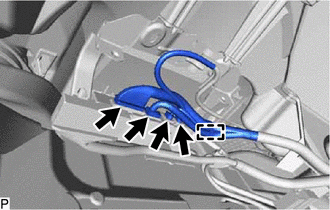
Disconnect each connector.
-
Disengage the clamp.
-
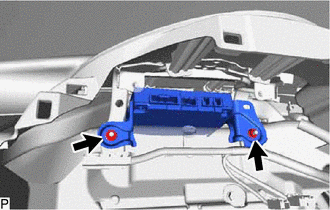
Remove the 2 nuts and telematics transceiver with bracket.
-
-
REMOVE TELEMATICS TRANSCEIVER (w/ Telematics Transceiver except G-BOOK)
-
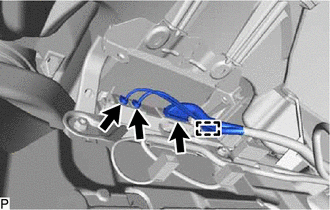
Disconnect each connector.
-
Disengage the clamp.
-
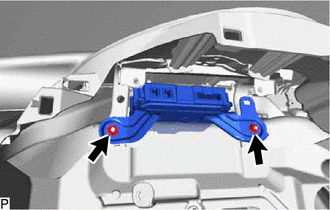
Remove the 2 nuts and telematics transceiver.
-
-
REMOVE NO. 1 TELEPHONE BRACKET (w/ Telematics Transceiver for G-BOOK)
-
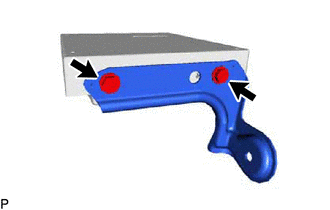
Remove the 2 screws and No. 1 telephone bracket.
-
-
REMOVE NO. 2 TELEPHONE BRACKET (w/ Telematics Transceiver for G-BOOK)
-
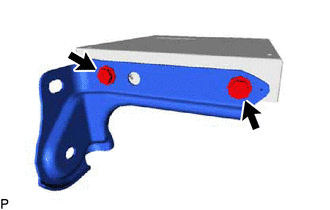
Remove the 2 screws and No. 2 telephone bracket.
-
-
REMOVE TELEMATICS TRANSCEIVER (w/ Telematics Transceiver for G-BOOK)