| DTC Code | DTC Name |
|---|---|
| B1323 | Lost Communication with Haptic Device |
| B1324 | Lost Communication with Meter |
DESCRIPTION
These DTCs are stored when communication between the radio receiver assembly and combination meter assembly or remote touch (remote operation controller assembly) is not possible.
The radio receiver assembly is the master unit.
| DTC No. | Detection Item | DTC Detection Condition | Trouble Area |
|---|---|---|---|
| B1323 | Lost Communication with Haptic Device | CAN reception error |
|
| B1324 | Lost Communication with Meter | CAN reception error |
|
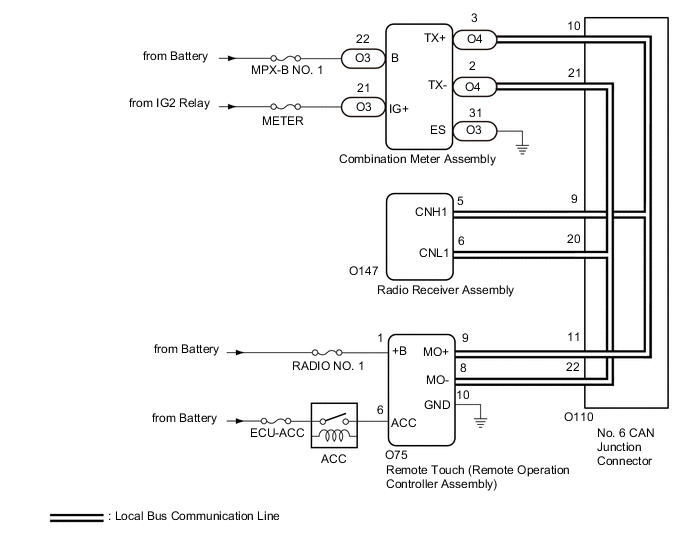
CAUTION / NOTICE / HINT
-
Depending on the parts that are replaced during vehicle inspection or maintenance, performing initialization, registration or calibration may be needed. Refer to Precaution for Navigation System.
-
When replacing the radio receiver assembly, always replace it with a new one. If a radio receiver assembly which was installed to another vehicle is used, the following may occur:
-
-
A communication malfunction DTC may be stored.
-
The radio receiver assembly may not operate normally.
-
-
Inspect the fuses for circuits related to this system before performing the following procedure.
PROCEDURE
- Click here
CHECK MODEL
-
Choose the model to be inspected.
Result Result Proceed to for LHD A for RHD B
-
- Click here
CHECK DTC
-
Check for DTCs and check that no DTCs are output.
- Body Electrical > Navigation System > Trouble Codes
-
-
Result Result Proceed to DTC B1323 and B1324 are not output A DTC B1323 and B1324 are output B DTC B1323 is output C DTC B1324 is output D
- A
USE SIMULATION METHOD TO CHECKClick here
- BClick here
- CClick here
- DClick here
-
- Click here
CHECK LOCAL BUS
-
Disconnect the cable from the negative (-) battery terminal.
-
Measure the resistance according to the value(s) in the table below.
Standard Resistance Tester Connection Condition Specified Condition O169-9 - O169-20 Cable disconnected from negative (-) battery terminal 54 to 69 Ω Result Result Proceed to OK A NG (Below 54 Ω) B NG (70 Ω or higher) C
- A
USE SIMULATION METHOD TO CHECKClick here
- BClick here
- CClick here
-
- Click here
CHECK HARNESS AND CONNECTOR (RADIO RECEIVER ASSEMBLY - NO. 10 CAN JUNCTION CONNECTOR)
-
Disconnect the cable from the negative (-) battery terminal.
-
Disconnect the O169 No. 10 CAN junction connector.
-
Connect the O147 radio receiver assembly connector.
-
Measure the resistance according to the value(s) in the table below.
Standard Resistance Tester Connection Condition Specified Condition O169-9 - O169-20 Cable disconnected from negative (-) battery terminal 108 to 132 Ω Result Proceed to OK NG
- OKClick here
- NGClick here
-
- Click here
CHECK HARNESS AND CONNECTOR (COMBINATION METER ASSEMBLY - NO. 10 CAN JUNCTION CONNECTOR)
-
Disconnect the cable from the negative (-) battery terminal.
-
Disconnect the O169 No. 10 CAN junction connector.
-
Connect the O4 combination meter assembly connector.
-
Measure the resistance according to the value(s) in the table below.
Standard Resistance Tester Connection Condition Specified Condition O169-10 - O169-21 Cable disconnected from negative (-) battery terminal 200 Ω or higher Result Proceed to OK NG
- OKClick here
- NGClick here
-
- Click here
CHECK HARNESS AND CONNECTOR (REMOTE TOUCH (REMOTE OPERATION CONTROLLER ASSEMBLY) - NO. 10 CAN JUNCTION CONNECTOR)
-
Disconnect the cable from the negative (-) battery terminal.
-
Disconnect the O169 No. 10 CAN junction connector.
-
Connect the O75 remote touch (remote operation controller assembly) connector.
-
Measure the resistance according to the value(s) in the table below.
Standard Resistance Tester Connection Condition Specified Condition O169-11 - O169-22 Cable disconnected from negative (-) battery terminal 108 to 132 Ω Result Proceed to OK NG
- OK
REPLACE NO. 10 CAN JUNCTION CONNECTOR
- NGClick here
-
- Click here
CHECK HARNESS AND CONNECTOR (REMOTE TOUCH (REMOTE OPERATION CONTROLLER ASSEMBLY) - NO. 10 CAN JUNCTION CONNECTOR)
-
Disconnect the cable from the negative (-) battery terminal.
-
Disconnect the O75 remote touch (remote operation controller assembly) connector.
-
Connect the O169 No. 10 CAN junction connector.
-
Measure the resistance according to the value(s) in the table below.
Standard Resistance Tester Connection Condition Specified Condition O75-9 (MO+) - O75-8 (MO-) Cable disconnected from negative (-) battery terminal 108 to 132 Ω Result Proceed to OK NG
- OK
REPLACE REMOTE TOUCH (REMOTE OPERATION CONTROLLER ASSEMBLY)Click here
- NG
REPAIR OR REPLACE HARNESS OR CONNECTOR
-
- Click here
CHECK HARNESS AND CONNECTOR (COMBINATION METER ASSEMBLY - NO. 10 CAN JUNCTION CONNECTOR)
-
Disconnect the cable from the negative (-) battery terminal.
-
Disconnect the O4 combination meter assembly connector.
-
Connect the O169 No. 10 CAN junction connector.
-
Measure the resistance according to the value(s) in the table below.
Standard Resistance Tester Connection Condition Specified Condition O4-3 (TX+) - O4-2 (TX-) Cable disconnected from negative (-) battery terminal 54 to 69 Ω Result Proceed to OK NG
- OK
REPLACE COMBINATION METER ASSEMBLYClick here
- NG
REPAIR OR REPLACE HARNESS OR CONNECTOR
-
- Click here
CHECK HARNESS AND CONNECTOR (RADIO RECEIVER ASSEMBLY - NO. 10 CAN JUNCTION CONNECTOR)
-
Disconnect the cable from the negative (-) battery terminal.
-
Disconnect the O147 radio receiver assembly connector.
-
Connect the O169 No. 10 CAN junction connector.
-
Measure the resistance according to the value(s) in the table below.
Standard Resistance Tester Connection Condition Specified Condition O147-5 (CNH1) - O147-6 (CNL1) Cable disconnected from negative (-) battery terminal 108 to 132 Ω Result Proceed to OK NG
- OK
REPLACE RADIO RECEIVER ASSEMBLYClick here
- NG
REPAIR OR REPLACE HARNESS OR CONNECTOR
-
- Click here
CHECK HARNESS AND CONNECTOR (RADIO RECEIVER ASSEMBLY - NO. 10 JUNCTION CONNECTOR)
-
Disconnect the cable from the negative (-) battery terminal.
-
Disconnect the O147 radio receiver assembly connector.
-
Connect the O169 No. 10 CAN junction connector.
-
Measure the resistance according to the value(s) in the table below.
Standard Resistance Tester Connection Condition Specified Condition O147-5 (CNH1) - O147-6 (CNL1) Cable disconnected from negative (-) battery terminal 108 to 132 Ω Result Proceed to OK NG
- OK
REPLACE RADIO RECEIVER ASSEMBLYClick here
- NGClick here
-
- Click here
CHECK HARNESS AND CONNECTOR (RADIO RECEIVER ASSEMBLY - NO. 10 CAN JUNCTION CONNECTOR)
-
Disconnect the cable from the negative (-) battery terminal.
-
Disconnect the O169 No. 10 CAN junction connector.
-
Connect the O147 radio receiver assembly connector.
-
Measure the resistance according to the value(s) in the table below.
Standard Resistance Tester Connection Condition Specified Condition O169-9 - O169-20 Cable disconnected from negative (-) battery terminal 108 to 132 Ω Result Proceed to OK NG
- OK
REPLACE NO. 10 CAN JUNCTION CONNECTOR
- NG
REPAIR OR REPLACE HARNESS OR CONNECTOR
-
- Click here
CHECK HARNESS AND CONNECTOR (REMOTE TOUCH (REMOTE OPERATION CONTROLLER ASSEMBLY) POWER SOURCE)
-
Disconnect the O75 remote touch (remote operation controller assembly) connector.
-
Measure the resistance according to the value(s) in the table below.
Standard Resistance Tester Connection Condition Specified Condition O75-10 (GND) - Body ground Always Below 1 Ω -
Measure the voltage according to the value(s) in the table below.
Standard Voltage Tester Connection Condition Specified Condition O75-1 (+B) - Body ground Always 11 to 14 V O75-6 (ACC) - Body ground Engine switch on (ACC) 11 to 14 V Result Proceed to OK NG
- OKClick here
- NG
REPAIR OR REPLACE HARNESS OR CONNECTOR
-
- Click here
CHECK HARNESS AND CONNECTOR (REMOTE TOUCH (REMOTE OPERATION CONTROLLER ASSEMBLY) - NO. 10 CAN JUNCTION CONNECTOR)
-
Disconnect the cable from the negative (-) battery terminal.
-
Disconnect the O169 No. 10 CAN junction connector.
-
Connect the O75 remote touch (remote operation controller assembly) connector.
-
Measure the resistance according to the value(s) in the table below.
Standard Resistance Tester Connection Condition Specified Condition O169-11 - O169-22 Cable disconnected from negative (-) battery terminal 108 to 132 Ω Result Proceed to OK NG
- OK
REPLACE NO. 10 CAN JUNCTION CONNECTOR
- NGClick here
-
- Click here
CHECK HARNESS AND CONNECTOR (REMOTE TOUCH (REMOTE OPERATION CONTROLLER ASSEMBLY) - NO. 10 CAN JUNCTION CONNECTOR)
-
Disconnect the cable from the negative (-) battery terminal.
-
Disconnect the O75 remote touch (remote operation controller assembly) connector.
-
Connect the O169 No. 10 CAN junction connector.
-
Measure the resistance according to the value(s) in the table below.
Standard Resistance Tester Connection Condition Specified Condition O75-9 (MO+) - O75-8 (MO-) Cable disconnected from negative (-) battery terminal 108 to 132 Ω Result Proceed to OK NG
- OK
REPLACE REMOTE TOUCH (REMOTE OPERATION CONTROLLER ASSEMBLY)Click here
- NG
REPAIR OR REPLACE HARNESS OR CONNECTOR
-
- Click here
CHECK HARNESS AND CONNECTOR (COMBINATION METER ASSEMBLY POWER SOURCE)
-
Disconnect the O3 combination meter assembly connector.
-
Measure the resistance according to the value(s) in the table below.
Standard Resistance Tester Connection Condition Specified Condition O3-31 (ES) - Body ground Always Below 1 Ω -
Measure the voltage according to the value(s) in the table below.
Standard Voltage Tester Connection Condition Specified Condition O3-22 (B) - Body ground Always 11 to 14 V O3-21 (IG+) - Body ground Engine switch on (IG) 11 to 14 V Result Proceed to OK NG
- OKClick here
- NG
REPAIR OR REPLACE HARNESS OR CONNECTOR
-
- Click here
CHECK HARNESS AND CONNECTOR (COMBINATION METER ASSEMBLY - NO. 10 CAN JUNCTION CONNECTOR)
-
Disconnect the cable from the negative (-) battery terminal.
-
Disconnect the O169 No. 10 CAN junction connector.
-
Connect the O3 combination meter assembly connector.
-
Measure the resistance according to the value(s) in the table below.
Standard Resistance Tester Connection Condition Specified Condition O169-10 - O169-21 Cable disconnected from negative (-) battery terminal 200 Ω or higher Result Proceed to OK NG
- OK
REPLACE NO. 10 CAN JUNCTION CONNECTOR
- NGClick here
-
- Click here
CHECK HARNESS AND CONNECTOR (COMBINATION METER ASSEMBLY - NO. 10 CAN JUNCTION CONNECTOR)
-
Disconnect the cable from the negative (-) battery terminal.
-
Disconnect the O4 combination meter assembly connector.
-
Connect the O169 No. 10 CAN junction connector.
-
Measure the resistance according to the value(s) in the table below.
Standard Resistance Tester Connection Condition Specified Condition O4-3 (TX+) - O4-2 (TX-) Cable disconnected from negative (-) battery terminal 54 to 69 Ω Result Proceed to OK NG
- OK
REPLACE COMBINATION METER ASSEMBLYClick here
- NG
REPAIR OR REPLACE HARNESS OR CONNECTOR
-
- Click here
CHECK DTC
-
Check for DTCs and check that no DTCs are output.
- Body Electrical > Navigation System > Trouble Codes
-
-
Result Result Proceed to DTC B1323 and B1324 are not output A DTC B1323 and B1324 are output B DTC B1323 is output C DTC B1324 is output D
- A
USE SIMULATION METHOD TO CHECKClick here
- BClick here
- CClick here
- DClick here
-
- Click here
CHECK LOCAL BUS
-
Disconnect the cable from the negative (-) battery terminal.
-
Measure the resistance according to the value(s) in the table below.
Standard Resistance Tester Connection Condition Specified Condition O110-9 - O110-20 Cable disconnected from negative (-) battery terminal 54 to 69 Ω Result Result Proceed to OK A NG (Below 54 Ω) B NG (70 Ω or higher) C
- A
USE SIMULATION METHOD TO CHECKClick here
- BClick here
- CClick here
-
- Click here
CHECK HARNESS AND CONNECTOR (RADIO RECEIVER ASSEMBLY - NO. 6 CAN JUNCTION CONNECTOR)
-
Disconnect the cable from the negative (-) battery terminal.
-
Disconnect the O110 No. 6 CAN junction connector.
-
Connect the O147 radio receiver assembly connector.
-
Measure the resistance according to the value(s) in the table below.
Standard Resistance Tester Connection Condition Specified Condition O110-9 - O110-20 Cable disconnected from negative (-) battery terminal 108 to 132 Ω Result Proceed to OK NG
- OKClick here
- NGClick here
-
- Click here
CHECK HARNESS AND CONNECTOR (COMBINATION METER ASSEMBLY - NO. 6 CAN JUNCTION CONNECTOR)
-
Disconnect the cable from the negative (-) battery terminal.
-
Disconnect the O110 No. 6 CAN junction connector.
-
Connect the O4 combination meter assembly connector.
-
Measure the resistance according to the value(s) in the table below.
Standard Resistance Tester Connection Condition Specified Condition O110-10 - O110-21 Cable disconnected from negative (-) battery terminal 200 Ω or higher Result Proceed to OK NG
- OKClick here
- NGClick here
-
- Click here
CHECK HARNESS AND CONNECTOR (REMOTE TOUCH (REMOTE OPERATION CONTROLLER ASSEMBLY) - NO. 6 CAN JUNCTION CONNECTOR)
-
Disconnect the cable from the negative (-) battery terminal.
-
Disconnect the O110 No. 6 CAN junction connector.
-
Connect the O75 remote touch (remote operation controller assembly) connector.
-
Measure the resistance according to the value(s) in the table below.
Standard Resistance Tester Connection Condition Specified Condition O110-11 - O110-22 Cable disconnected from negative (-) battery terminal 108 to 132 Ω Result Proceed to OK NG
- OK
REPLACE NO. 6 CAN JUNCTION CONNECTOR
- NGClick here
-
- Click here
CHECK HARNESS AND CONNECTOR (REMOTE TOUCH (REMOTE OPERATION CONTROLLER ASSEMBLY) - NO. 6 CAN JUNCTION CONNECTOR)
-
Disconnect the cable from the negative (-) battery terminal.
-
Disconnect the O75 remote touch (remote operation controller assembly) connector.
-
Connect the O110 No. 6 CAN junction connector.
-
Measure the resistance according to the value(s) in the table below.
Standard Resistance Tester Connection Condition Specified Condition O75-9 (MO+) - O75-8 (MO-) Cable disconnected from negative (-) battery terminal 108 to 132 Ω Result Proceed to OK NG
- OK
REPLACE REMOTE TOUCH (REMOTE OPERATION CONTROLLER ASSEMBLY)Click here
- NG
REPAIR OR REPLACE HARNESS OR CONNECTOR
-
- Click here
CHECK HARNESS AND CONNECTOR (COMBINATION METER ASSEMBLY - NO. 6 CAN JUNCTION CONNECTOR)
-
Disconnect the cable from the negative (-) battery terminal.
-
Disconnect the O4 combination meter assembly connector.
-
Connect the O110 No. 6 CAN junction connector.
-
Measure the resistance according to the value(s) in the table below.
Standard Resistance Tester Connection Condition Specified Condition O4-3 (TX+) - O4-2 (TX-) Cable disconnected from negative (-) battery terminal 54 to 69 Ω Result Proceed to OK NG
- OK
REPLACE COMBINATION METER ASSEMBLYClick here
- NG
REPAIR OR REPLACE HARNESS OR CONNECTOR
-
- Click here
CHECK HARNESS AND CONNECTOR (RADIO RECEIVER ASSEMBLY - NO. 6 CAN JUNCTION CONNECTOR)
-
Disconnect the cable from the negative (-) battery terminal.
-
Disconnect the O147 radio receiver assembly connector.
-
Connect the O110 No. 6 CAN junction connector.
-
Measure the resistance according to the value(s) in the table below.
Standard Resistance Tester Connection Condition Specified Condition O147-5 (CNH1) - O147-6 (CNL1) Cable disconnected from negative (-) battery terminal 108 to 132 Ω Result Proceed to OK NG
- OK
REPLACE RADIO RECEIVER ASSEMBLYClick here
- NG
REPAIR OR REPLACE HARNESS OR CONNECTOR
-
- Click here
CHECK HARNESS AND CONNECTOR (RADIO RECEIVER ASSEMBLY - NO. 6 JUNCTION CONNECTOR)
-
Disconnect the cable from the negative (-) battery terminal.
-
Disconnect the O147 radio receiver assembly connector.
-
Connect the O110 No. 6 CAN junction connector.
-
Measure the resistance according to the value(s) in the table below.
Standard Resistance Tester Connection Condition Specified Condition O147-5 (CNH1) - O147-6 (CNL1) Cable disconnected from negative (-) battery terminal 108 to 132 Ω Result Proceed to OK NG
- OK
REPLACE RADIO RECEIVER ASSEMBLYClick here
- NGClick here
-
- Click here
CHECK HARNESS AND CONNECTOR (RADIO RECEIVER ASSEMBLY - NO. 6 CAN JUNCTION CONNECTOR)
-
Disconnect the cable from the negative (-) battery terminal.
-
Disconnect the O110 No. 6 CAN junction connector.
-
Connect the O147 radio receiver assembly connector.
-
Measure the resistance according to the value(s) in the table below.
Standard Resistance Tester Connection Condition Specified Condition O110-9 - O110-20 Cable disconnected from negative (-) battery terminal 108 to 132 Ω Result Proceed to OK NG
- OK
REPLACE NO. 6 CAN JUNCTION CONNECTOR
- NG
REPAIR OR REPLACE HARNESS OR CONNECTOR
-
- Click here
CHECK HARNESS AND CONNECTOR (REMOTE TOUCH (REMOTE OPERATION CONTROLLER ASSEMBLY) POWER SOURCE)
-
Disconnect the O75 remote touch (remote operation controller assembly) connector.
-
Measure the resistance according to the value(s) in the table below.
Standard Resistance Tester Connection Condition Specified Condition O75-10 (GND) - Body ground Always Below 1 Ω -
Measure the voltage according to the value(s) in the table below.
Standard Voltage Tester Connection Condition Specified Condition O75-1 (+B) - Body ground Always 11 to 14 V O75-6 (ACC) - Body ground Engine switch on (ACC) 11 to 14 V Result Proceed to OK NG
- OKClick here
- NG
REPAIR OR REPLACE HARNESS OR CONNECTOR
-
- Click here
CHECK HARNESS AND CONNECTOR (REMOTE TOUCH (REMOTE OPERATION CONTROLLER ASSEMBLY) - NO. 6 CAN JUNCTION CONNECTOR)
-
Disconnect the cable from the negative (-) battery terminal.
-
Disconnect the O110 No. 6 CAN junction connector.
-
Connect the O75 remote touch (remote operation controller assembly) connector.
-
Measure the resistance according to the value(s) in the table below.
Standard Resistance Tester Connection Condition Specified Condition O110-11 - O110-22 Cable disconnected from negative (-) battery terminal 108 to 132 Ω Result Proceed to OK NG
- OK
REPLACE NO. 6 CAN JUNCTION CONNECTOR
- NGClick here
-
- Click here
CHECK HARNESS AND CONNECTOR (REMOTE TOUCH (REMOTE OPERATION CONTROLLER ASSEMBLY) - NO. 6 CAN JUNCTION CONNECTOR)
-
Disconnect the cable from the negative (-) battery terminal.
-
Disconnect the O75 remote touch (remote operation controller assembly) connector.
-
Connect the O110 No. 6 CAN junction connector.
-
Measure the resistance according to the value(s) in the table below.
Standard Resistance Tester Connection Condition Specified Condition O75-9 (MO+) - O75-8 (MO-) Cable disconnected from negative (-) battery terminal 108 to 132 Ω Result Proceed to OK NG
- OK
REPLACE REMOTE TOUCH (REMOTE OPERATION CONTROLLER ASSEMBLY)Click here
- NG
REPAIR OR REPLACE HARNESS OR CONNECTOR
-
- Click here
CHECK HARNESS AND CONNECTOR (COMBINATION METER ASSEMBLY POWER SOURCE)
-
Disconnect the O3 combination meter assembly connector.
-
Measure the resistance according to the value(s) in the table below.
Standard Resistance Tester Connection Condition Specified Condition O3-31 (ES) - Body ground Always Below 1 Ω -
Measure the voltage according to the value(s) in the table below.
Standard Voltage Tester Connection Condition Specified Condition O3-22 (B) - Body ground Always 11 to 14 V O3-21 (IG+) - Body ground Engine switch on (IG) 11 to 14 V Result Proceed to OK NG
- OKClick here
- NG
REPAIR OR REPLACE HARNESS OR CONNECTOR
-
- Click here
CHECK HARNESS AND CONNECTOR (COMBINATION METER ASSEMBLY - NO. 6 CAN JUNCTION CONNECTOR)
-
Disconnect the cable from the negative (-) battery terminal.
-
Disconnect the O110 No. 6 CAN junction connector.
-
Connect the O3 combination meter assembly connector.
-
Measure the resistance according to the value(s) in the table below.
Standard Resistance Tester Connection Condition Specified Condition O110-10 - O110-21 Cable disconnected from negative (-) battery terminal 200 Ω or higher Result Proceed to OK NG
- OK
REPLACE NO. 6 CAN JUNCTION CONNECTOR
- NGClick here
-
- Click here
CHECK HARNESS AND CONNECTOR (COMBINATION METER ASSEMBLY - NO. 6 CAN JUNCTION CONNECTOR)
-
Disconnect the cable from the negative (-) battery terminal.
-
Disconnect the O4 combination meter assembly connector.
-
Connect the O110 No. 6 CAN junction connector.
-
Measure the resistance according to the value(s) in the table below.
Standard Resistance Tester Connection Condition Specified Condition O4-3 (TX+) - O4-2 (TX-) Cable disconnected from negative (-) battery terminal 54 to 69 Ω Result Proceed to OK NG
- OK
REPLACE COMBINATION METER ASSEMBLYClick here
- NG
REPAIR OR REPLACE HARNESS OR CONNECTOR
-