| DTC Code | DTC Name |
|---|---|
| CD/DVD Sound Skips |
CAUTION / NOTICE / HINT
-
Depending on the parts that are replaced during vehicle inspection or maintenance, performing initialization, registration or calibration may be needed. Refer to Precaution for Audio and Visual System.
-
When replacing the radio receiver assembly, always replace it with a new one. If a radio receiver assembly which was installed to another vehicle is used, the following may occur:
-
-
A communication malfunction DTC may be stored.
-
The radio receiver assembly may not operate normally.
-
PROCEDURE
- Click here
CHECK DISC
-
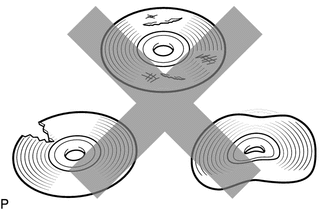
Check that the disc is not deformed or cracked.
OK No deformation or cracks on the disc Result Proceed to OK NG
- OKClick here
- NG
END (DISC IS FAULTY)
-
- Click here
CHECK DISC
-
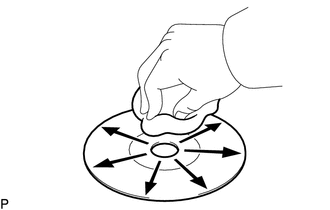
Check the disc.
OK The disc is clean. Note:Do not use a conventional record cleaner or anti-static preservative.
Tip:If dirt is on the disc surface, wipe it clean with a soft cloth from the inside to the outside in a radial direction.
Result Proceed to OK NG
- OKClick here
- NG
CLEAN DISC
-
- Click here
REPLACE DISC AND RECHECK
-
Replace the disc with a new or known good one and check that the malfunction disappears.
OK Malfunction disappears. Result Proceed to OK NG
- OK
END (DISC WAS FAULTY)
- NGClick here
-
- Click here
CHECK RADIO RECEIVER ASSEMBLY
-
Check the radio receiver assembly installation condition.
-
Check that the radio receiver assembly is properly installed.
OK The radio receiver assembly is properly installed.
Result Proceed to OK NG -
- OK
REPLACE RADIO RECEIVER ASSEMBLYClick here
- NG
REINSTALL RADIO RECEIVER ASSEMBLY
-