| DTC Code | DTC Name |
|---|---|
| B15EE | Telematics Contract Invalid |
DESCRIPTION
If an unauthorized contract flag is stored by the G-BOOK device, this DTC will be stored.
| DTC No. | Detection Item | DTC Detection Condition | Trouble Area |
|---|---|---|---|
| B15EE | Telematics Contract Invalid | Contract is invalid | - |
PROCEDURE
- Click here
CHECK CONTRACT FLAG
-
Check the contract flag.
-
Enter diagnostic mode.
-
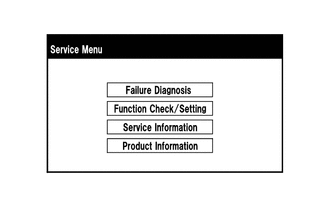
Select "Service Information" on the "Service Menu" screen.
-
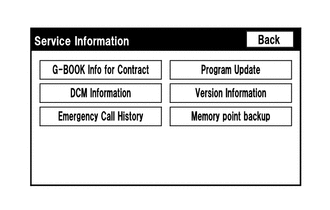
Select "G-BOOK Info for Contract" on the "Service Information" screen.
-
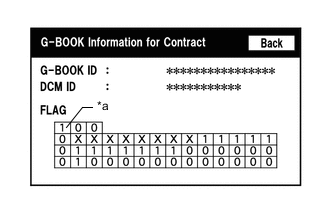
*a Cells to be Checked Check if the flag information indicates "1" as shown in the illustration.
Result Result Proceed to "1" is not indicated. A "1" is indicated. B
-
- AClick here
- BClick here
GO TO STEP 3
-
- Click here
PERFORM OPERATION
-
Perform "Download necessary data".
Result Proceed to NEXT
- NEXTClick here
-
- Click here
PERFORM MANUAL MAINTENANCE CHECK
-
Manual maintenance check
-
Move the vehicle into a communication service area. Wait for a while and perform a manual maintenance check.
Result Result Proceed to Manual maintenance check does not complete normally. A Manual maintenance check completes normally. B Tip:If the manual maintenance check completes normally, clear past DTCs (this problem was caused by DTCs stored due to past environmental factors).
-
- AClick here
- B
END
-
- Click here
CONTACT G-BOOK SUPPORT CENTER
-
Contact the G-BOOK support center.
-
Contact the G-BOOK support center and inform them of the following.
-
Flag information is either "1" or "0".
-
The manual maintenance check did not complete normally.
Tip:The G-BOOK support center will perform an investigation and provide the results.
-
Result Proceed to NEXT -
- NEXT
FOLLOW INSTRUCTIONS PROVIDED BY G-BOOK SUPPORT CENTER
-