HEADUP DISPLAY SWITCH REMOVAL
PROCEDURE
-
REMOVE INSTRUMENT CLUSTER FINISH PANEL GARNISH ASSEMBLY
-
REMOVE HEADUP DISPLAY SWITCH (NO. 2 COMBINATION SWITCH ASSEMBLY)
-
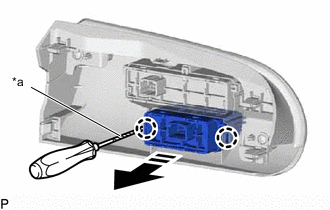
*a Protective Tape 
Remove in this Direction Using a screwdriver, disengage the 2 claws and remove the headup display switch (No. 2 combination switch assembly) as shown in the illustration.
Tech Tips
Tape the screwdriver tip before use.
-